Release Notes - What's New Deck Template
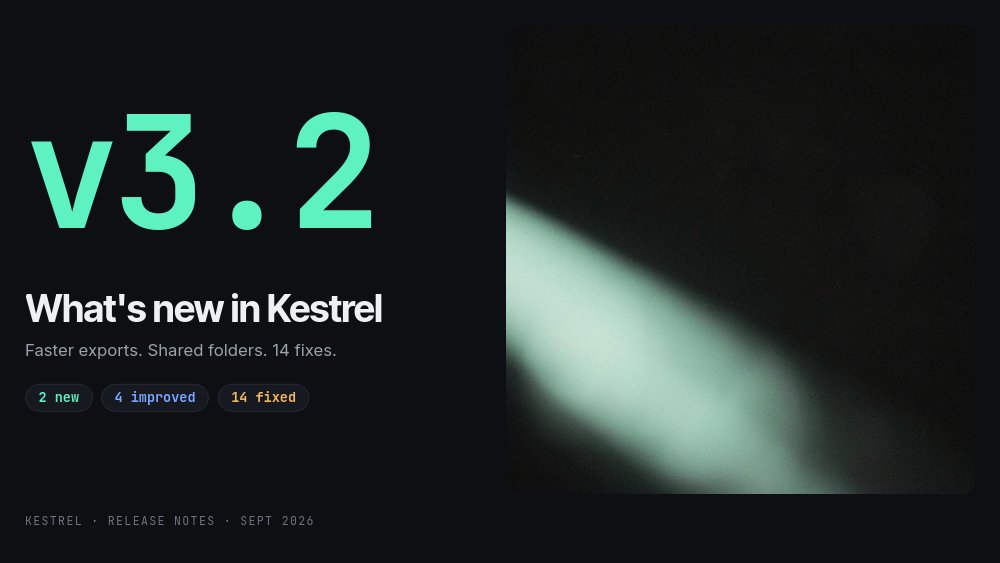
A release notes template for teams that ship versions, not single features. Kestrel, a fictional design collaboration tool, announces v3.2 with a mint "v3.2" set enormous in JetBrains Mono, "What's new in Kestrel" beneath it, and the whole release in one terse line: "Faster exports. Shared folders. 14 fixes." Three mono summary chips count it up - 2 new, 4 improved, 14 fixed - and the rest of the what's new deck unpacks each number in order, in the near-black, soft-white look of a developer tool changelog.
#What Makes This Template Stand Out
It is organized the way users actually read release notes: headline first, detail second, fixes last. The highlights pane ("Three things to try first.") gives three dark cards with 3D icons and type chips - Shared folders and Exports 3x faster tagged NEW, Comments on frames tagged IMPROVED. Then each NEW item gets its own pane. Shared folders pairs two numbered benefits with a UI card built entirely from editable text and shapes: a "Design system" folder with a mint Shared pill and rows for Components, Tokens, Icons, and Onboarding flows. No screenshots to retake when the UI changes.
The color system is the category system. Mint means new, blue means improved, amber means fixed, and the chip under the version tag swaps between them as you move through the deck. That same logic colors the stats: the export pane runs a mint "3x" above "faster exports", with a before/after card where "42s" is struck through by a drawn mint line and "14s" sits below it next to a "-67% render time" chip. The fixes pane turns amber, with a giant 14 and eight numbered fix lines in a two-column mono list.
Motion is precise rather than playful. The version tag glides between its hero and chip positions as a block transition, cards rise from the bottom, icons pop, the big numbers number-roll, and the improvement and fix rows blur in quickly one after another. Nothing loops - it is meant to be clicked through, then left on the "v3.2 is live." close with its mint Download pill.
- Traveling version tag: hero numeral on the cover, corner chip on every inner pane, full size again on the close
- Shared NEW / IMPROVED / FIXED chip that swaps label and color per pane
- UI card built from editable text and shapes, so the "screenshot" updates with a few keystrokes
- Before and after export stat with a drawn strike-through and number-roll figures
- Two-column fixes list in JetBrains Mono with room for eight entries plus an overflow line
- 7-pane 16:9 dark deck in JetBrains Mono, Inter Tight, and Inter, with a mint, blue, and amber chip palette
#Who Should Use This Template
- Product managers walking the company through what shipped this cycle, so sales and support hear it before customers do.
- Developer relations and product marketing teams who host release webinars and want a deck that looks like the product's own changelog.
- SaaS founders who publish a monthly or quarterly version update and want one asset that works as a slide deck, an embed, and a video.
- Customer success managers preparing "what changed since you last logged in" walkthroughs for key accounts.
#Best Use Cases
#A What's New Deck on the Changelog Page
Export to HTML, React, Vue, Svelte, or Next.js and place the deck at the top of your changelog or release page. Visitors get the visual story first and the full text log beneath it. Because interactivity survives code export, you can wire the Download pill to your download or upgrade URL with a click action and it keeps working in the embed.
#Release Webinars and Internal Demos
Publish as a hosted link and present full-screen. The highlights pane sets the agenda, each feature pane gives you a natural moment to switch to a live demo, and the fixes pane closes the loop on the bugs your support team has been hearing about. Autoplay is off, so you can talk for as long as each pane needs.
#Release Video for Social and In-App Announcements
Turn on autoplay, set a pane duration, and export to MP4. The number-roll stats and blur-in lists make a short, legible release clip for LinkedIn, X, or an in-app "what's new" modal - produced from the same project as the live deck.
#How to Customize This Template
- Open PaneFlow and select "Release Notes - What's New Deck" from the template gallery
- Change the "v3.2" version tag once - it is the same block on every pane - and update "What's new in Kestrel" and the one-line summary
- Edit the three summary chips ("2 new", "4 improved", "14 fixed") and the footer "KESTREL · RELEASE NOTES · SEPT 2026"
- Rewrite the three highlight cards and swap their icons for your own feature art
- On the Shared folders pane, replace the headline, the two numbered benefits, and the folder names and file counts in the UI card
- On the exports pane, update the "3x" figure, the "42s" and "14s" before/after stats, and the "-67% render time" chip
- Replace the four improvement rows (UNDO, LAYERS, THEME, BUNDLE) and the eight fix lines, keeping "full list at kestrel.app/changelog" pointed at your log
- Point the Download pill at your URL with a click action, then publish as a hosted link, embed the HTML export, or export to MP4
#Related Templates
- Feature Announcement - a single-feature announcement for social and launch posts
- Product Roadmap - Now / Next / Later - show what is coming after this release
- AI Product Launch - a launch-day asset sized for the feed
- Conference Talk - Speaker Deck - the same dark, precise mood for a stage talk
#Related Resources
- PaneFlow for SaaS - release notes, feature tours, and product updates that export to code
- PaneFlow for Product Managers - release reviews, roadmaps, and stakeholder decks
- PaneFlow for Product Launches - launch assets for every channel from one project
Start with Release Notes - What's New Deck
Open this template in PaneFlow, customize it to match your brand, and export as HTML, React, Vue, or video.







