Product Roadmap - Now / Next / Later Template
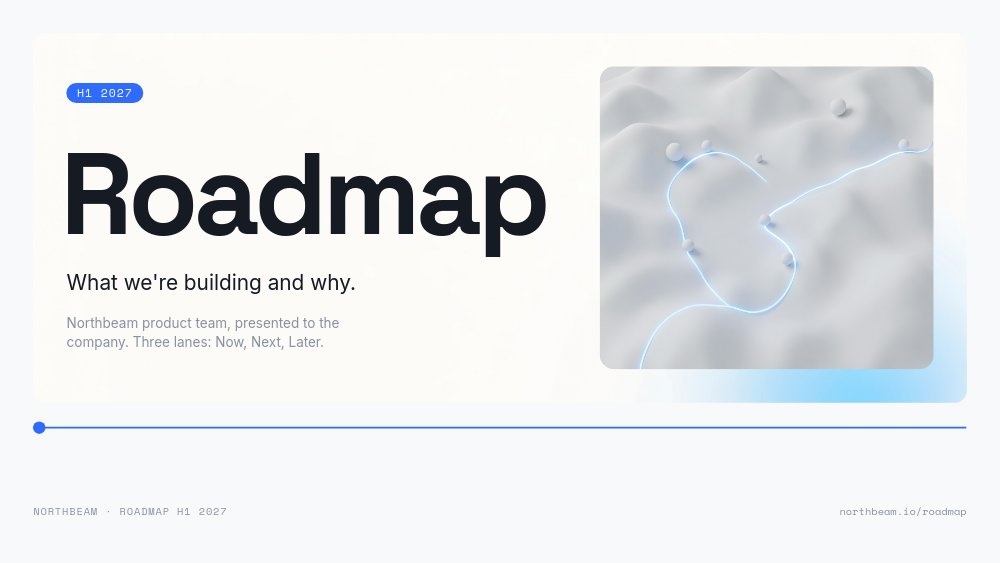
A product roadmap template that tells the room what the team is building, what comes next, and what is still a guess. Built for Northbeam, a fictional analytics company for e-commerce teams presenting its H1 2027 roadmap, the deck opens on a 240px "Roadmap" headline in Space Grotesk and a thin electric-blue timeline with a single dot parked at the left edge. From there the dot travels. Every lane pane nudges it further along the line, and the Now / Next / Later chips reorganize themselves around it, so the roadmap reads as one continuous story instead of eight disconnected slides.
#What Makes This Template Stand Out
The lane header is the navigation. On the overview pane, three tinted lane panels sit side by side - Now in pale blue with "Attribution v2", "Slack alerts", and "Shopify sync"; Next in cool grey with "Forecasting" and "Cohort explorer"; Later washed out with "Data warehouse export" and "Mobile app". Advance once and the NOW chip swells into a blue pill title while NEXT and LATER tuck into the corner. That block transition repeats for each lane, which does the job a roadmap agenda slide usually does, without ever showing one.
The design follows the confidence of each lane. Now cards are crisp white with status chips ("IN QA", "BUILDING", "SHIPPING FEB"), owner initials, and one hard number each: 12 beta accounts live, 70% complete, 2,400 stores on the waitlist. Next cards get more room for a "WHY" line - "Customers ask for it in one of every three sales calls." Later cards are drawn as dashed outlines with muted grey type and a mono footer that says it plainly: "NOT SCOPED · NOT STAFFED · TELL US IF IT MATTERS". Graphite ink, a cool white field, and a single blue accent keep it readable from the back of the room.
Motion is restrained on purpose. Cards fade up from the bottom in a gentle stagger, the three status figures number-roll on the Now pane, the cover hairline draws itself in, and on the Not Doing pane a thin line draws through "A native mobile SDK", "Custom dashboard builder", and "TikTok Shop connector" - each with a one-line reason beside it. Nothing loops and nothing bounces, which is what you want when the CEO is in the front row.
- Now / Next / Later lane chips in one shared block that morph into each lane's title
- Blue timeline dot that slides along a hairline across panes 1 to 6 as a built-in progress cue
- Status cards with owner initials and number-roll metrics: 12 beta accounts, 70% complete, 2,400 waitlist stores
- Dashed, ghosted Later cards that signal uncertainty without a disclaimer slide
- Not Doing pane with drawn strike-through lines and a reason for every no
- 8-pane 16:9 deck in Space Grotesk, Inter, and Space Mono with autoplay off for live presenting
#Who Should Use This Template
- Product managers presenting the quarterly or half-year roadmap at an all-hands. The lane structure answers "when will X ship?" before anyone asks it.
- Heads of product at SaaS startups briefing a customer advisory board. The Later pane explicitly invites feedback, which turns a status update into a conversation.
- Founders who need a roadmap slide sequence for leadership or investor updates that shows priorities and trade-offs, not just a feature wish list.
- Platform and internal tools teams communicating to other engineering teams what they can depend on now and what is still directional.
#Best Use Cases
#Company All-Hands Roadmap Review
Publish the product roadmap template as a hosted link and present it from any browser. The overview pane gives the whole plan in one glance, then the three lane panes walk through detail at a pace you control with clicks. Close on "Questions, requests, disagreements:" with the PM name, a Slack channel, and the roadmap URL as chips, so the follow-up discussion has somewhere to go.
#Customer Advisory Board Sessions
Customers care most about Next and Later. The Next cards carry a customer-voiced "why", and the Later cards literally ask to be told if they matter. Export a PDF for the pre-read, then present live during the session and capture which Later items the room pushes forward.
#A Living Roadmap in Your Wiki
Export to HTML and embed the deck in Notion, Confluence, or an internal portal. The footer copy on the close pane says it best: "We update this deck monthly. The lanes move, the themes don't." Edit the cards in PaneFlow, re-publish, and the embed stays current without anyone chasing a new file.
#How to Customize This Template
- Open PaneFlow and pick "Product Roadmap - Now / Next / Later" from the template gallery
- On the cover, replace "H1 2027", the "Roadmap" headline, and the "Northbeam product team, presented to the company" line with your own period and audience
- Update the persistent footer "NORTHBEAM · ROADMAP H1 2027" and the "northbeam.io/roadmap" link once - it rides on every pane
- On the overview pane, rename the lane items and their short status chips ("IN QA", "70%", "SHIPS FEB", "Q2", "H2", "TBD")
- On the Now pane, rewrite each card title, description, owner line ("Maya Reyes · Growth"), and the metric that number-rolls
- On the Next and Later panes, replace the card copy and the "WHY" lines, keeping the Later cards short and honest
- Rewrite the four themes ("Trust the numbers", "Fewer tabs", "Faster answers", "Bigger teams") and the three Not Doing items with their reasons
- Swap the close pane contact chips and photo, preview the lane transitions, then publish as a hosted link or export to PDF
#Related Templates
- OKR & Strategy - Three Objectives - pair the roadmap with the objectives it serves
- Release Notes - What's New Deck - announce the Now lane once it ships
- Go-to-Market Plan - Tangerine Pop - the launch plan that follows a roadmap commitment
- Feature Tour - SaaS Section - show the shipped features on your marketing site
#Related Resources
- PaneFlow for Product Managers - roadmaps, launch decks, and stakeholder updates
- PaneFlow for SaaS - product storytelling from roadmap to release
- PaneFlow for Startups - decks for teams that ship and report fast
Start with Product Roadmap - Now / Next / Later
Open this template in PaneFlow, customize it to match your brand, and export as HTML, React, Vue, or video.







