Conference Talk - Speaker Deck Template
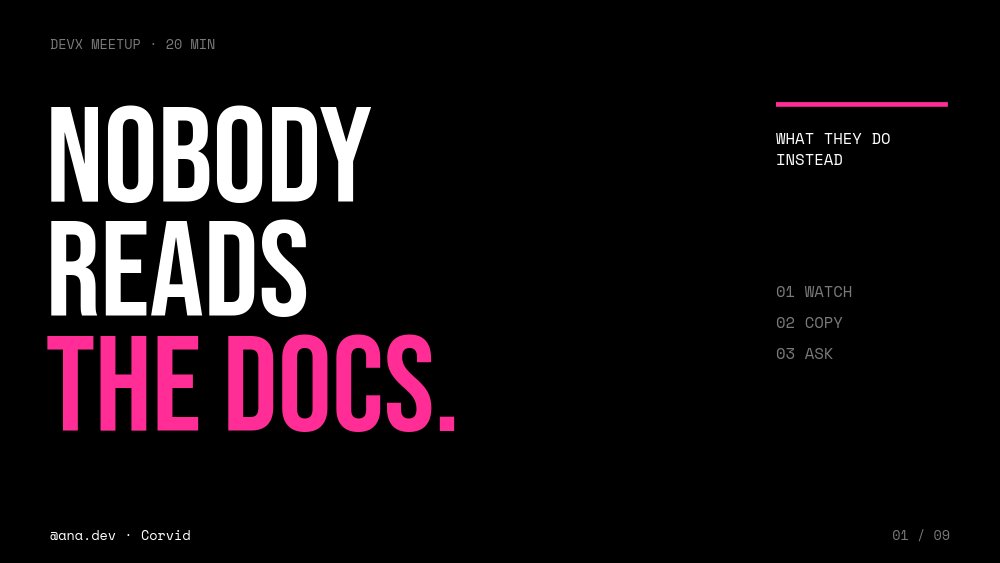
A conference talk template built for the projector, not the laptop screen. The sample talk is "Nobody reads the docs." by Ana, the developer-experience lead at a fictional API company called Corvid, and the title slide says it the way a good talk should - three lines of towering Bebas Neue, with "THE DOCS." in electric magenta, on pure black. A mono label in the corner reads "DEVX MEETUP · 20 MIN" and the agenda sits quietly to the right: 01 WATCH, 02 COPY, 03 ASK. This speaker deck is the talk itself - one idea per slide, big type, clean section breaks - rather than a promo about the speaker.
#What Makes This Template Stand Out
It follows talk cadence. After the title, a speaker pane introduces you - "HI, I'M ANA." with two plain lines ("I lead developer experience at Corvid. I watch people try to ship their first request."), three mono chips for role, company, and handle, and a black-and-white portrait cutout against a magenta panel. Then the talk runs in three pairs: a section title pane, then a statement pane. "WATCH" leads to "THEY OPEN YOUR DOCS. THEN THEY OPEN YOUTUBE." "COPY" leads to "THE FIRST THING THEY PASTE IS THE FIRST THING YOU GET JUDGED ON." "ASK" leads to "YOUR DOCS HAVE A SEARCH BOX. YOUR USERS HAVE A CHAT WINDOW." The structure makes it hard to cram three points onto one slide, which is the whole point.
The stage design does the heavy lifting in a dim room. Pure black background, white condensed type set as large as the slide allows, magenta reserved for the one word that matters in each statement, and giant section numerals in near-black that read as texture rather than content. Body copy never drops below a size you can read from the back row. Even the code example on the COPY pane is built from editable Space Mono text on a dark card - a three-line curl request to "api.corvid.example" - so you can change it without screenshots. A persistent footer holds "@ana.dev · Corvid" and a page count ("04 / 09") on every pane.
Motion follows stage timing. Headlines letter-fade in word by word, the magenta keyword stomps down last, the rule draws under it, and a "62%" stat number-rolls beside "watch before they read" (labeled "ILLUSTRATIVE TALK DATA", so swap in your own). Between each section title and its statement, the ghosted numeral glides from the center into the right column as a block transition with a longer, deliberate 900ms move - enough time to take a breath before the next point.
- Title, speaker intro, three section and statement pairs, and a closing links slide - nine panes total
- Ghosted 01, 02, 03 section numerals that glide from the section title into the statement pane
- Magenta rule block that travels between panes to underline each new headline
- Letter-fade headlines with a stomping magenta keyword and a number-roll stat
- Editable mono "code" card built from text children, plus a persistent speaker handle and page count
- 9-pane 16:9 dark deck in Bebas Neue, Inter, and Space Mono with keyboard navigation for clickers
#Who Should Use This Template
- Developers and developer advocates speaking at meetups and conferences who want a bold deck without spending a weekend in Keynote.
- Product and design leads giving an opinionated talk with three clear points, where each slide should land like a headline.
- Founders pitching an idea on stage at a demo day or community event, where a single sentence per slide beats a dense deck.
- First-time speakers who need structure: the section-and-statement rhythm keeps a 20-minute talk on track.
#Best Use Cases
#Meetup and Conference Talks
Present the conference talk template from a hosted link on any laptop. The big type reads on small projectors and in bright rooms alike, and the page count in the corner helps you pace a 20-minute slot. Replace the three sections with your own points and the speaker pane with your intro, and the deck is ready.
#Sharing the Slides After You Speak
Put your published deck link on the "THANKS." slide next to your handle and company. Attendees open the exact slides you presented - animations included - on their phones, and you can embed the deck in your blog post recap using the HTML export.
#Recorded Talks and Social Clips
Export the deck to MP4 to create a recorded version, or export images of the statement panes to post as quote cards on LinkedIn and X after the event. Each statement is designed to stand alone as one sentence, which makes them natural share material.
#How to Customize This Template
- Open PaneFlow and select "Conference Talk - Speaker Deck" from the template gallery
- Rewrite the title "NOBODY / READS / THE DOCS.", the "DEVX MEETUP · 20 MIN" label, and the 01 / 02 / 03 agenda
- Update the persistent footer "@ana.dev · Corvid" once - it appears on every pane with the page count
- Replace "HI, I'M ANA.", the two intro lines, the three chips, and the portrait with your own cutout
- Rename the three sections ("WATCH", "COPY", "ASK") and their sublines, keeping one short phrase each
- Rewrite each statement pane headline, keeping one magenta keyword per statement
- Replace the "62%" stat and its label, the curl example lines, and the "Discord", "Slack", "the AI thing" chips
- Update the closing links and "Make the first five minutes count.", then publish as a hosted link and export a PDF backup
#Related Templates
- Keynote Speaker - Cinematic Bold - promote your talk before the event
- Webinar Promo - announce an online version of the talk
- Release Notes - What's New Deck - the same dark, developer-tool mood for product updates
- Developer Portfolio - Terminal Mono - a speaker bio page with a mono, dev-first look
#Related Resources
- PaneFlow for Developers - talks, portfolios, and decks that export to code
- PaneFlow for SaaS - developer-relations talks and product storytelling
- PaneFlow for Startups - demo day and community event presentations
Start with Conference Talk - Speaker Deck
Open this template in PaneFlow, customize it to match your brand, and export as HTML, React, Vue, or video.







