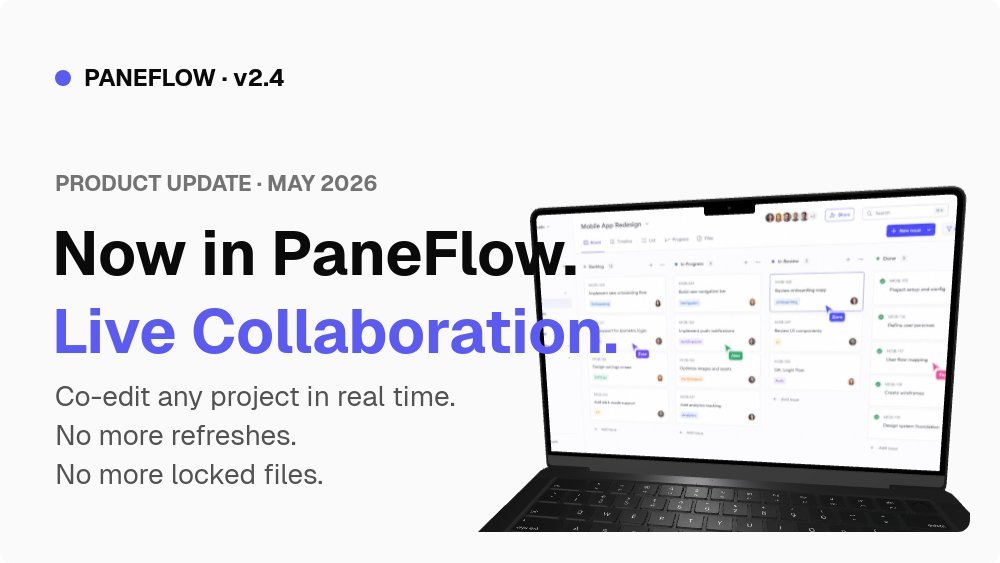
Feature Announcement Template - Web App Update Slideshow
Ship a feature announcement that reads like a real product changelog instead of a marketing flyer. The Web App Feature Announcement template is an 8-pane 16:9 slideshow built around a clean off-white background, a single indigo accent, and a tight arc that moves from "what shipped" to "who can use it" without filler.
#What Makes This Template Stand Out
This template is the SaaS-minimal counterpart to the dark, dev-native AI launch template. The aesthetic is quiet on purpose. A #fafafa background, near-black ink, Geist throughout, and one indigo #5b5bf2 accent that does all the work: section numbers (02, 03, 04, 06), the version pill (PANEFLOW · v2.4), the "NEW IN 2.4" badge, and the Pro tier card on the availability pane. Nothing competes for attention except the screenshots themselves.
The structural detail that separates this from a generic SaaS deck is the annotated "how it works" pane. Pane 4 places three indigo pill labels - 01 Live cursors, 02 Inline comments, 03 Instant sync - directly on top of a real product screenshot, with succession animation that staggers each label in. It is the same visual pattern Linear and Stripe use in their changelog posts, and it does the job of three feature-list slides in a single frame.
The cover pane pairs the version line and "PRODUCT UPDATE · MAY 2026" eyebrow with a hero feature name set in headline-weight Geist, then flips the second line to indigo so the feature name reads as the visual focal point. There is space on the right for a real laptop screenshot of the feature in context, which gives the announcement immediate "this is shipping" credibility before the viewer reaches pane 2.
- 16:9 landscape format built for embedded changelogs, internal demos, and Loom-style walkthroughs
- 8-pane release arc: cover, problem framing, introducing, annotated how-it-works, in-the-wild use case, availability
- SaaS-minimal `#fafafa` palette with a single `#5b5bf2` indigo accent that propagates across every pane
- Annotated UI walkthrough on pane 4 with three indigo pill callouts and staggered succession animation
- Geist 600 headlines paired with Geist body for the same typographic system Vercel and Linear use
- Real availability table on pane 7 with Free and Pro tiers, RECOMMENDED badge, and per-tier feature lists
#Who Should Use This Template
- SaaS product teams shipping a new feature and posting it to a "What's New" page, an email changelog, or a Loom-recorded walkthrough
- Product managers writing release notes who want a visual artefact to attach to the Linear ticket or the launch Slack post
- Developer relations teams announcing a new API, SDK feature, or dashboard capability where the audience expects an annotated screenshot
- Internal comms leads rolling out a new feature to a customer success or sales team and need a self-serve walkthrough they can replay
#Best Use Cases
#Embedded "What's New" Page on Your Marketing Site
Most product sites have a /changelog or /whats-new route that gets neglected because writing release posts is tedious. This template solves the bottleneck by giving you an 8-pane skeleton you fill in once per release: cover, problem framing, introducing, how it works, use case, availability. Export as an HTML embed, drop it onto the changelog route, and every release lands with the same animation language and the same visual rhythm. Customers who follow the changelog learn what to expect.
#Release Walkthroughs for Customer Success and Sales
When a feature ships, customer success and sales need to be able to demo it to existing accounts within 48 hours. A static slide deck is too dry; a Loom recording is too disposable. This template gives you the middle ground: a self-paced animated walkthrough they can share with a customer, embed in a help-centre article, or play live on a call. The annotated "how it works" pane in particular is the slide they will reach for most.
#Email Announcement Hero Asset
Email campaign tools like Customer.io and Loops accept video or animated GIF in the hero block. Export this template as MP4 or GIF and use it as the lead asset of your release announcement email. The 16:9 ratio fits the standard email column, the indigo-on-off-white palette renders cleanly in both light and dark email clients, and the eight-pane arc means the hero animation tells the full story before the recipient even scrolls to the body copy.
#How to Customize This Template
- Open PaneFlow and select "Web App Feature Announcement" from the template gallery
- Update the version pill (
PANEFLOW · v2.4) and eyebrow (PRODUCT UPDATE · MAY 2026) on the cover with your product name and release window - Replace the "Live Collaboration" feature name on the cover and the introducing pane with the feature you are shipping
- Swap the laptop screenshot on the cover and the annotated UI screenshot on pane 4 for real screenshots from your app
- Edit the three pill callouts (
01,02,03) on pane 4 to match the three things you most want viewers to notice - Rewrite the use-case pane with a real customer scenario from your support tickets or sales calls
- Update the availability pane with your actual Free and Pro tier names, prices, and per-tier feature lists
- Set the indigo accent colour in project settings to your brand colour if you want the announcement to match your site palette
- Export as HTML embed, MP4, or PDF and ship it to your changelog, email, or product site
#Related Templates
- AI Product Launch - Twitter-Ready - dark, square-format launch carousel for Twitter and LinkedIn
- Pricing & Packages Reveal - animated pricing tier reveal for the same SaaS audience
- Coming Soon - Waitlist Teaser - pre-launch teaser for features that are not yet live
- SaaS Pitch - Minimal - the long-form investor-facing version of the same minimal SaaS aesthetic
#Related Resources
- PaneFlow for SaaS - presentation tooling for product, growth, and developer relations teams
- PaneFlow for Product Managers - release notes, internal demos, and stakeholder readouts
- PaneFlow vs Pitch - how PaneFlow compares for animated, embeddable product announcements
Start with Web App Feature Announcement
Open this template in PaneFlow, customize it to match your brand, and export as HTML, React, Vue, or video.







