AI Product Launch Template - Twitter-Ready Square Carousel
Launch your AI product on Twitter the way developers expect to see it: dark background, mono type, a real CLI command, and a single neon gradient instead of a marketing illustration. The AI Product Launch template is an 8-pane square carousel built for the founder Tweet thread that pins to your profile on launch day, with the same arc Linear, Vercel, and Replit follow when they ship.
#What Makes This Template Stand Out
Most "launch" templates are built for a board meeting and then awkwardly cropped into a square. This one is the opposite. It is square-first, built for the feed, with a pacing that matches how developers actually scroll: a one-line cover, a one-line problem, a one-line solution, two real demo panes, capabilities, pricing, and a CTA. Eight panes total, no filler.
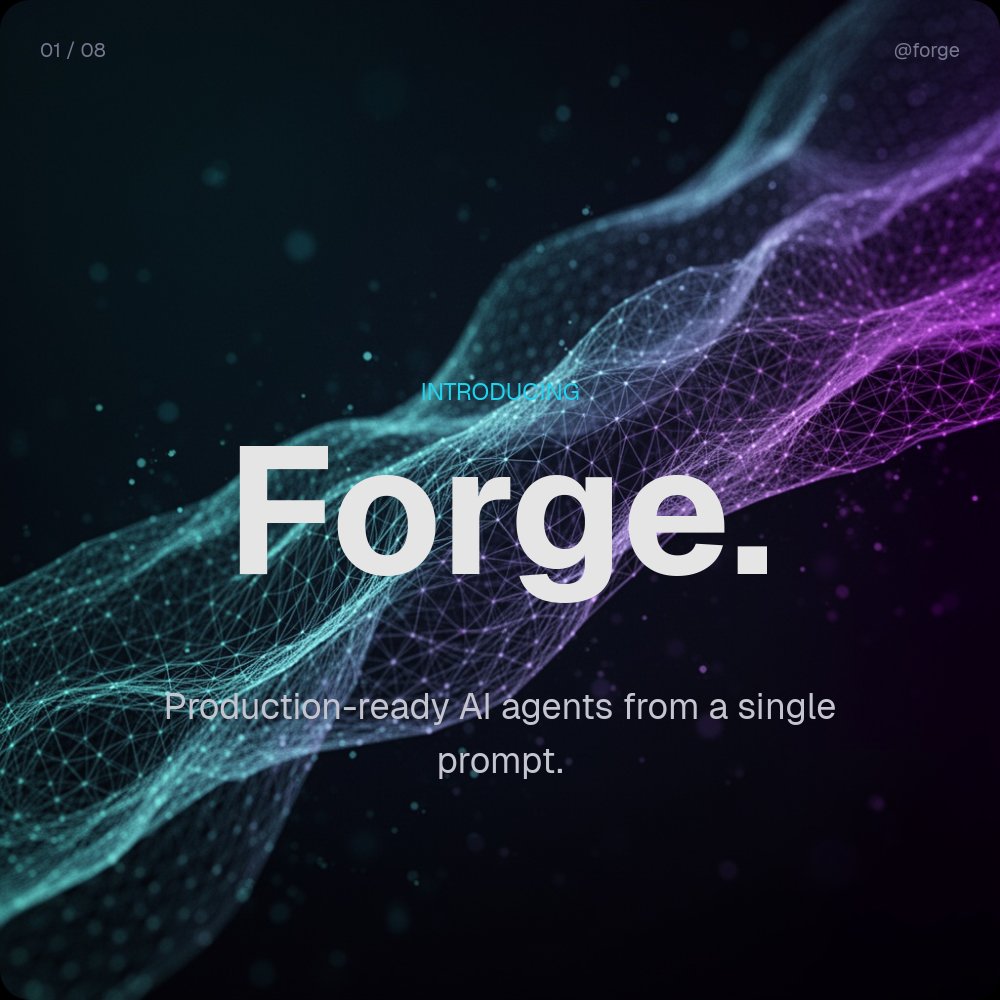
The defining visual is the cyan-to-violet plexus mesh on pane 1, which gives the cover a sense of motion and intelligence without leaning on a generic AI illustration. From pane 2 onward the background drops to a near-black #0a0a14 and the work is done by typography: Geist 700 for headlines, Geist regular for body, JetBrains Mono for the code. The accent flips between cyan and violet across panes so the section labels (PROBLEM, SOLUTION, DEMO 01, PRICING) act as colour-coded chapter markers.
Pane 4 is the centrepiece. It uses a real PaneFlow code block, not a flattened screenshot, so the CLI command stays crisp at any export resolution and you can edit the syntax inline. The typewriter animation reveals the line as if it is being typed, then the success checks fade in below in cyan. The result is a demo pane that feels like a recording of a real terminal session rather than a marketing slide.
- 1:1 square format optimised for Twitter, LinkedIn, and Product Hunt launch posts
- 8-pane launch arc: cover, problem, solution, two demos, capabilities, pricing, CTA
- Dark `#0a0a14` palette with cyan-to-violet gradient accents and section colour-coding
- Real PaneFlow code block on the demo pane with typewriter reveal and syntax highlighting
- Geist 700 headlines paired with JetBrains Mono for terminal-native authenticity
- Letter-blur headlines, drift transitions, and neon chart-ready capability panes
#Who Should Use This Template
- AI startup founders announcing a public launch or Product Hunt drop and writing the pinned Tweet thread themselves
- Developer tool teams shipping a new CLI, SDK, or runtime where the demo is a command, not a screenshot of a settings page
- Open-source maintainers posting a v1 release where the audience expects code and tone of voice that does not feel marketing-led
- Solo technical founders who do not have a designer on staff and need a launch deck that signals seriousness without looking like a generic SaaS template
#Best Use Cases
#Twitter / X Launch Threads for AI and Dev Tools
The pinned launch thread is the single highest-leverage post a founder writes in the first year of a company. This template is built for that exact moment. The 1:1 square format renders cleanly on the Twitter feed, the dark background pops against the white timeline, and the eight-pane arc gives you one image per Tweet across a thread without padding. Export as JPG frames and attach them in order, or upload the full carousel as an MP4 if you want the typewriter animation to play.
#Product Hunt Launch Day Gallery
Product Hunt's gallery rewards screenshots that read at thumbnail size and tell a story when expanded. The contrast of the dark background plus single neon accent makes each pane legible in the small gallery preview, and the eight panes give hunters a complete picture of what your product is, why it exists, what it does, and how to try it. Drop the panes into the gallery in pane order and the launch page tells the same story your Tweet thread does.
#LinkedIn Document Posts for Technical Audiences
LinkedIn's document carousel format reads particularly well for B2B and developer launches. Export the eight panes as a PDF, upload it as a document post, and viewers swipe through your full launch arc inside the LinkedIn feed. The dark, mono-led aesthetic helps the post stand out from the default LinkedIn pastel-and-stock-photo look, which is exactly what you want when your audience is engineers and CTOs.
#How to Customize This Template
- Open PaneFlow and select "AI Product Launch - Twitter-Ready" from the template gallery
- Replace
Forge.on pane 1 with your product name and update the one-line tagline below it - Rewrite the problem and solution panes (panes 2 and 3) in your own founder voice, one declarative line each
- Edit the CLI command in the code block on pane 4 to match your real install or first-run command
- Swap the demo screenshot on pane 5 for a real screenshot of your product UI, terminal, or run history
- Update the pricing tiers on pane 7 with your actual Free and Pro plan limits, or rename them to match your tier names
- Replace the URL, GitHub handle, and Twitter handle on pane 8 with your real launch destinations
- Export as MP4 for Twitter video, JPG frames for individual Tweets, or PDF for a LinkedIn document post
#Related Templates
- AI Dev Tool Pitch - Dark Terminal - the long-form 16:9 investor version of the same dark terminal aesthetic
- Web App Feature Announcement - the light-theme 16:9 version for shipping new features inside an existing product
- Coming Soon - Waitlist Teaser - pre-launch teaser for the weeks before you go public
- Product Launch - t0ggles - full SaaS product launch with 3D animations and spin effects
#Related Resources
- PaneFlow for SaaS - presentation tooling for product, growth, and developer relations teams
- PaneFlow for Product Launches - animated product reveal slideshows and launch assets
- PaneFlow vs Gamma - how PaneFlow's code blocks and animation control compare for technical launches
Start with AI Product Launch - Twitter-Ready
Open this template in PaneFlow, customize it to match your brand, and export as HTML, React, Vue, or video.







