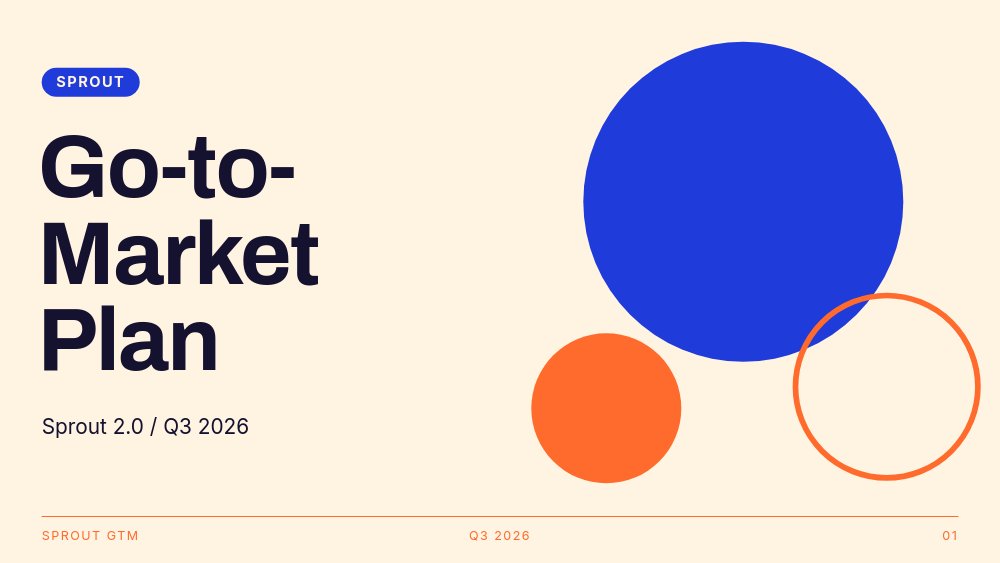
Go-to-Market Plan - Tangerine Pop Template
A go-to-market plan for product marketers and founders who need the team to actually read the plan. Eight panes of cream and cobalt with tangerine accents, built around a circle cluster that travels every pane like the deck's camera subject. The placeholder launch - Sprout 2.0, a habit tracker shipping in Q3 - is drawn sharply enough to show you what good looks like: three goal numbers, one persona, two channels, four phases, and a close that assigns owners by name.
#What Makes This Template Stand Out
The circle cluster is the deck's identity. A large cobalt disc, a solid tangerine dot, and a thin tangerine outline circle anchor the cover at full size, then shrink and reposition on every subsequent pane - tucked into the top corner on the goals pane, eating the persona photo as a circle crop on the audience pane, returning to cover position on the close so the loop reads as intentional. One motif, eight placements, zero clip art.
The numbers do the talking. Pane 2 opens "Ninety days, three numbers." and stacks three white cards - 10,000 paid subscribers, 40% aided awareness, 35% day-30 retention - with the values rolling up on entry. Pane 7 grades the same numbers as "The board we grade in December," each with one line on how it is measured ("Stripe active count net of refunds"). Goals and targets bookending the deck with the same three figures is the kind of discipline most GTM decks claim and few show.
The channels pane earns its budget. Two primary cards (App Store featuring, Creator partnerships) carry one-line strategies, three small chips (Newsletter swaps, Reddit AMAs, Lifecycle email) hold the supporting cast, and a horizontal stacked bar draws itself across the pane to show the 50/30/20 split. The timeline pane that follows runs giant cobalt numerals 01 through 04 across the full width - Private beta in July, Creators seeded in August, Launch week in September, Retention push in October - with tangerine dots marking each phase.
- Cream, cobalt, and tangerine palette with Archivo 800 headlines and a cream-to-cobalt color-flip rhythm
- Circle cluster of three shapes that travels and rescales across all eight panes
- Number-roll goal and target stats: 10,000 paid, 40% awareness, 35% day-30 retention, $48 CAC ceiling
- Channels pane with two primary cards, three supporting chips, and a budget bar that draws the 50/30/20 split
- Timeline pane with giant 01-04 numerals and four dated phases from private beta to retention push
- Persistent hairline footer with project name, quarter, and page number on every pane
#Who Should Use This Template
- Product marketers presenting a launch plan to the team or the board. The goals-to-targets bookend structure answers the first question any reviewer asks: what are we promising, and how will we know.
- Founders running their first structured launch who need the skeleton as much as the design. The eight panes are the GTM checklist in order - fill them in and the plan is done.
- Growth and lifecycle leads pitching budget. The 50/30/20 budget bar and the named channel cards turn an allocation argument into one readable picture.
- Teams that present quarterly plans on a cadence. Swap the quarter in the footer, update the numbers, and the same deck ships every cycle without redesign.
#Best Use Cases
#Launch Kickoffs and Board Reviews
Present full-screen in the browser at the kickoff meeting. The color-flip between cream and cobalt panes gives the deck a pulse in a dark conference room, and the number-roll stats put the three commitments on screen one count-up at a time. For the board version, the targets pane ("The board we grade in December") does the accountability work without an extra appendix.
#The Plan of Record
Export to PDF and the deck becomes the document everyone links in Slack and Notion. Because the structure is goals, audience, positioning, channels, timeline, targets, owners - in that order - it reads top to bottom as a memo even without a presenter. The owner chips on the close (Marketing: Ana, Product: Theo, Data: Sam) keep names attached to the plan after the meeting ends.
#Internal Launch Hype
Export to video and the deck becomes a 40-second announcement that autoplays through the launch story - useful for all-hands intros, internal newsletters, or a teaser posted the week before launch. The pulsing tangerine dot on the cover and the snappy pop entrances read as energy rather than decoration at video pace.
#How to Customize This Template
- Open PaneFlow and select "Go-to-Market Plan - Tangerine Pop" from the template gallery
- Update the cover: your product and version in place of "Sprout 2.0 / Q3 2026", your brand chip top-left, and the footer hairline text
- Replace the three goal cards on pane 2 with your business, marketing, and product numbers - the number-roll animation picks up whatever values you type
- Rewrite "The restarter" persona on pane 3: swap the circle-cropped photo, the three trait lines, and the tangerine quote chip with a real customer quote
- Edit the positioning statement on pane 4 and the three USP chips beneath it
- Update the two primary channel cards and three supporting chips on pane 5, then adjust the budget bar labels to your split
- Rename the four timeline phases on pane 6 with your months and milestones, and set the targets on pane 7 with how each is measured
- Assign the owner chips on the close to real names, then present in the browser, export to PDF for the plan of record, or to video for the internal announcement
#Related Templates
- Startup Pitch - Soft Gradient Rounds - the investor-facing counterpart with the same friendly geometry
- SaaS Pitch - Minimal - a quieter product deck for when the room wants restraint
- Content Strategy - Forest Neon - another internal strategy deck with a single loud accent
- Creative Pitch - Warm Gradient - the same warm-and-bold energy pointed at client pitching
#Related Resources
- PaneFlow for Marketers - campaign plans and launch decks with motion built in
- PaneFlow for Product Launches - launch assets from one project: deck, PDF, video
- PaneFlow vs Pitch - how PaneFlow compares for animated, exportable team decks
Start with Go-to-Market Plan - Tangerine Pop
Open this template in PaneFlow, customize it to match your brand, and export as HTML, React, Vue, or video.







