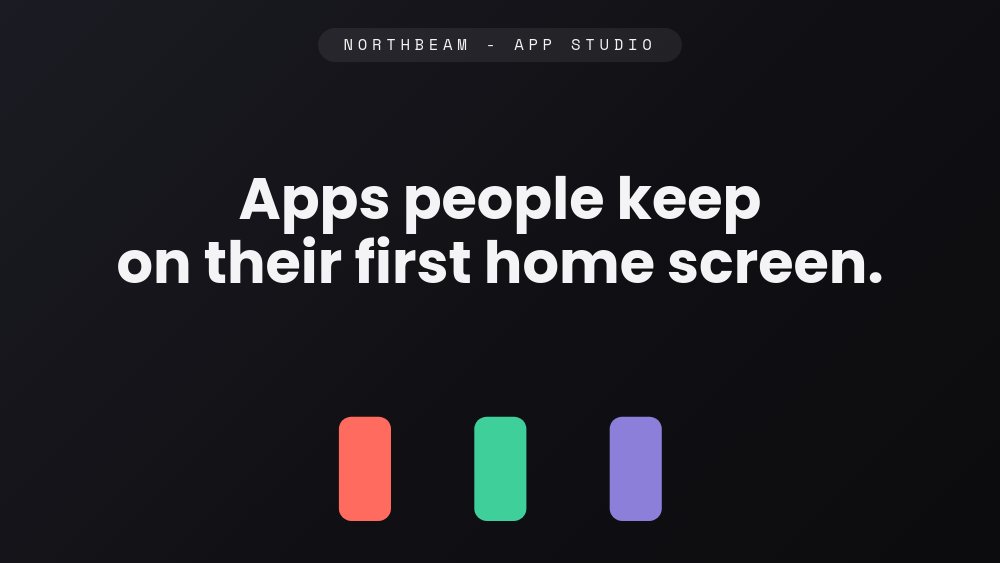
Mobile App Portfolio - Device Trio Template
A portfolio for app studios and mobile developers whose proof is shipped products on real home screens. Five panes on a soft dark stage: friendly Poppins headlines, Space Mono metadata, and one real-time 3D phone per app, each catching colored light from its own screen - coral for Dawnly, mint for Stride, violet for Inkpot. A "NORTHBEAM - APP STUDIO" chip anchors every pane while the devices do the talking.
#What Makes This Template Stand Out
The phones are PaneFlow's real-time 3D device component, not flat mockup screenshots. Each app pane stages an actual rendered device at its own angle - Dawnly's phone leans in from the right, Stride's mirrors it from the left, Inkpot's sits near-frontal with a slow rotate sweep - and because adjacent panes hand off device position, the phone seems to hold its place while the pane changes around it. Swap the screen image and the body, bezel, and reflections stay photoreal in every export.
The color system gives each app a pane of its own. The stage stays near-black throughout, but Dawnly's screen washes the pane in coral, Stride's in mint, Inkpot's in violet - and each accent is allowed to color only its own chips and stat numerals. The cover hints the trio with three small phone silhouettes in those exact hues, and the close lines up the three app icon chips (D, S, I), so the palette itself tells you the studio has shipped three times.
The stats do the credibility work in one glance. Each app gets a large rolling numeral pair: "120k downloads" and "4.8" with a star for the sleep app, "85k downloads" beside an App Store Editors' Choice nod for the running app, "60k journals started" for the journaling app. One-line descriptions stay product-true - "Wake up on the right side of your sleep cycle." - and the whole pane reads like an App Store feature card that moves.
- Real-time 3D phone mockups - rotatable rendered devices, not flat screenshots
- Per-app screen-glow accents: coral, mint, and violet, each confined to its own pane
- Number-roll stat rows: downloads, ratings, Editors' Choice, journals started
- Device position hand-off between panes so the phone appears to stay while content changes
- Persistent NORTHBEAM studio chip, with app icon chips lining up on the close
- 5-pane 16:9 loop ending on a "Have an app in mind?" CTA with a Work with us pill
#Who Should Use This Template
- Two-person app studios and indie shops introducing a portfolio of shipped apps in one artifact. The studio chip plus three branded panes maps exactly onto the "small team, real products" pitch.
- Mobile developers and contractors courting client work. "We design, build, and ship apps end to end." on the close is the offer; the three device panes are the evidence.
- Solo developers with multiple apps who want each product to feel like its own brand without building three separate sites. The per-app accent system does the separation.
- Studios pitching investors or partners who need download counts and store accolades to land in the first thirty seconds. The number-roll stats put them there.
#Best Use Cases
#Studio Portfolio Sites
Export to HTML, React, Vue, or Svelte and run the loop as the centerpiece of your studio site, or publish it as a hosted PaneFlow link. The five panes cycle from the "Apps people keep on their first home screen." cover through three app showcases to the Work with us close on a 5 to 6 second beat, with glow blobs drifting at deep parallax behind the devices.
#Client and Investor Pitches
Drop the loop at the front of a pitch deck or send the hosted link before a call. Three apps, three angles, three stat rows - the portfolio question is answered before slide two. Export to video for email embeds, or to PDF when the process demands attachments.
#App Store and Launch Marketing
Each app pane doubles as a standalone product card: device at an angle, icon chip, one-liner, stats. Duplicate the project, keep one app's pane, and export it as a video or image sequence for the launch post. The 3D device angle gives the screenshot-on-a-phone format depth that flat mockups do not have.
#How to Customize This Template
- Open PaneFlow and select "Mobile App Portfolio - Device Trio" from the template gallery
- Rewrite the cover headline "Apps people keep on their first home screen." and the studio chip with your own studio name
- Replace each phone's screen image with a screenshot or brand wallpaper from your own app - the 3D body and angles stay put
- Update each app pane: icon chip letter, app name, one-line pitch, and the two number-roll stats
- Adjust the per-app accent colors if your apps have their own brand hues - keep each color confined to its own pane
- Edit the close pane: the "Have an app in mind?" line, the supporting sentence, and the Work with us CTA pill
- Duplicate an app pane for a fourth product, or delete one if you ship two - then update the icon chips on the cover and close
- Run the loop once to check the device hand-offs, then export to HTML, React, Vue, Svelte, or video
#Related Templates
- Mobile App Showcase - 3D Device - the single-app feature tour built on the same 3D device component
- Mobile Apps Portfolio - an alternative multi-app portfolio with a different rhythm
- iPhone 17 Pro - a product-launch treatment of the 3D phone for hardware itself
- Indie Maker Portfolio - Product Shelf - for builders whose shipped products span more than mobile
#Related Resources
- PaneFlow for Developers - export to React, Vue, Svelte, or plain HTML and keep every animation
- PaneFlow for Portfolios - portfolio templates and hosting for people who ship work
- PaneFlow for SaaS - product showcases, feature tours, and launch slides for software teams
Start with Mobile App Portfolio - Device Trio
Open this template in PaneFlow, customize it to match your brand, and export as HTML, React, Vue, or video.







