Mobile App Showcase - 3D Device Template
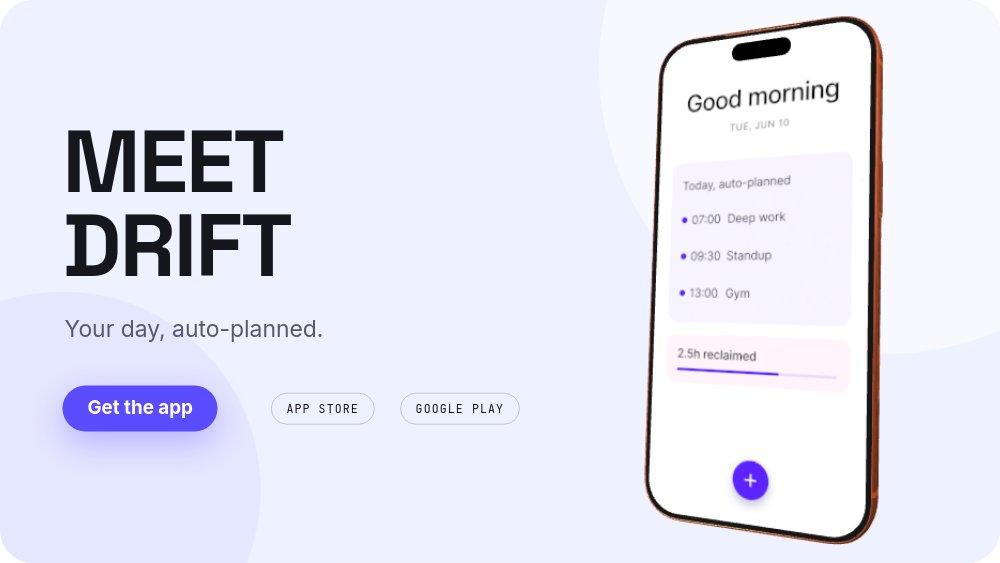
An app showcase where the phone is the protagonist. Five 16:9 panes on a soft lilac-to-blush gradient introduce a fictional planner called Drift - "MEET DRIFT. Your day, auto-planned." - and then send a real-time 3D iPhone traveling across the canvas, rotating to a new angle for each feature beat: planning, focus, social proof, and a closing "START TOMORROW, TONIGHT." Space Grotesk headlines, JetBrains Mono metric chips, one violet accent, zero mockup screenshots.
#What Makes This Template Stand Out
The device is a real-time 3D model, not a flat screenshot in a phone-shaped frame. It opens angled to the right of the headline, swings left and rotates for the first feature, sweeps back right for the second, and lands face-on and larger for the social-proof pane - with true perspective the whole way. Because the phone is a single component reused across panes, PaneFlow animates the travel between positions automatically, which gives the showcase a camera-move quality that static device mockups cannot fake.
The feature beats argue in numbers. Each feature pane pairs a numbered kicker and headline - "01 / PLAN: It plans while you sleep", "02 / FOCUS: One tap. Deep focus." - with a JetBrains Mono metric chip that number-rolls into place: 07:00 next to "your agenda, ready", 2.5h next to "reclaimed every day". Two lines of body copy each, and the phone carrying the actual UI does the demonstrating.
The proof pane surrounds the product with its reviews. The phone sits face-on at center while a 4.9 rating number-rolls in beside "12K RATINGS ON THE APP STORE" and three frosted review cards pop in around the device - "Drift gave me my evenings back.", "The morning plan is scary good.", "Like a chief of staff in my pocket." - each with a shape-built five-star row. The closer compresses everything into one line, "START TOMORROW, TONIGHT.", over an enlarged CTA and a "FREE ON IOS AND ANDROID" mono line.
- Real-time 3D iPhone model that travels and rotates to a new angle on every pane
- Numbered feature beats: 01 / PLAN "It plans while you sleep" and 02 / FOCUS "One tap. Deep focus."
- JetBrains Mono metric chips with number-roll: 07:00 agenda, 2.5h reclaimed, 4.9 rating
- Three frosted review cards with shape-built star rows popping in around the face-on phone
- Soft lilac-to-blush gradient field with a single violet accent and store badge chips
- 5-pane 16:9 loop closing on "START TOMORROW, TONIGHT." with an enlarged CTA
#Who Should Use This Template
- Mobile app founders who need the landing page showcase to look funded before the app is. The 3D device and number-roll metrics deliver big-studio production from one screenshot and a copy pass.
- Product marketers at app companies running feature launches. The numbered-beat structure maps one pane per feature, each with its own headline, body, and proof metric.
- App studios and agencies shipping showcase sections for clients. Swap the screen image, retheme the gradient, rewrite the beats - the 3D staging carries between projects untouched.
- Indie developers who cannot justify mockup tooling and motion software for one launch. The device realism, travel, and rotations are all built in; you bring a screenshot.
#Best Use Cases
#App Landing Page Showcase Sections
Export to HTML, React, Vue, or Svelte and mount it as the centerpiece section of your app's landing page. The phone keeps rotating through the feature beats on a 5-second autoplay, the metric chips re-roll on every pass, and the "Get the app" pill with App Store and Google Play chips sits exactly where a visitor expects to convert.
#Launch Videos and Ads
The 16:9 canvas is already a video frame. Export the full loop for the launch post, or cut individual feature beats into short ad variants - each pane is a self-contained claim with a headline, a metric, and the product on screen. The 3D device motion gives paid creative the production value that flat screenshot ads lack.
#Feature Announcements
When the next big feature ships, duplicate a feature pane, point the kicker at "03 / WHATEVER IS NEW", and update the metric chip. The phone's travel animation absorbs the new pane into the loop automatically, and the same file re-exports the site section and the announcement video in one pass.
#How to Customize This Template
- Open PaneFlow and select "Mobile App Showcase - 3D Device" from the template gallery
- Replace the device's screen image with a single screenshot of your app - it carries across all five panes
- Rename "MEET DRIFT" and the "Your day, auto-planned." tagline, and edit the "Get the app" pill and store badge chips
- Rewrite the "01 / PLAN" beat: headline, two-line body, and the 07:00 metric chip with its label
- Rewrite the "02 / FOCUS" beat the same way, updating the 2.5h chip to your feature's number
- Update the 4.9 rating, the "12K RATINGS ON THE APP STORE" label, and the three review cards with real quotes and initials
- Edit the closing "START TOMORROW, TONIGHT." line and the "FREE ON IOS AND ANDROID" mono footer
- Export to HTML, React, Vue, or Svelte for your landing page, or to video for the launch post
#Related Templates
- Mobile App Portfolio - Device Trio - three devices at once for studios showing a body of work
- iPhone 17 Pro - the 3D device as the product itself, in a hardware-launch register
- SaaS Hero - Kinetic Type - the web-product counterpart with built UI cards instead of a device
- Event Hero - Countdown - launch-promo urgency for the event around your release
#Related Resources
- PaneFlow for Product Launches - showcase sections and launch videos from one source file
- PaneFlow for SaaS - feature tours and product reveals built for software teams
- PaneFlow for Developers - export to React, Vue, Svelte, or plain HTML and keep every animation
Start with Mobile App Showcase - 3D Device
Open this template in PaneFlow, customize it to match your brand, and export as HTML, React, Vue, or video.







