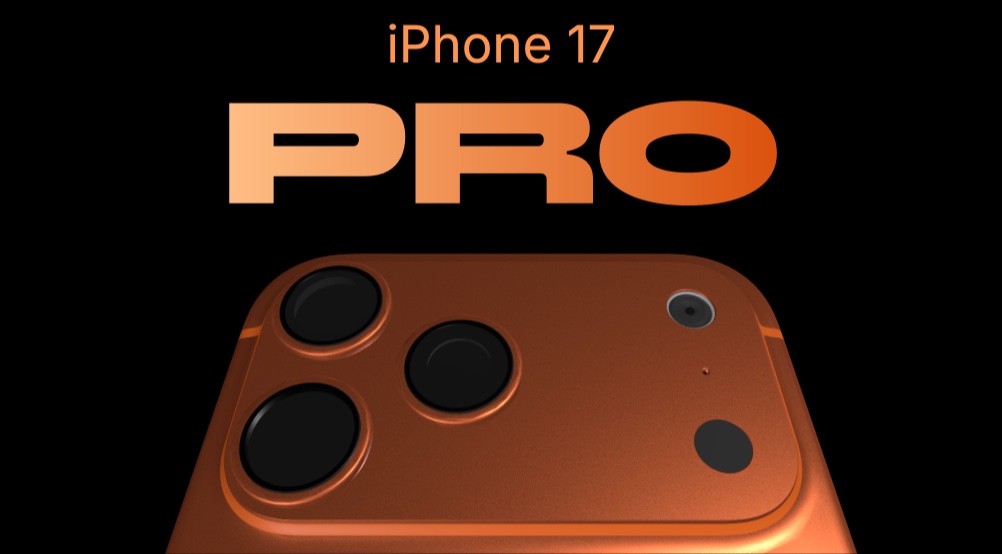
iPhone 17 Pro - 3D Device Showcase Template
This template takes the product showcase concept further with a true 3D device mockup. While most presentation tools give you flat phone frames, this template renders an iPhone model with real 3D rotation - the device tilts, turns, and reveals your product screens from different angles as the viewer navigates between panes.
#What Makes This Template Stand Out
The defining feature of the iPhone 17 Pro template is its 3D device mockup system. PaneFlow's built-in 3D engine renders an iPhone model directly in the browser - no external 3D software, no pre-rendered videos, no iframes loading third-party content. The device rotates smoothly with configurable X, Y, and Z axis controls, creating a cinematic product reveal that feels like a hands-on demo.
- 3D iPhone mockup with real-time rotation on X/Y/Z axes
- Dark theme for dramatic, high-contrast product reveals
- 9 panes with varied grid layouts for rich storytelling
- Fade and parallax transitions with multi-layer depth
- Hidden pagination for clean, immersive experience
- Fully responsive across desktop, tablet, and mobile
The dark background creates high contrast against your product screens, making colors pop and drawing the eye directly to your content. With 9 panes and varied grid layouts - from full-bleed hero shots to 3-column feature grids - you have enough structure to tell a complete product story without the presentation feeling repetitive.
#Who Should Use This Template
- Product teams presenting new features at all-hands meetings or conferences. The 3D iPhone mockup adds a level of polish that flat screenshots cannot match, and the dark theme reads well on projectors and large displays.
- App developers building portfolio pieces or case studies. Show your work inside a realistic device context with cinematic transitions that demonstrate the user experience, not just the interface.
- SaaS companies creating product tour pages. The 9-pane structure is enough to walk through onboarding, core features, and key differentiators in a single scrollable experience.
- Design agencies pitching app concepts to clients. Present UI designs inside a 3D device that rotates to show different states, giving clients a sense of the finished product before development begins.
#Best Use Cases
#Conference Presentations and Keynotes
The dark theme and 3D device mockup are built for big screens. When you present this template at a conference or team meeting, the device rotation catches the audience's attention in a way that static slides never will. The hidden pagination keeps the interface clean - the focus stays on the content. Set it to autoplay for a hands-free demo, or navigate manually to control the pace of the presentation.
#Product Documentation and Feature Tours
Technical product pages often struggle to balance detail with engagement. This template solves that by combining informative text layouts with a 3D device that shows the product in action. Use the 3-column grid panes for feature breakdowns, then transition to a full-bleed pane with the 3D mockup showing the feature in context. The fade transitions keep the flow smooth without being distracting.
#Client Pitches for App Development
When pitching an app concept to a client, static wireframes feel incomplete. This template lets you place your design comps inside a realistic 3D device, with animated transitions between screens that simulate the actual user flow. The client sees not just what the app looks like, but how it feels to navigate. Export the presentation as video for async review, or present live from the browser.
#How to Customize This Template
- Open PaneFlow and select "iPhone 17 Pro" from the template gallery
- Click the 3D iPhone mockup and upload your own app screenshots
- Adjust the rotation angles (rotateX, rotateY, rotateZ) to find the best viewing angle for your screens
- Edit text blocks with your product name, feature descriptions, and messaging
- Modify the dark background colors if you want to match your brand palette
- Rearrange or duplicate panes to add more feature sections
- Set autoplay timing or leave manual navigation for controlled presentations
- Export as HTML, video, or publish to CDN
#Related Templates
- iPhone 16 Pro - light theme product showcase with parallax transitions
- AirPods Max - premium product reveal with deep parallax layers
- Product Launch - t0ggles - full SaaS product launch with 3D animations and spin effects
- PaneFlow Intro - animated product introduction template
#Related Resources
- PaneFlow for Developers - export as React, Vue, and Svelte components
- PaneFlow for Product Launches - animated product reveal slideshows
- PaneFlow vs Keynote - how PaneFlow compares for product presentations
Start with iPhone 17 Pro
Open this template in PaneFlow, customize it to match your brand, and export as HTML, React, Vue, or video.







