Indie Maker Portfolio - Product Shelf Template
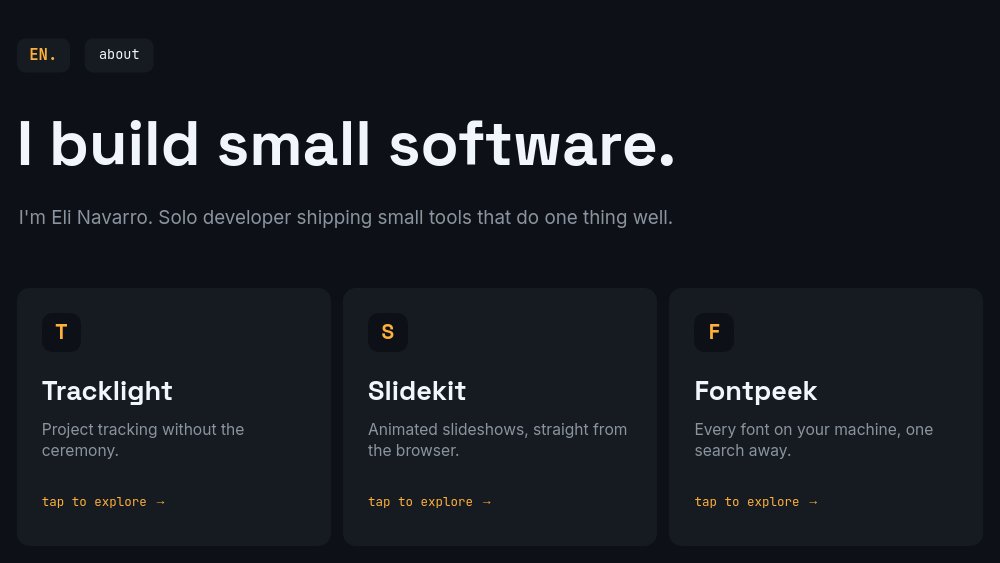
A portfolio for the solo developer with several shipped products and no interest in narrating them. Six panes of GitHub-night dark with soft cards, JetBrains Mono metadata, and one amber accent - and autoplay is off. Visitors click. The index pane states "I build small software." over three product cards, each labeled "tap to explore", and every card opens a detail pane where the product's interface is rebuilt from blocks: a sprint board for the project tracker, an editor canvas for the slideshow builder, a font list for the font manager.
#What Makes This Template Stand Out
It is a portfolio that behaves like a product. Most portfolio templates play at you; this one waits. The index holds still - headline, one-line bio ("I'm Eli Navarro. Solo developer shipping small tools that do one thing well."), three cards - until the visitor picks a product, and the chosen card's content carries into the detail pane's header. Back chips and a persistent monogram-plus-about header mean the navigation logic survives export: published or exported to HTML, it reads as a small interactive site.
The UI mockups are built from blocks, not screenshots. Tracklight's detail pane shows a working-looking sprint view - sidebar, "Sprint 24" with 8 open and 3 in review, task rows wearing in-progress, queued, and shipped chips. Slidekit's pane shows a slideshow editor with a "Launch day." canvas and pane thumbnails. Fontpeek's pane is the trick shot: a font browser whose five rows each render in their actual typeface, from Playfair Display to JetBrains Mono - a UI card that demos itself. Because all of it is text and shapes, you can retitle a task row as easily as a headline.
The numbers are placed where a buyer's eye goes. Each detail pane pairs its mockup with two number-roll stats in the lower left - 4,200 teams and shipping since 2022 for Tracklight, 18k slideshows published and a #1 Product of the Day for Slidekit, 9k downloads and free-and-open-source for Fontpeek. The contact pane closes the loop in the same terse register: "Want something built?", an amber email, and GitHub and X handles in mono.
- Click-driven navigation with autoplay off: index cards open detail panes, back chips return, no dead ends
- Quiet dev-dark palette: GitHub-night background, soft cards, Space Grotesk display, JetBrains Mono meta
- Three product detail panes with UI mockups built entirely from blocks - zero screenshots to recreate
- Fontpeek mockup renders five rows in five real typefaces, a font manager that demos itself
- Number-roll proof stats per product: 4,200 teams, 18k slideshows, 9k downloads
- Persistent monogram and about chip on every pane, ending on a "Want something built?" contact pane
#Who Should Use This Template
- Indie hackers with a product shelf. If you ship tools the way others ship side projects, this is the "my products" page that treats each one as a first-class exhibit.
- Solo SaaS founders consolidating two or three apps under one name. The index-and-detail structure mirrors how visitors actually evaluate a multi-product maker: scan the shelf, inspect one, check the numbers.
- Open-source maintainers with shipped software, not just repos. The detail panes give each project the product treatment - interface, traction, one-line pitch - that a README never manages.
- Freelance developers selling build work. The closing pane is a direct commercial ask, and three polished product exhibits are the strongest possible evidence above it.
#Best Use Cases
#The /products Page of a Personal Site
Export to HTML, React, Vue, or Svelte and mount it as the products section of your existing domain - or publish the hosted PaneFlow link and let it be the whole site. Because navigation is click-driven, visitors browse at their own pace, and the snappy detail-pane entrances reward every click. Put the link in your GitHub profile and your X bio.
#Launch and Hiring Credibility
When a launch post or a consulting pitch needs a "who is this person" link, this answers in one URL: three shipped products, real traction numbers, a face on the about pane, and a contact path. The restraint of the design - one accent color, mono metadata - signals exactly the engineering taste the products claim.
#A Living Product Index
Because the mockups are blocks rather than screenshots, updating the portfolio after a release takes minutes: bump the stats, add a task row, rename a sprint. The portfolio stays current with the products instead of lagging a redesign behind them, which is the usual fate of a maker's portfolio page.
#How to Customize This Template
- Open PaneFlow and select "Indie Maker Portfolio - Product Shelf" from the template gallery
- Update the monogram chip, the index headline, and the one-line bio with your name and thesis
- Rename the three product cards - logo letter, product name, one-line pitch - keeping each pitch under ten words
- Rebuild Tracklight's detail pane as your first product: retitle the header card, edit the sprint-board rows and status chips, and set the two stats
- Do the same for the second and third detail panes - the Slidekit editor canvas and the Fontpeek font list are both plain text and shapes you can retheme to any product category
- Edit the about pane with your portrait, years, and short bio, and check the about chip still routes to it
- Set your email and handles on the "Want something built?" contact pane
- Click through every path - cards in, back chips out, about from anywhere - then publish as a hosted link or export to HTML, React, Vue, or Svelte
#Related Templates
- Developer Portfolio - Terminal Mono - the library-and-commit-log counterpart when your work is infrastructure
- Personal Portfolio - Monochrome Amber - the same single-accent dark restraint for visual work
- Web Designer Portfolio - Site Reel - for portfolios where the product is the website itself
- SaaS Pitch - Minimal - when one of the shelf products graduates to its own pitch deck
#Related Resources
- PaneFlow for Developers - export to React, Vue, Svelte, or plain HTML with interactions intact
- PaneFlow for Portfolios - portfolio templates and one-link hosting for people who ship
- PaneFlow for SaaS - product storytelling for software, from shelf pages to launch decks
Start with Indie Maker Portfolio - Product Shelf
Open this template in PaneFlow, customize it to match your brand, and export as HTML, React, Vue, or video.







