Cyber Week Daily Drops - Day Tabs Template
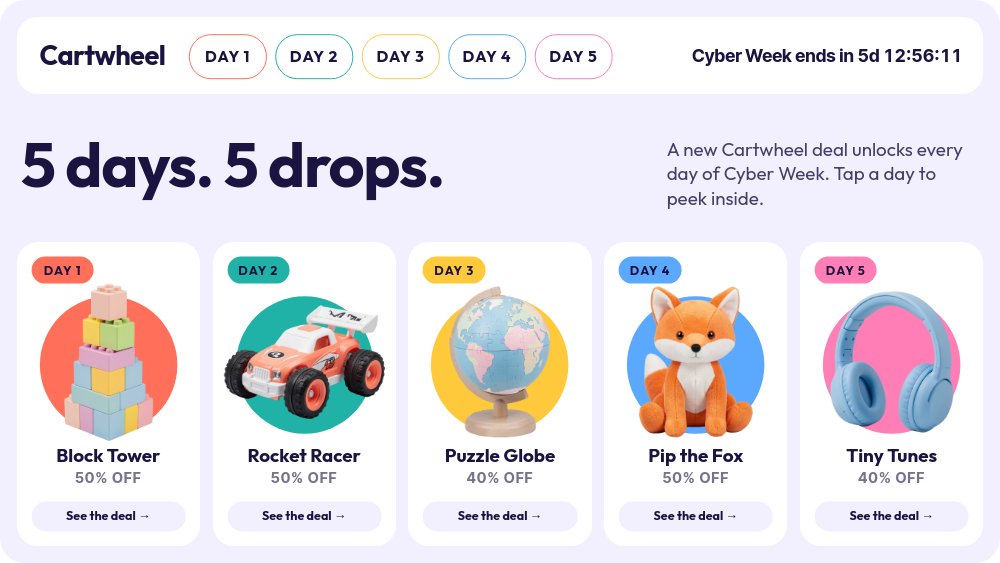
"5 days. 5 drops." That is the whole pitch, and the layout makes it obvious. A white nav strip holds the "Cartwheel" wordmark, five outlined day tabs in coral, teal, sun, sky, and pink, and a live ticker reading "Cyber Week ends in 5d 12:56:11". Below it, five deal tiles show each day's toy on a matching color disc. Built for the fictional toy shop Cartwheel, this interactive Cyber Week widget turns a week of deals into a click-through: tap a day, see that day's deal, and jump to any other day from the tabs.
#What Makes This Template Stand Out
This is real navigation, not a slideshow in disguise. The nav block is shared across all six panes, so the tabs and the ticker never re-animate when a shopper clicks; only the content below changes. Each tab has two states with the same geometry, an outlined inactive pill and a filled active one in the day's color, so the current day is always obvious. The overview tiles, the tabs, and the wordmark are all wired, and every day pane carries an "← All deals" pill, so there are no dead ends anywhere in the widget.
The day panes feel like opening a toy box. On "DAY 1 DEAL", a Block Tower Set bounces on a big coral disc while a dark "-50%" badge pops in beside it, and on the right a white deal card lists "Block Tower Set", "Twenty chunky pastel bricks that click, stack and topple. Ages 2+.", a line drawn through "$48", and a "$24" that rolls up in Inter Tight. A "Limited to the first 300 orders" line and a coral "Grab it →" pill close the card. The other four days follow the same rhythm with the Rocket Racer RC ($58 to $29), Puzzle Globe ($40 to $24), Pip the Plush Fox ($32 to $16), and Tiny Tunes Headset ($45 to $27).
The countdown is the only time statement. Tabs say "DAY 1" through "DAY 5", never weekdays or dates, so the widget works no matter which day your Cyber Week starts. The ticker is set in bold Inter Tight on the nav strip and, when the week is over, swaps to "Cyber Week is over - thanks for shopping" instead of freezing at zero. Outfit, a rounded geometric sans, carries the headline, product names, and body copy, which keeps the whole widget friendly and toy-like.
- Five clickable day tabs with active and inactive states on a shared nav block
- Live "Cyber Week ends in" ticker visible on every pane, with a custom ended message
- Overview tiles that each open their day pane with a click
- Day panes with bouncing product cutouts, drawn strikes, and number-roll prices
- "← All deals" back pill and a clickable wordmark - no dead ends
- 6-pane 16:9 widget with autoplay off - click actions survive HTML, React, Vue, and Svelte export
#Who Should Use This Template
- Toy, kids, and gift stores running a new deal every day of Cyber Week.
- Ecommerce marketers who want one embeddable widget for the whole week instead of five separate banners.
- Shopify, Webflow, and Framer teams looking for clickable day tabs with a live countdown and no third-party app.
- Email and CRM marketers who need one link to send in every daily email, with each day's deal a single click away.
#Best Use Cases
#Cyber Week Landing Page Widget
Export to HTML, React, Vue, Svelte, or Next.js and make the widget the centerpiece of your Cyber Week page. Shoppers land on the overview, pick a day from the tiles or tabs, and move between deals without reloading. Add a URL click action to each "Grab it →" pill so every deal pane links straight to its product page.
#Daily Email Campaign
Publish the widget as a hosted link and send it in every email of the campaign. Each email can feature that day's product and point readers to the widget, where the live ticker reminds them how long the week has left and the tabs let them catch up on any day they missed.
#Social Teasers From the Same Project
Export the overview pane as an image for an announcement post, and export each day pane as an image to tease that day's drop. Image exports show the time left at the moment of export, so the ticker reads correctly on the day you post.
#How to Customize This Template
- Open PaneFlow and select "Cyber Week Daily Drops - Day Tabs" from the template gallery
- Select the
Cyber Week ends in {d}d {hh}:{mm}:{ss}ticker, open the "Countdown" group, and set "Ends at" to the end of your sale - Use "Preview" to check the ended message "Cyber Week is over - thanks for shopping" and reword it if needed
- Replace "Cartwheel" in the nav and the subline "A new Cartwheel deal unlocks every day of Cyber Week. Tap a day to peek inside."
- Update the five overview tiles - "Block Tower", "Rocket Racer", "Puzzle Globe", "Pip the Fox", "Tiny Tunes" - with your products and "50% OFF" or "40% OFF" labels
- On each day pane, swap the cutout and update the "DAY N DEAL" chip, product name, description, old and new prices, discount badge, and "Limited to the first 300 orders" line
- Add a URL click action to each "Grab it →" pill, then click every tab, tile, wordmark, and back pill in preview to confirm the navigation
- Keep dates and weekdays out of the copy, then export to HTML, React, Vue, Svelte, or Next.js, or publish as a hosted link
#Related Templates
- Holiday Deal Calendar - Door Grid - an advent-style door grid with the same click-to-deal navigation
- Black Friday Doorbusters - Deal Grid - a deal grid with a live countdown on every card
- Cyber Monday Hero - Y2K Chrome - a flash sale hero with a giant live hours clock
- Tabbed Feature Showcase - the same tab pattern for an evergreen product section
#Related Resources
- PaneFlow for Ecommerce - interactive deal widgets and seasonal campaigns for your store
- PaneFlow for Marketers - campaign pages and embeds that drive repeat visits
- PaneFlow for Landing Pages - interactive sections that export to production code
Start with Cyber Week Daily Drops - Day Tabs
Open this template in PaneFlow, customize it to match your brand, and export as HTML, React, Vue, or video.







