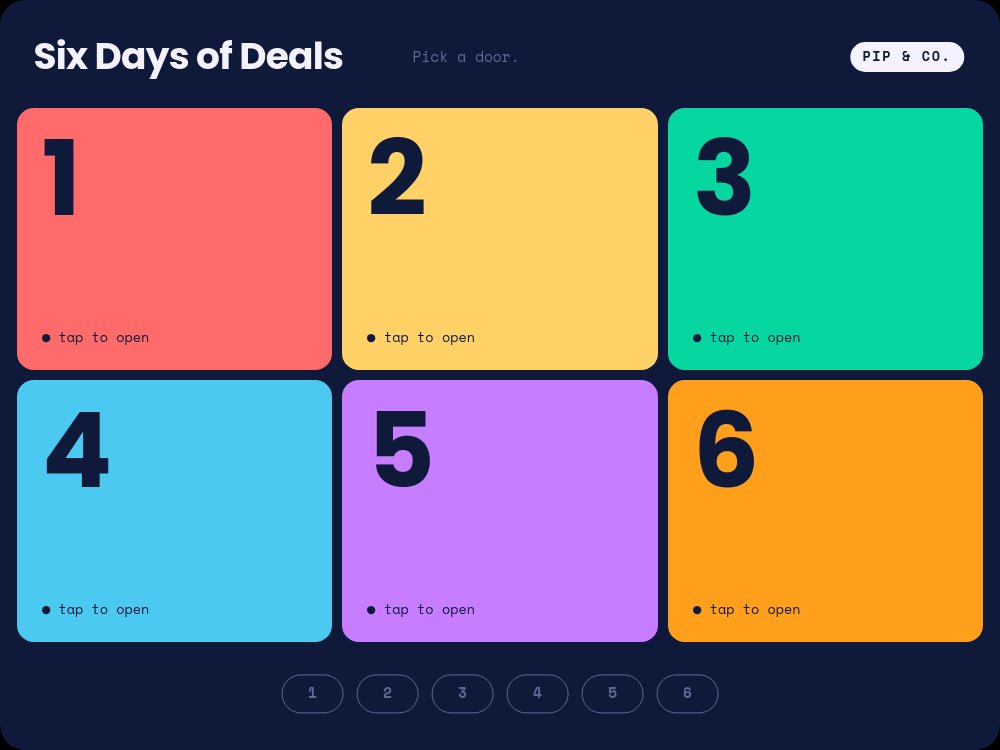
Holiday Deal Calendar - Door Grid Template
"Pick a door." That is the whole instruction, and it is all anyone needs. Six numbered doors in coral, butter, mint, sky, lilac, and tangerine fill a midnight navy grid under "Six Days of Deals", each with a small "tap to open" label, and a row of six outlined chips waits at the bottom. Built for the fictional toy shop Pip & Co., this interactive deal calendar turns an advent calendar into a click-through sale: each door opens onto one discounted toy, from a wooden train set to an art kit, and every deal pane has a way back.
#What Makes This Template Stand Out
This is real navigation, not a slideshow in costume. Each door block carries a click action to its own deal pane, the bottom chip row works as persistent navigation on all seven panes (the active day fills with that door's color, the rest stay outlined), and an "← All doors" chip on every deal pane returns to the grid. There are no dead ends: a visitor can jump from day 2 to day 5 without going back, and the final pane even reassures them - "Day 6: last door. Missed a day? Doors stay open all week."
The door-to-deal transition is the delight. Because each door is the same block on the grid and on its deal pane, clicking it makes the colored card grow from its grid cell into a tall left panel, carrying its numeral with it until the "1" or "6" becomes a poster-size digit under a "DAY 1 OF 6" label. On the right, the deal assembles in a fixed rhythm: the product cutout pops in, the product name appears in Poppins, a line draws through the old price, and the new price rolls up in the door's color. The pacing is fast because the visitor asked for it with a click.
The palette leans toy box without going garish. Six saturated door colors sit on deep navy with dark numerals, so the grid pops, and each color carries through to its deal pane - the price, the "Today only" chip, and the active chip in the nav all match the door that was opened. Poppins ExtraBold handles the header, numerals, and product names, Inter Tight sets the prices, Inter writes the day lines like "Day 3: the one everyone wanted.", and Space Mono labels everything small. A single pulsing dot on door 1's "tap to open" label is the only looping motion, a quiet cue for where to start.
- Six clickable door blocks that navigate to their own deal panes
- Door-to-hero morph: the colored card grows into the deal pane's left panel
- Persistent numbered chip navigation on every pane plus an "All doors" back chip
- Drawn strike line across the old price, then a number-roll new price
- Six door colors carried through prices, chips, and nav on each deal pane
- 7-pane 4:3 widget with autoplay off - click actions survive HTML, React, Vue, and Svelte export
#Who Should Use This Template
- Online stores running a multi-day holiday promotion who want visitors to come back and open the next door.
- Toy, gift, and kids brands where a playful mechanic suits the audience better than a discount table.
- Shopify and Webflow teams looking for an interactive advent calendar they can embed without a third-party app.
- Email and CRM marketers who need one link to send every day of the campaign, with each day's deal a single click away.
#Best Use Cases
#Interactive Advent Calendar on a Campaign Page
Export to HTML, React, Vue, or Svelte and make the calendar the centerpiece of a "Six Days of Deals" landing page. Visitors land on the door grid, open a door, and move between deals with the chip row. Link each "Add to cart" pill to the matching product page with a URL click action so the widget converts rather than just entertains.
#Daily Email Campaign
Publish the calendar as a hosted link and send it in every daily email of the campaign. Each email features that day's product and sends readers to the grid to open its door; because the whole calendar lives at one URL, subscribers who skipped an email can still open any door they missed.
#Social Teasers From the Same Project
Export the door grid pane as an image for an announcement post, and export individual deal panes as images or short clips to tease each day on social. The navy field and candy colors keep every asset recognizably part of the same campaign.
#How to Customize This Template
- Open PaneFlow and select "Holiday Deal Calendar - Door Grid" from the template gallery
- Update the header - "Six Days of Deals", "Pick a door.", and the "PIP & CO." chip - with your campaign and brand
- Recolor any of the six doors, and the matching price and chip accents on its deal pane
- On door 1's pane, replace the train cutout and update "Wooden Train Set", "$64", "$39", and "Day 1: the classic, back in stock."
- Repeat for the other five deals - "Family Board Game", "Plush Fox", "Forest Jigsaw Puzzle", "Kids' Headphones", and "Art Kit" - with their prices and day lines
- Widen or narrow each strike line to match your old price, and update the "Today only" chips if deals run longer
- Add a URL click action to each "Add to cart" pill, then click every door, chip, and back button in preview to confirm the navigation
- Export to HTML, React, Vue, Svelte, or Next.js, or publish as a hosted link and embed it on your campaign page
#Related Templates
- Choose-Your-Path Quiz - the same click-to-branch navigation applied to a personality quiz
- Hotspot Product Tour - clickable hotspots that open product details on one image
- Tabbed Feature Showcase - tab-style interactive navigation for a website section
- Holiday Gift Guide - Editorial Loop - a calmer, autoplaying gift spread for the same season
#Related Resources
- PaneFlow for Ecommerce - interactive product widgets and seasonal campaigns for your store
- PaneFlow for Marketers - campaign pages and embeds that drive repeat visits
- PaneFlow for Landing Pages - interactive sections that export to production code
Start with Holiday Deal Calendar - Door Grid
Open this template in PaneFlow, customize it to match your brand, and export as HTML, React, Vue, or video.







