Black Friday Doorbusters - Deal Grid Template
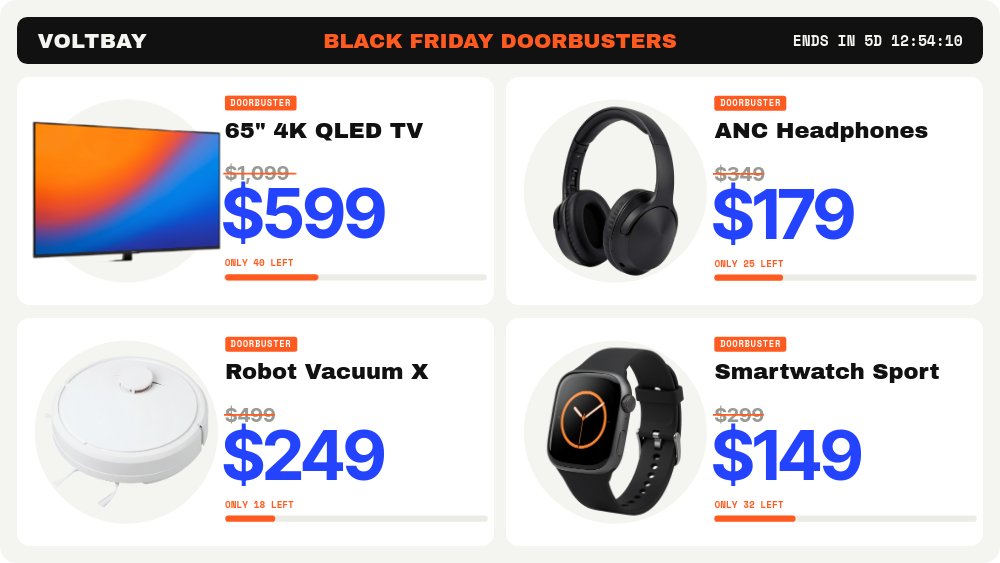
A doorbuster section that looks like a retail flyer done properly. A black header strip carries "VOLTBAY", "BLACK FRIDAY DOORBUSTERS" in safety orange, and a live "ENDS IN" countdown on the right. Below it, four white deal tiles fill a 2x2 grid on an off-white field: a 65" 4K QLED TV, ANC Headphones, Robot Vacuum X, and Smartwatch Sport, each with an orange "DOORBUSTER" chip, a struck gray price, a huge electric blue sale price, and an "ONLY 40 LEFT" style stock line with an orange bar. Built for the fictional electronics store Voltbay, this 16:9 website section packs four limited-stock deals into one embeddable block.
#What Makes This Template Stand Out
The first tile becomes the first card. On pane two, the TV tile grows out of its grid cell into a full-width deal card, and the header strip swaps its countdown for "WHILE STOCK LASTS". The card adds what the tile had no room for: a mono spec line ("Quantum dot panel, 120Hz, Dolby Vision"), "LIMIT 2 PER CUSTOMER", a wider stock bar, and its own countdown under "DOORBUSTER ENDS IN". Panes three to five give the headphones ("$349" to "$179"), the robot vacuum ("$499" to "$249"), and the smartwatch ("$299" to "$149") the same big-card treatment, and the smartwatch card closes with a "See all doorbusters" pill before the loop returns to the grid.
Every deal has its own live timer. That matters for doorbusters, which often end at different times: each card's countdown has its own end date, ticks down to the second, and switches to "Doorbuster ended" on its own when time is up. Stock counts stay honest, too - "ONLY 40 LEFT", "ONLY 25 LEFT", "ONLY 18 LEFT", and "ONLY 32 LEFT" are plain text you update, not a fake decrementing number.
The look is busy on purpose but disciplined. Archivo Black for product names and the header, Inter Tight for prices and timers, Space Mono for chips, specs, and stock lines, on a strict grid of white cards with rounded corners. Motion is punchy: tiles and chips pop, orange strike lines draw across the old prices, and the new prices number-roll up. Each product sits on a soft light disc, so even the white robot vacuum stands out from its white card.
- 16:9 website section (1920x1080) with autoplay and looping for homepages and sale pages
- Five live countdowns - one in the header strip, one per deal card - each with its own end date
- Graceful ended state: "Doorbuster ended" replaces each timer, labels and CTA hide
- Tile-to-card morph: the TV tile grows from the grid into the first deal card
- Drawn orange strikes over old prices and number-roll blue sale prices
- Editable stock lines and resizable stock bars - no fake draining inventory
#Who Should Use This Template
- Electronics and big-box retailers running limited-stock doorbusters with a hard deadline per deal.
- Ecommerce managers who need a Black Friday section on the homepage this week, not a custom build next month.
- Marketplace and deal sites that feature a handful of hero deals above a longer product list.
- Agencies building sale pages for several retail clients. The structure holds for any four products; only the cutouts, copy, and colors change.
#Best Use Cases
#Homepage Doorbuster Section
Place the section right under your hero on Black Friday. The overview grid shows all four deals at a glance, the big cards sell each one, and the header countdown keeps the deadline in view.
#Black Friday Landing Page
Use it as the centerpiece of a dedicated sale page, with your full product grid below. Point the "See all doorbusters" pill at the rest of the sale.
#Staggered Hourly or Daily Deals
Give each card a different "Ends at" and run the deals in waves. As each timer reaches zero, its card reads "Doorbuster ended" while the others keep counting, so the section stays accurate without a re-publish.
#How to Customize This Template
- Open PaneFlow and select "Black Friday Doorbusters - Deal Grid" from the template gallery
- Select the "ENDS IN" countdown in the header strip on the overview pane, open the "Countdown" group, and set "Ends at"
- Repeat for the "DOORBUSTER ENDS IN" timer on each of the four deal cards - same date for one deadline, different dates for staggered deals
- Toggle "Preview" in the Countdown group to check "Doorbuster ended" and "DOORBUSTERS ENDED", and rewrite them if you like
- Replace "VOLTBAY" with your store name and swap the four product cutouts on both the tiles and the cards
- Update the product names, spec lines, old and new prices, and the "ONLY 40 LEFT" stock lines; resize the orange stock bars to match
- Replace the placeholder URL on the "See all doorbusters" pill with your sale collection link
- Export to HTML, React, Vue, Svelte, or Next.js, or publish and embed the section on your site
#Related Templates
- Black Friday Hero - Noir Gold Countdown - a quiet luxury hero with a live boxed clock
- Cyber Week Daily Drops - Day Tabs - an interactive widget for a week of daily deals
- Holiday Deal Calendar - Door Grid - six clickable doors that open into deal panes
- Tech Gadget PDP - Spec Callouts - a product page section for electronics after the sale
#Related Resources
- PaneFlow for Ecommerce - sale sections, product heroes, and campaign creative for online stores
- PaneFlow for Landing Pages - animated sections exported to HTML, React, Vue, and Svelte
- Text and Countdown Docs - countdown tokens, Largest Unit, When Ended, and the Show setting
Start with Black Friday Doorbusters - Deal Grid
Open this template in PaneFlow, customize it to match your brand, and export as HTML, React, Vue, or video.







