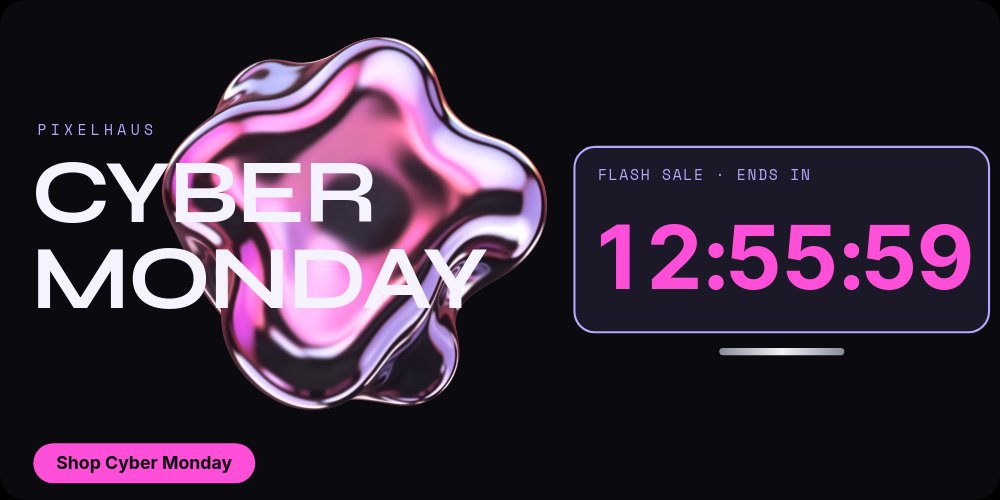
Cyber Monday Hero - Y2K Chrome Template
A Cyber Monday hero that looks like a 2001 MP3 player found its way onto your homepage. A liquid chrome blob with pink and lilac reflections floats behind a wide Syne "CYBER / MONDAY", and on the right a lilac-outlined screen shows "FLASH SALE · ENDS IN" above a giant pink clock that ticks live, second by second. Built for the fictional gadget store Pixelhaus, this 2:1 hero runs a four-pane flash sale: the countdown, a pocket console deal, earbuds and an instant camera, and a final "Clock's ticking." seam that loops back to the start.
#What Makes This Template Stand Out
The clock is the hero, and it travels. On the first pane the screen fills the right half with digits in bold Inter Tight. On the product panes it shrinks into a compact screen in the bottom-right corner, still ticking, so the deadline never leaves the frame while the deals take over. On the last pane it returns to the center at full size under "Clock's ticking.", which makes the loop seam feel like a deliberate beat rather than a restart. A thin chrome-gradient bar under the screen completes the device look.
The deals are built for a store. The "POCKET CONSOLE" pane drops a translucent lilac handheld in the center, a lilac "-40%" chip pops in, a pink line draws through "$129", and "$77" rolls up in display-size type. The next pane pairs "CLEAR BUDS" ($89 to $53) with an "INSTANT CAMERA" ($149 to $89), side by side with the same strike-and-roll rhythm, next to the headline "Gadgets, 40% off." The products are real cutout images, so they sit cleanly on the black field and swap for your own photos.
The Y2K mood comes from material and type, not clip art. The chrome blob is a transparent PNG that slowly turns with a touch of parallax, Syne gives the wordmark and headlines their wide techno stance, Space Mono sets the small spaced labels like "PIXELHAUS" and the product names, and bubblegum pink is reserved for the clock and the single "Shop Cyber Monday" pill. Copy avoids dates and durations on purpose, so the countdown is the only time statement on the page.
- Giant live "{hh}:{mm}:{ss}" countdown that ticks in embeds and code exports
- Clock screen that travels from hero to corner and back to center across panes
- Ended state swaps the digits for "This sale has ended" automatically
- Three gadget deals with drawn pink strikes and number-roll prices
- Transparent liquid chrome blob with slow motion and parallax
- 2:1 hero (1920x960), 3.5s per pane, loops - exports to HTML, React, Vue, Svelte, and Next.js
#Who Should Use This Template
- Consumer tech and gadget stores swapping the homepage hero for a Cyber Monday flash sale.
- Creator merch and streetwear shops whose audience responds to Y2K chrome and bubblegum color more than to discount tables.
- Shopify, Webflow, and Framer teams that want a ticking clock in the hero without installing a countdown app.
- Developers maintaining a storefront who would rather drop in an exported React or Vue component than wire a timer by hand.
#Best Use Cases
#Cyber Monday Homepage Hero
Export to HTML, React, Vue, Svelte, or Next.js and replace your hero for the length of the sale. The clock ticks in the visitor's browser, the deals rotate every 3.5 seconds, and the "Shop Cyber Monday" pill links to your sale collection with a URL click action.
#Flash Sale Landing Page
Publish the project as a hosted link and embed it at the top of a flash sale page linked from email and SMS. Because the countdown is live and ends at the same moment for everyone, the same embed stays accurate whether a subscriber opens the email at noon or at midnight.
#Social Teasers From the Same Project
Export the product panes as images for a carousel or a quick story. Image exports show the time left at the moment of export, so re-export close to posting, or lean on the "Clock's ticking." pane for posts that need to stay true all day.
#How to Customize This Template
- Open PaneFlow and select "Cyber Monday Hero - Y2K Chrome" from the template gallery
- Select the clock, open the "Countdown" group, and set "Ends at" to the moment your sale ends
- If your sale runs longer than two days, change the format to
{d}d {hh}:{mm}:{ss}or adjust "Largest Unit" - Use "Preview" to check the ended state and edit "This sale has ended" if you want different wording
- Replace "PIXELHAUS" with your brand and keep or rewrite the "CYBER / MONDAY" wordmark
- Swap the console, earbuds, and camera cutouts, then update "POCKET CONSOLE", "CLEAR BUDS", "INSTANT CAMERA" and their old and new prices
- Update "-40%" and "Gadgets, 40% off." to your discount, and widen or narrow the strike lines to fit your old prices
- Point the "Shop Cyber Monday" click action at your sale URL, keep dates out of the copy, and export to HTML, React, Vue, Svelte, or Next.js
#Related Templates
- Cyber Monday Story - Final Hours - a vertical final-hours story with a huge live hours numeral
- Cyber Week Daily Drops - Day Tabs - stretch Cyber Monday into five clickable daily deals
- Black Friday Hero - Noir Gold Countdown - the luxury Black Friday hero with boxed live digits
- Tech Gadget PDP - Spec Callouts - an evergreen product page section for the same gadgets
#Related Resources
- PaneFlow for Ecommerce - sale heroes, product sections, and seasonal store assets
- PaneFlow for Landing Pages - animated hero sections that export to production code
- Text and Countdown Docs - countdown tokens, "Largest Unit", and ended states explained
Start with Cyber Monday Hero - Y2K Chrome
Open this template in PaneFlow, customize it to match your brand, and export as HTML, React, Vue, or video.







