Keynote Speaker - Cinematic Bold Template
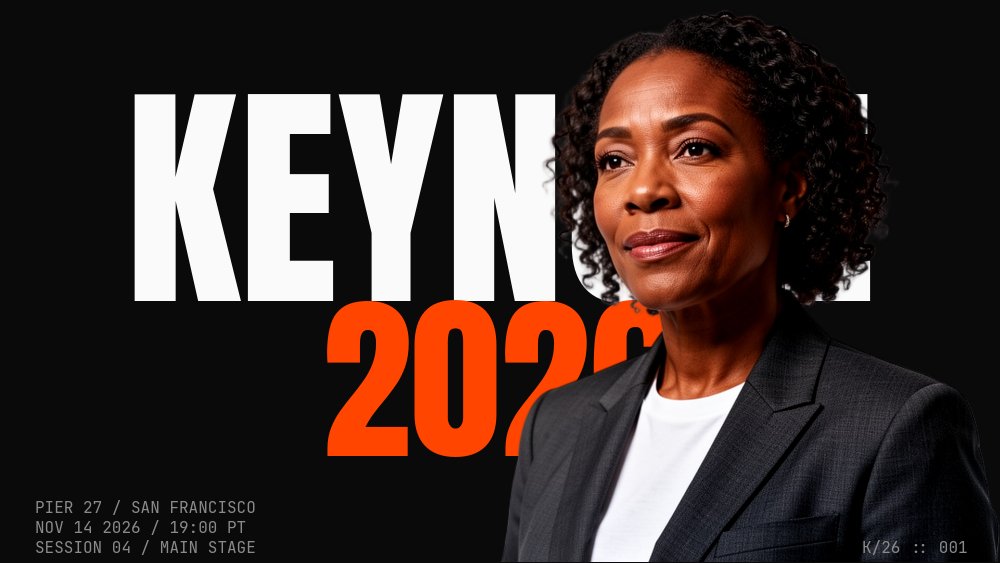
A 16:9 speaker introduction template built for the moment before a keynote, fireside chat, or podcast episode begins - the slide that tells the room someone important is about to start talking. Pure black background, white Anton condensed wordmarks at 24cqw, an incandescent orange accent for the year and one letter of the speaker's name, JetBrains Mono micro-meta for venue and session details, and a cutout that pierces the KEYNOTE headline like the speaker is already on stage.
#What Makes This Template Stand Out
The defining choice is the brutalist screamer treatment paired with the cutout-pierces-type cover. Most conference intro slides default to a quiet name card with a corporate photo. This one inverts that - "KEYNOTE" stomps onto a pure black stage in white Anton at 24cqw, the year "2026" lands below it in incandescent orange, and the speaker cutout drops in from above with weight so the wordmark reads behind the suit and shoulders. The three corner mono labels (venue, date, session number) frame the composition with the credential information that an event audience needs without crowding the type.
The marquee anchor pane is the cinematic gut-punch. A drift-x infinite text loop runs "KEYNOTE KEYNOTE KEYNOTE" behind the speaker cutout, which stays anchored dead-center in a power pose looking direct at camera. It is the only looping animation in the deck, which is exactly why it lands - everything else is composed and still, so the one moving element reads as the speaker walking out under stadium ticker lights rather than as visual noise.
The seven-pane arc respects how an audience meets a speaker. Cover sets the event. The name pane gives the speaker their full real estate with a single accent letter. The role pane stacks "FOUNDER, GROUNDWORK" / "AUTHOR, REMOTE GROUND" / "PREVIOUSLY, STRIPE" with a horizontal dark band cutting between the rows like a cinematic edit. The talk title pane sits in pure typographic stillness. The abstract pane runs three columns of mono body copy. The marquee anchor pane is the entrance. The register CTA pane closes with a pulsing orange call to action and a mono URL.
- Pure black stage with white Anton headlines and incandescent orange accent for year and one letter
- Cutout-pierces-type cover with speaker cutout dropping in front of the KEYNOTE wordmark
- JetBrains Mono micro-meta in every pane corner: venue, date, session, page count
- Cinematic role pane with a horizontal dark band cutting between FOUNDER, AUTHOR, PREVIOUSLY rows
- Marquee anchor pane with infinite drift-x ticker behind a stationary full-body speaker cutout
- 7-pane 16:9 arc from cover to register CTA with stomp, letter-blur, pop, and pulse animations
#Who Should Use This Template
- Conference speakers and event producers running a keynote intro slide on the main stage. The cutout-pierces-type cover and the stomp animation make the moment land harder than a static name card, and the 16:9 format fits any projector or LED wall without reformatting.
- Founder talks and fireside chat moderators introducing a guest speaker. The seven-pane structure compresses to four panes if needed, and the role-stack pane (founder / author / previously) is exactly the credential format a moderator usually reads aloud.
- Podcast hosts and video interview producers opening an episode with a guest intro segment. Export to video and use the cover, name, role, and marquee panes as the opening title sequence for a guest interview.
- Corporate event marketing teams producing announcement assets for upcoming speakers. The register CTA pane and the venue mono-meta turn the deck into a self-contained announcement that can run on social, in email, and on the event page.
#Best Use Cases
#Main Stage Conference Keynote Intro
Run the deck as the projection slide that plays in the room while the speaker walks out. The stomp animation on the KEYNOTE wordmark lands as the lights come up, the cutout drops in as the speaker actually crosses the stage, and the marquee anchor pane plays during the applause beat before the speaker takes the mic. Autoplay through panes one to three, then hold on the talk title for the speaker to begin. The brutalist black-stage palette holds up under any room lighting.
#Speaker Announcement Asset
Export to video and post the seven-pane deck as the announcement that a speaker has been booked. The cover, name, role-stack, and register CTA carry the announcement message; the abstract and marquee panes add depth for anyone who clicks through. The orange accent is saturated enough to hold attention in a feed without overpowering the speaker's name.
#Podcast or Video Guest Intro Sequence
Export the cover, name, and marquee panes as a 12 to 15 second opening title sequence for a guest interview. The cutout-pierces-type cover sets up who is about to speak, the name pane lands the headline credit, and the marquee anchor pane gives the host a natural beat to start the conversation underneath. The JetBrains Mono micro-meta reads as native production design rather than slide-deck filler.
#How to Customize This Template
- Open PaneFlow and select "Keynote Speaker - Cinematic Bold" from the template gallery
- Replace the cover cutout with your own background-removed speaker portrait (head, shoulders, suit chest, three-quarter angle)
- Update the KEYNOTE wordmark and the orange year on the cover, plus the three mono corner labels (venue, date, session number)
- Edit the first name, last name, and the orange accent letter on the speaker name pane (pane 2)
- Rewrite the three role rows on pane 3 (FOUNDER, AUTHOR, PREVIOUSLY) with your speaker's actual credentials
- Set the four-line talk title on pane 4 and the three-column abstract body copy on pane 5
- Replace the anchor cutout on pane 6 and rewrite the marquee text if you want a different drift word
- Update the REGISTER CTA, the URL, and the QR placeholder on pane 7, then export to video for announcement use or to HTML for the live event projection
#Related Templates
- About Me - Cutout Portrait - same cutout-pierces-type cover move on a 3:4 personal-brand carousel
- Manifesto Declaration - Gesturing Cutout - vertical declaration deck with the same brutalist energy
- Marquee Anchor - Ticker Behind - dedicated marquee + anchored cutout template if the ticker is the centerpiece
- Moonshot Pitch - Dramatic Bold - cinematic bold pitch deck with similar typographic restraint
#Related Resources
- PaneFlow for Startups - speaker decks, founder talks, and announcement assets for early-stage teams
- PaneFlow for Marketers - event marketing, speaker announcements, and campaign deck patterns
- PaneFlow vs Gamma - how PaneFlow handles cinematic typography and animation beyond Gamma's AI-generated decks
Start with Keynote Speaker - Cinematic Bold
Open this template in PaneFlow, customize it to match your brand, and export as HTML, React, Vue, or video.







