Developer Portfolio - Terminal Mono Template
A portfolio for backend, systems, and open-source developers who would rather show a commit log than a headshot. Six panes of editor-theme noir - near-black background, cream JetBrains Mono, terminal-green accents - with zero photography and zero decoration. A green $ prompt chip travels every pane as the bullet, the cursor, and the brand, while a path bar in the top corner tracks where you are: ~/iris-tan, /stack, /contributions, /repos, /contact.
#What Makes This Template Stand Out
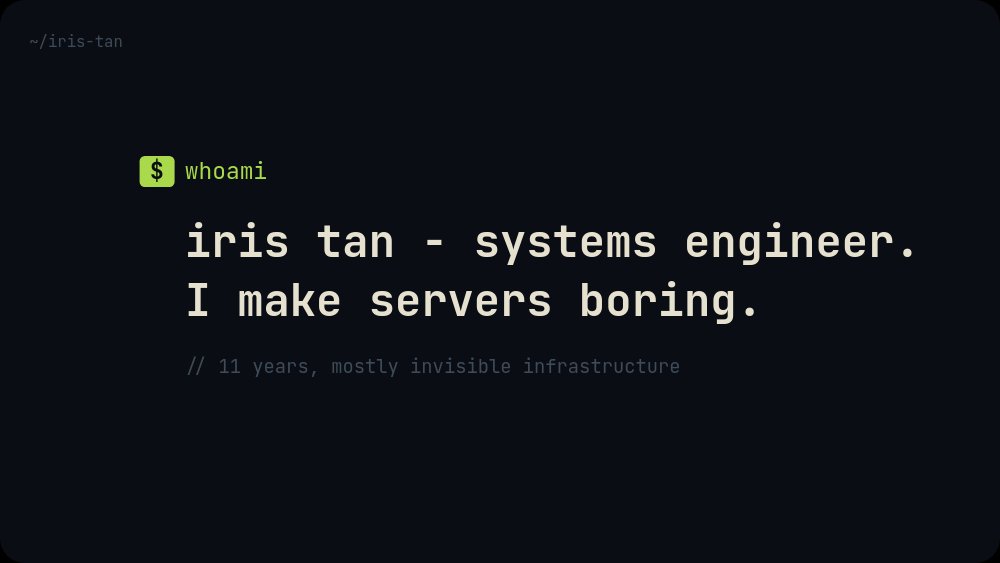
The cover answers the only question a portfolio gets asked, in the language of the audience. "$ whoami" sits in terminal green, and the answer types itself out: "iris tan - systems engineer. / I make servers boring." A dim comment line underneath - "// 11 years, mostly invisible infrastructure" - lands the experience claim as a code comment instead of a brag. The typewriter animation is doing the talking-head work; there is no photo because the aesthetic argument is that there does not need to be one.
The contribution heatmap is the centerpiece flex. A full-width GitHub-style grid of rounded green squares - built as a code child, not a screenshot - fills the contributions pane, with "2,400 commits in 2026" number-rolling in beneath the prompt chip. It reads instantly to anyone who has ever looked at a GitHub profile, and because it is rendered from markup rather than pasted from a screenshot, it stays crisp at any canvas size.
The repo pane treats projects like terminal windows. The prompt runs "ls ~/repos --sort=stars" and three cards answer: quiver ("message queue. exactly-once delivery, no asterisks."), lokk ("distributed locks that actually expire."), and tidegauge ("metrics agent. 4 MB RSS, zero dependencies."). Each card carries a thin dim border, a path title row, a star count that rolls up - 4.2k, 1.8k, 950 - and a language dot. The one-line descriptions are the writing standard the whole template enforces: specific, dry, verifiable.
- All-JetBrains-Mono typography on editor-theme noir with terminal-green accents
- Typewriter whoami cover with a dim code-comment experience line
- GitHub-style contribution heatmap built from markup, captioned with a number-roll commit count
- Two-column language ledger - Go, Rust, TypeScript, SQL - with rolling year counts
- Three terminal-window repo cards with star counts, language dots, and one-line descriptions
- Persistent path bar and traveling $ prompt chip, ending on a pulsing cursor contact pane
#Who Should Use This Template
- Backend and systems engineers whose work has no screenshots. When the output is uptime, latency, and libraries, a heatmap and three repo cards are the honest portfolio - this template makes that restraint look deliberate.
- Open-source maintainers introducing themselves and their projects in one artifact. The repo cards map one-to-one onto your pinned repositories, star counts included.
- Developers applying to infrastructure and dev-tool companies where a designed-up portfolio can read as the wrong signal. Commit-message terseness is the house style on both sides of that interview.
- Indie hackers and consultants selling reliability. "Replies in one business day, usually faster" on the contact pane is the whole pitch: a person who answers pings.
#Best Use Cases
#Personal Portfolio Sites
Export to HTML and host it as your entire site, or export to React, Vue, or Svelte and mount it on your existing domain. The six panes autoplay through whoami, stack, contributions, repos, and contact like a terminal session replaying itself, and the pulsing green cursor on the final pane keeps the page feeling alive while it waits. Put the hosted link in your GitHub profile bio and the loop closes.
#Job Applications and Interview Intros
Send the published link alongside a resume, or export to PDF as the attachment itself. The stack ledger - Go 9 yrs, Rust 6 yrs, TypeScript 8 yrs, SQL 11 yrs - answers the screening question in one pane, and the repo descriptions demonstrate the rarest interview skill: explaining a system in one line. For panel intros, the deck autoplays as a 30-second self-introduction you never have to narrate.
#Conference Bios and Speaker Pages
When an event asks for a speaker introduction, this exports cleanly to a video loop or image sequence in the same terminal voice as a technical talk. The whoami pane works standalone as the title card; the contributions and repo panes fill the "about the speaker" slot with evidence instead of adjectives.
#How to Customize This Template
- Open PaneFlow and select "Developer Portfolio - Terminal Mono" from the template gallery
- Rewrite the whoami answer on the cover - name, discipline, and your one-line thesis - plus the dim comment line beneath it
- Update the path bar segments (~/iris-tan, /stack, /contributions, /repos, /contact) to your own handle
- Edit the language ledger on the stack pane with your four languages and rolling year counts
- Update the heatmap caption with your real commit count, and adjust the green tile grid in the code child if you want it to mirror your year
- Rewrite the three repo cards - names, one-line descriptions, star counts, and language dots - with your actual projects
- Edit the contact pane: the "$ ping iris" prompt, your email and GitHub URL, and the reply-time comment line
- Run through the loop once to check the typewriter pacing, then export to HTML, React, Vue, or Svelte, or publish as a hosted link
#Related Templates
- AI Dev Tool Pitch - Dark Terminal - the same terminal noir register applied to a product pitch deck
- Indie Maker Portfolio - Product Shelf - for developers whose projects are shipped products rather than libraries
- Personal Portfolio - Monochrome Amber - a warmer single-accent monochrome take on the personal portfolio
- Web Designer Portfolio - Site Reel - the visual-work counterpart when screenshots are the portfolio
#Related Resources
- PaneFlow for Developers - export to React, Vue, Svelte, or plain HTML and keep every animation
- PaneFlow for Portfolios - portfolio templates and hosting for people who ship work
- PaneFlow vs Canva - how PaneFlow goes beyond Canva for code-true, exportable portfolios
Start with Developer Portfolio - Terminal Mono
Open this template in PaneFlow, customize it to match your brand, and export as HTML, React, Vue, or video.







