Restaurant Menu Tabs Template
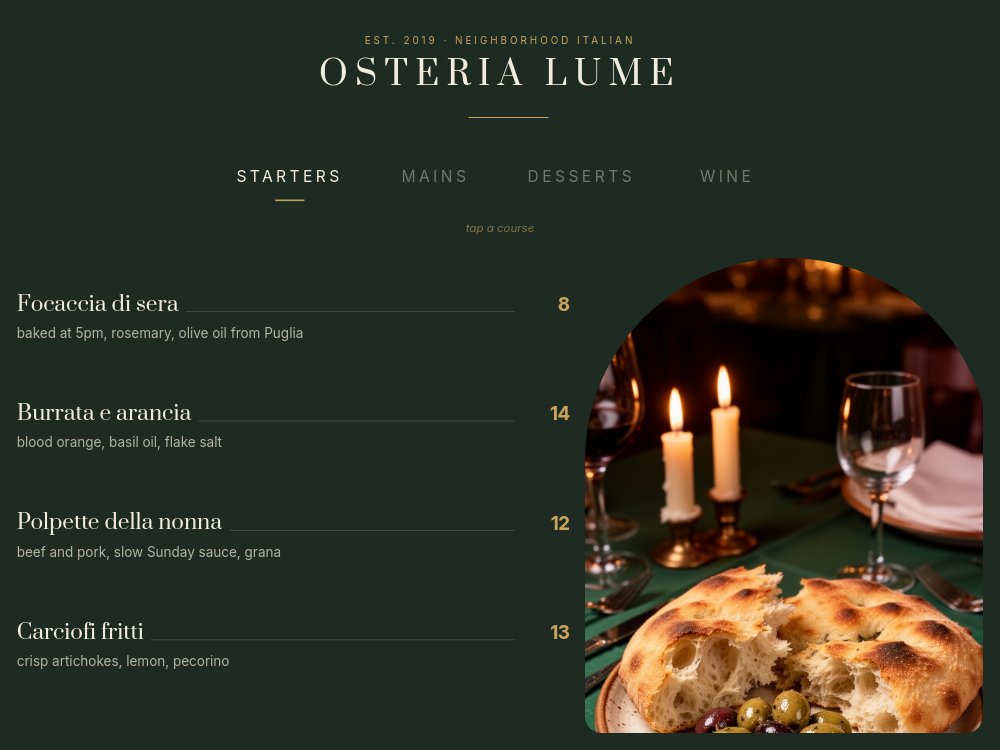
A 4:3 interactive menu for restaurant websites, set in a candlelit trattoria register: bottle-green field, cream Prata serifs, brass accents, and one glowing dish photo per course. The fictional house is Osteria Lume - "EST. 2019 · NEIGHBORHOOD ITALIAN" - and its four courses live behind a tab row reading STARTERS, MAINS, DESSERTS, WINE, with a small italic instruction underneath: "tap a course". Guests flip the menu the way they would at the table, instead of scrolling a PDF that was designed for print.
#What Makes This Template Stand Out
The course tabs are real navigation. The active course gets a cream label with a brass underline, the inactive courses dim into the green, and both states of every tab are wired with click actions to their pane. Because PaneFlow exports interactivity along with animation, the menu keeps flipping after export to HTML, React, Vue, and Svelte - and plays through all four courses automatically when exported to video for an in-house screen or a reel.
The menu typography does what print menus do well, on a screen. Each dish row sets a Prata serif name against a brass price connected by a thin rule - "Focaccia di sera ... 8", "Osso buco ... 32" - with a quiet one-line description beneath: "baked at 5pm, rosemary, olive oil from Puglia", "veal shank, saffron risotto, gremolata". The dot leaders are drawn as hairline shapes rather than typed periods, so the price column stays aligned no matter what you rename. All fifteen dishes and pours ship as real menu copy, not lorem ipsum.
Each course gets one photograph in an arched card - a rounded-top frame on the right that reads as a doorway into the dining room. Focaccia and olives by candlelight for Starters, tagliatelle twirled high on a fork for Mains, tiramisu for Desserts, two glasses of red against candle bokeh for Wine. The Wine pane carries the conversion: a brass-outlined "CORKAGE TUESDAYS - FREE" chip and a solid brass "Book a table" pill, so the menu ends where a good dinner starts.
- Four course tabs - STARTERS, MAINS, DESSERTS, WINE - wired with real click navigation and a brass active underline
- Dish rows with Prata serif names, hairline dot leaders, brass prices, and one-line descriptions
- Fifteen real dishes and pours as placeholder copy - no lorem ipsum to untangle
- Arched photo card per course with candlelit, shallow-depth food photography
- Wine pane close with "CORKAGE TUESDAYS - FREE" chip and a brass "Book a table" CTA pill
- 4-pane 4:3 interactive format with autoplay off - tabs survive HTML, React, Vue, and Svelte export
#Who Should Use This Template
- Restaurants replacing the PDF menu on their website or behind a table QR code. Each course becomes one legible pane instead of a pinch-zoomed print spread, and edits take minutes instead of a print run.
- Cafes, bars, and bakeries with course-shaped menus of their own - the four tabs rename cleanly to Coffee / Brunch / Pastry / Beans or Cocktails / Snacks / Bottles / Zero-proof without touching the architecture.
- Hospitality groups and hotel restaurants that need the menu to match the brand. The bottle-green and brass palette swaps to your identity while the tab mechanics and dish-row typography stay intact.
- Agencies and freelancers building restaurant sites. One template yields the interactive menu section, a hosted QR destination, and a video loop for the host-stand screen - three deliverables from one project.
#Best Use Cases
#The Menu Section of a Restaurant Website
Export to HTML, React, Vue, or Svelte and embed the menu where the PDF download link used to be. Autoplay is off, so the menu rests on Starters until a guest taps a course, and every tab stays clickable inside the exported component. The "Book a table" pill on the Wine pane points at your reservation system, turning the menu itself into the booking funnel.
#A QR-Code Menu at the Table
Publish the project as a hosted PaneFlow link and print the QR. Guests get a menu designed for a phone screen - one course per pane, large serif names, honest brass prices - instead of a shrunken A4 PDF. When the kitchen changes the dolce of the day or a price moves, edit the text and the QR keeps pointing at the current menu.
#Seasonal Menu Launches
When the autumn menu lands, the same project becomes the announcement. Swap the dishes, re-shoot or regenerate the four arched photos, and export to video - the courses flip through automatically with the dish rows staggering in, ready for Instagram or the in-house screen. The interactive version and the video come from one source, so the site menu and the promo never disagree.
#How to Customize This Template
- Open PaneFlow and select "Restaurant Menu Tabs" from the template gallery
- Replace the "OSTERIA LUME" wordmark and the "EST. 2019 · NEIGHBORHOOD ITALIAN" kicker with your restaurant's name and line
- On the Starters pane, rewrite the four dish rows - names, one-line descriptions, and brass prices - and swap the arched focaccia photo for your own
- On the Mains pane, do the same for the four mains and the pasta photograph
- On the Desserts pane, update the dessert list and the "dolce of the day - ask" line, plus the tiramisu photo
- On the Wine pane, edit the by-the-glass pours and bottle line, the "CORKAGE TUESDAYS - FREE" chip, and point "Book a table" at your reservation link
- Rename the course tabs if your menu splits differently - edit both the active and inactive states of each tab
- Tap through all four courses in preview, then export to HTML, React, Vue, or Svelte, publish as a hosted QR link, or export to video for in-house screens
#Related Templates
- Restaurant Menu - Editorial - the linear, autoplay take on a designed digital menu
- Restaurant Hero - Cinematic Appetite - a matching dark, appetite-led hero to sit above this menu
- Property Tour - Room Picker - the same picker mechanics walking rooms instead of courses
- Tabbed Feature Showcase - the tab-bar navigation pattern in its SaaS form
#Related Resources
- PaneFlow for Agencies - client-ready interactive sections, menus, and site modules
- PaneFlow for Webflow - embedding exported interactive sections in Webflow sites
- PaneFlow vs Canva - why a clickable menu beats a designed-but-static one
Start with Restaurant Menu Tabs
Open this template in PaneFlow, customize it to match your brand, and export as HTML, React, Vue, or video.







