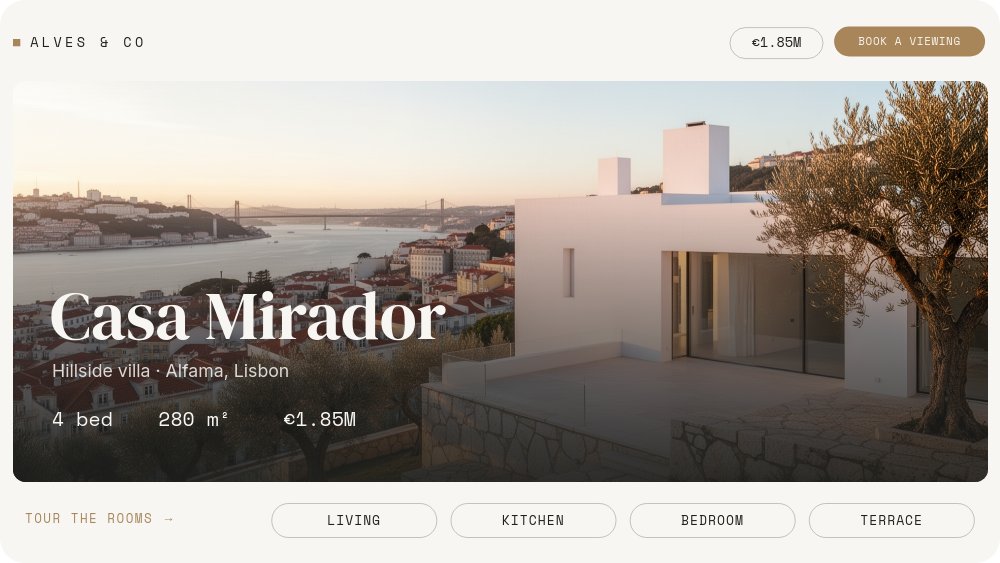
Property Tour - Room Picker Template
A 16:9 room-by-room tour for property listings, staged with architectural-digest calm: bright off-white frame, DM Serif Display headlines, brass details, and golden-hour photography of Casa Mirador, a hillside villa above Alfama, Lisbon. The overview pane sets the listing - "Casa Mirador", "Hillside villa · Alfama, Lisbon", a mono stat row reading "4 bed / 280 m² / €1.85M" - and a rail of four outlined chips along the bottom invites the click: LIVING, KITCHEN, BEDROOM, TERRACE, with "TOUR THE ROOMS →" as the nudge. Buyers walk the property at their own pace instead of scrubbing a gallery.
#What Makes This Template Stand Out
The room rail is real navigation with no dead ends. Each chip has two states - brass-filled when you are standing in that room, outlined otherwise - and both states are wired with click actions to their pane; on the overview, all four sit ready. A persistent "BOOK A VIEWING" chip in the top-right routes any pane to the closing pitch, which swaps that button to "← OVERVIEW" so visitors can loop back. Because PaneFlow exports interactivity along with animation, the whole tour survives HTML, React, Vue, and Svelte export as a working widget - and plays through automatically when exported to video.
The caption cards talk like a confident listing, not a brochure. Every room pane is a full-bleed photograph with a white card lower-left: a serif room name, one earned sentence - "Double-height windows. The river does the decorating.", "The kitchen you'll defend at parties.", "Wake up over the rooftops.", "Sunset is load-bearing here." - and a mono spec chip that does the verifying: "48 m² · south light", "Gaggenau · marble island", "En-suite · walk-in", "60 m² · plunge pool". One line of voice, one line of fact, per room.
The photography is treated as one property, not six stock photos. Golden-hour light runs through every frame - the exterior over the Tagus and the 25 de Abril bridge, the double-height living room at sunset, the marble-island kitchen, the rooftop bedroom, the plunge-pool terrace - and the closing pane shifts to blue hour with the windows glowing under "Private viewings this month", an agent line in mono ("MARTA ALVES · ALVES & CO · +351 915 220 480"), and a brass "Book a viewing" pill. Rooms enter as slow full-bleed reveals with a gentle zoom, caption cards slide up after, and the stat row number-rolls on the overview only.
- Four-chip room rail - LIVING, KITCHEN, BEDROOM, TERRACE - with brass active states and real click navigation
- Persistent "BOOK A VIEWING" chip on every pane routing to a blue-hour closing pitch, with a return to overview
- Caption cards pairing one confident line with a mono spec chip per room
- Number-rolling stat row on the overview: 4 bed / 280 m² / €1.85M
- Slow full-bleed photo reveals with a soft zoom, golden-hour light recipe across all six images
- 6-pane 16:9 interactive format with autoplay off - the tour survives HTML, React, Vue, and Svelte export
#Who Should Use This Template
- Real estate agents and brokerages giving a flagship listing more than a photo grid. The room rail turns the same six photographs into a tour buyers control, ending on a viewing CTA with the agent's direct line.
- Property developers selling off-plan or newly built homes. Renders drop into the full-bleed frames as cleanly as photographs, and the spec chips carry the hard numbers per room.
- Vacation rentals, boutique hotels, and venues. Rename the chips to suites, pools, and gardens, and the closing pane becomes "Check availability" - the explorer mechanics transfer without modification.
- Agencies producing listing media for clients. One project yields the interactive site embed, the hosted link for email campaigns, and the autoplay video for portals and social.
#Best Use Cases
#The Hero Module of a Listing Page
Export to HTML, React, Vue, or Svelte and place the tour where the static photo carousel would go. Autoplay is off, so the overview holds with its stats and rail until the buyer clicks - and every click is pane navigation, not a lightbox. The "Book a viewing" chip is reachable from every room, so the conversion path is never more than one tap away from wherever the buyer is standing.
#Email and Portal Campaigns for a Single Property
Publish the project as a hosted PaneFlow link and use it as the destination for "tour this property" buttons in email blasts and portal listings. The link opens a full-screen, self-paced tour with the agent's contact on the closing pane - a destination considerably more memorable than a paginated gallery, and updatable without resending anything.
#Listing Reels for Social
Export the same project to video and the tour plays itself: overview stats roll in, rooms reveal in sequence with their caption cards, and the blue-hour close lands the booking pitch. That is the Instagram reel and the YouTube pre-roll for the listing, generated from the same source as the website tour, so the campaign stays visually consistent everywhere.
#How to Customize This Template
- Open PaneFlow and select "Property Tour - Room Picker" from the template gallery
- On the overview, replace the exterior hero photo, rename "Casa Mirador" and the "Hillside villa · Alfama, Lisbon" subtitle, and update the stat row - beds, area, and price
- Swap the "ALVES & CO" chip top-left for your agency name, and update the price chip top-right
- Walk panes 2 through 5 - Living, Kitchen, Bedroom, Terrace - replacing each full-bleed photo, the caption line, and the mono spec chip; keep one light recipe across all images so the property reads as one place
- Rename the rail chips if your rooms differ - edit both the brass active and outlined inactive states of each chip
- On the closing pane, replace the dusk photo, rewrite "Private viewings this month", update the agent line and phone number, and point "Book a viewing" at your booking or contact link
- Click through every chip, the "BOOK A VIEWING" route, and the overview return in preview, then export to HTML, React, Vue, or Svelte for the listing page - or to video for the reel
#Related Templates
- Commercial Properties - the portfolio-scale counterpart for presenting multiple listings
- Architecture Hero - Slow Drift - the same calm, photography-led pacing as a website hero
- Restaurant Menu Tabs - the same picker mechanics flipping courses instead of rooms
- Hotspot Product Tour - click-driven exploration of a single image, useful for floor plans
#Related Resources
- PaneFlow for Agencies - listing media, client embeds, and multi-format property campaigns
- PaneFlow for Landing Pages - interactive modules that replace static galleries
- PaneFlow for Marketers - one source project for web, email, and social cuts
Start with Property Tour - Room Picker
Open this template in PaneFlow, customize it to match your brand, and export as HTML, React, Vue, or video.







