Restaurant Menu Template - Editorial Animated Menu
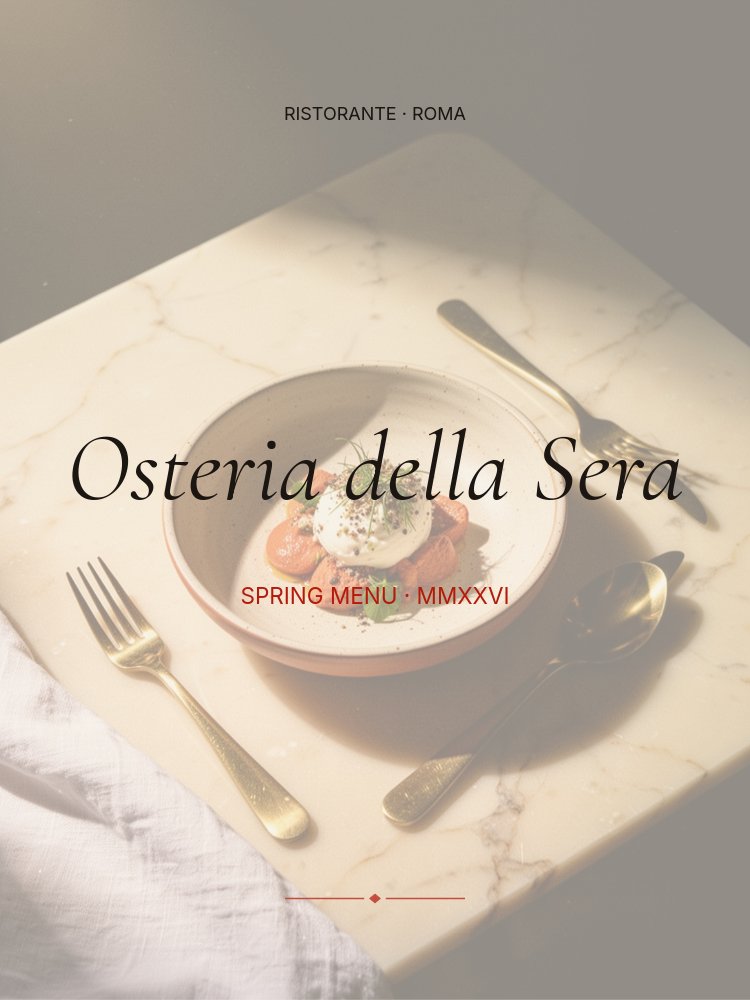
A menu is the most-read piece of writing in any restaurant, and most templates treat it like a spreadsheet. This restaurant menu template treats it like a magazine spread - cream paper, italic Cormorant headings, a single terracotta accent for prices, and slow editorial pacing that gives every dish room to breathe.
#What Makes This Template Stand Out
The defining choice here is restraint. There are no badges, no banners, no gradients, no decorative borders. The menu is built from three things: italic Cormorant Garamond section words at large scale, left-aligned dish cards in roman text with muted descriptions, and a single terracotta accent (#c44d3f) used only for prices, the section roman numerals, and the closing flourish. That discipline is what makes the template feel like an Osteria menu printed on heavy stock rather than a digital reskin of a Word doc.
The section header panes use a full-bleed dish photograph behind the italic section word at low opacity, set to a higher parallax depth than the foreground type. As the viewer moves between panes the photo drifts subtly while the typography holds its place, creating a layered editorial reveal rather than a slide change. The 8-pane structure follows a classic Italian course progression - cover, antipasti header, antipasti detail, primi header, primi detail, secondi header, secondi detail, closing - so the sequence reads like turning the pages of a real menu.
Pacing is slow on purpose. Letter-fade animations on the section words run at half speed, dish content drifts in with a 180ms succession stagger, and autoplay is tuned to 4-5 seconds per pane. The result is a menu that feels considered, not performative.
- 3:4 portrait format that translates cleanly to digital and print
- 8 panes structured as a classic Italian course progression
- Cream paper background with single terracotta accent for prices and section cues
- Italic Cormorant Garamond headings paired with neutral Inter body text
- Parallax between background dish photography and foreground section words
- Slow letter-fade and drift-y animations with 180ms succession stagger
#Who Should Use This Template
- Independent restaurants and trattorias that want a menu reveal as considered as their food. The editorial pacing and italic Cormorant headings signal craft without screaming for attention.
- Cafes, supper clubs, and pop-ups announcing a new seasonal menu on Instagram. The 3:4 format reads natively as a feed carousel or story.
- Hotel and hospitality marketing teams building digital menu boards for in-room TVs, lobby displays, or QR-linked table cards. The slow autoplay loop works as ambient signage without demanding attention.
- Food writers and chefs publishing a tasting menu, supper club lineup, or chef's table preview. The single-photo-per-section structure foregrounds dish writing the way a printed menu does.
#Best Use Cases
#Seasonal Menu Reveals on Instagram
Spring, summer, fall, winter - every change in the menu is a marketing moment. Replace the cover dateline with the new season, swap the dish photographs for what's on the pass this week, and post the slideshow as a feed carousel or story sequence. The 3:4 format crops cleanly to both formats, and the editorial pacing keeps viewers scrolling through every course rather than swiping past.
#Digital Menu Boards and QR-linked Table Menus
Generate a QR code that opens the slideshow on a guest's phone and you have a hosted, animated menu without paying for a menu-board SaaS. The cream and terracotta palette reads on phone screens and dim restaurant lighting alike, and the slow autoplay timing matches the pace at which a guest actually reads. Update the dishes once a week from PaneFlow and the QR-linked URL stays the same.
#Tasting Menus and Chef's Table Previews
For tasting menus and ticketed dining events, this template doubles as the marketing asset and the menu itself. The course-by-course structure mirrors how a tasting menu is served, and the dish description style - "slow-poached veal, capers, salsa tonnata" - reads the way a chef would describe their own food. Export as PDF for the night-of menu card and as video for the social promotion.
#How to Customize This Template
- Open PaneFlow and select "Restaurant Menu - Editorial" from the template gallery
- Replace the restaurant name and dateline on the cover pane with your own brand and season
- Swap the antipasti, primi, and secondi background dish photographs for your hero shots
- Edit the dish names, ingredient descriptions, and prices on each detail pane
- Rename the section words (Antipasti, Primi, Secondi) to match your menu structure
- Adjust the terracotta accent if your brand uses a different signature color
- Add or duplicate section pairs to handle dessert, sides, drinks, or wine programs
- Export as JPG sequence for Instagram, video for stories, or PDF for the printed table card
#Related Templates
- Cafe Coffee Brand - warm cream and rust palette for cafes and roasters with handwritten Caveat headings
- Beauty Drop Luxe - deep aubergine and gold editorial template for product launches with the same italic Cormorant treatment
- Wedding Invite Romantic - soft pastel editorial template using the same Cormorant heading discipline
- Apparel Collection - fashion lookbook with editorial typography and warm gold accents
#Related Resources
- PaneFlow for Marketers - building social and campaign content that doesn't look templated
- PaneFlow for Agencies - producing client-grade hospitality and lifestyle content at speed
- PaneFlow vs Canva - how PaneFlow's editorial typography and parallax animation go beyond static design tools
Start with Restaurant Menu - Editorial
Open this template in PaneFlow, customize it to match your brand, and export as HTML, React, Vue, or video.







