Hotspot Product Tour Template
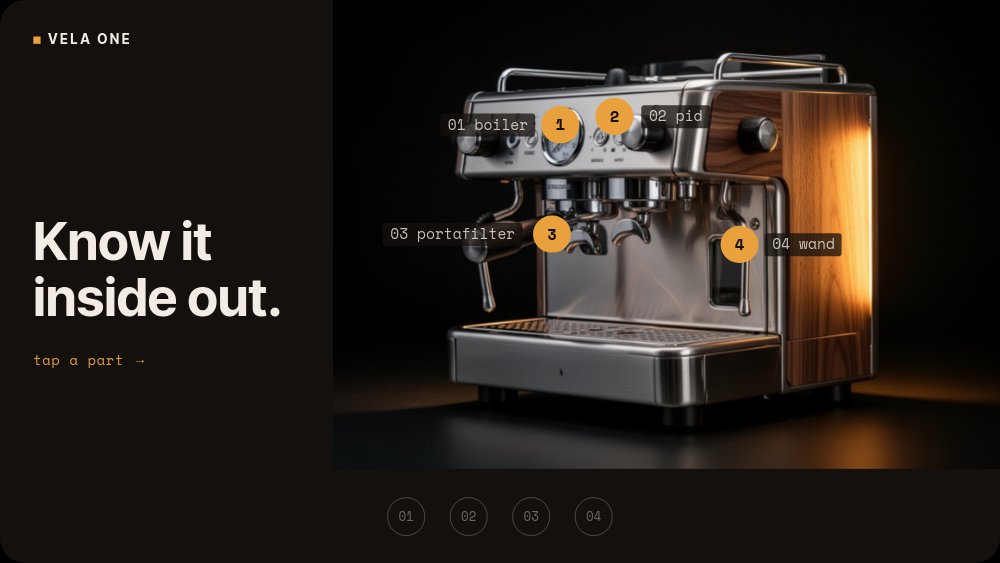
An interactive product tour for anything with anatomy. Five 16:9 panes of near-black warm industrial darkness built around the fictional Vela One, a compact dual-boiler espresso machine in brushed steel and walnut. The landing pane plants four pulsing amber hotspots directly on the machine's parts - boiler, PID, portafilter, steam wand - under the headline "Know it inside out." and the instruction "tap a part". Each dot is wired with real click navigation to its own feature pane, and that interactivity survives HTML, React, Vue, and Svelte export.
#What Makes This Template Stand Out
The hotspots sit on the product, not beside it. Four numbered amber dots pulse on the actual machine parts in the hero shot, each with a hairline mono label - 01 boiler, 02 pid, 03 portafilter, 04 wand - so the product photograph becomes the navigation. Autoplay is off by default: this is the rare template where the visitor drives, and the pulsing dots are the only motion that loops while it waits.
Every feature pane answers a click, so everything lands fast. Choose the boiler and a steam-gauge macro slides in from the left while "01 / Twin boiler" stacks on the right over one tight line - "Brew and steam at once. No waiting between shots." - and two mono spec chips roll their numbers in: 0.9 L + 0.4 L, ready in 4 min. The same grid repeats for PID control (±0.5°C), the 58 mm portafilter (9 bar extraction), and the cool-touch wand, so the four panes read as one system.
You can never get lost in it. A mini-index of four numbered dots holds bottom-center on every pane, the active number filled amber, the rest dim outlines - and every dot is itself clickable. Each feature pane carries a "back to overview" chip in the top corner, and the final pane trades the back chip's quiet for the tour's only CTA: an amber pill reading "See full specs". Overview to part, part to part, part to overview: every path is wired.
- Four pulsing amber hotspots placed directly on the product parts, each with a numbered mono label
- Real click navigation - hotspots, index dots, and back chips all jump between panes, even after code export
- Clickable mini-index on every pane with amber-filled active state, so visitors always know where they are
- Shared feature-pane grid: macro photo left, numbered headline and one tight line right, mono spec chips below
- Number-rolling spec chips - 0.9 L + 0.4 L, ±0.5°C, 9 bar extraction - that land instantly on arrival
- 5-pane 16:9 dark cinematic format with autoplay off, built to be driven by the visitor
#Who Should Use This Template
- Hardware and appliance brands marketing products whose value lives in specific components. The click-the-parts pattern turns a feature list into an exploration.
- Product marketers replacing long spec pages with one embed that lets visitors inspect exactly the part they care about and skip the rest.
- Ecommerce and DTC teams selling considered purchases - espresso machines, cameras, e-bikes, audio gear - where buyers research anatomy before they buy.
- Agencies building interactive launch pages who need hotspot UIs without writing the navigation logic by hand. The wiring is already done and exports as working code.
#Best Use Cases
#Interactive Product Pages
Export to HTML, React, Vue, or Svelte and mount the tour on your marketing or product page. Visitors click the hotspots and the navigation works natively in the exported code - no embedded player, no script dependency on PaneFlow. The "See full specs" CTA on the final pane hands off to your full spec sheet or buy page.
#Launch Pages and Landing Sections
For a new product announcement, the tour is the hero section: the dark cinematic hero shot earns the first impression, and the hotspots reward curiosity with detail panes instead of forcing a scroll through feature blocks. Because autoplay is off, the section never fights the rest of the page for attention.
#Sales Demos and Trade Show Kiosks
Run the published project full screen on a touch screen and the tour becomes a self-serve kiosk - the 72px-plus dots are sized as touch targets, the index keeps visitors oriented, and the back chips make it impossible to strand someone mid-tour. The same file doubles as a video export for screens where touch is not an option.
#How to Customize This Template
- Open PaneFlow and select "Hotspot Product Tour" from the template gallery
- Replace the hero machine photo on the overview pane, then drag the four amber hotspot dots onto your own product's parts
- Edit the four hairline mono labels - 01 boiler, 02 pid, 03 portafilter, 04 wand - to your part names, and update the "Know it inside out." headline if needed
- Update the persistent "VELA ONE" wordmark chip with your product name
- Swap the macro photo on each feature pane, then rewrite the numbered headline and its one-line claim
- Edit the mono spec chips on each feature pane - 0.9 L + 0.4 L, ±0.5°C, 9 bar extraction - with your figures
- Update the amber "See full specs" CTA on the final pane and point it at your spec sheet or buy page
- Keep all click wiring intact when adding panes, then export to HTML, React, Vue, or Svelte - the hotspot navigation ships with the code
#Related Templates
- Colorway Picker - Tono - the other interactive PDP pattern: click chips to switch colorways instead of parts
- Tech Gadget PDP - Spec Callouts - the autoplay sibling that presents specs as callouts instead of click targets
- Watch PDP - Macro Luxe - the same dark macro-inspection photography in a linear luxury sequence
- Luxury Product Hero - Dark Spotlight - the announcing hero section for the same near-black stage
#Related Resources
- PaneFlow for Product Launches - teasers, reveals, and launch-day assets from one source file
- PaneFlow for Developers - interactive embeds that export as clean HTML, React, Vue, or Svelte
- PaneFlow for SaaS - feature tours and product storytelling for software teams
Start with Hotspot Product Tour
Open this template in PaneFlow, customize it to match your brand, and export as HTML, React, Vue, or video.







