LinkedIn Listicle Carousel Template - Lessons Learned
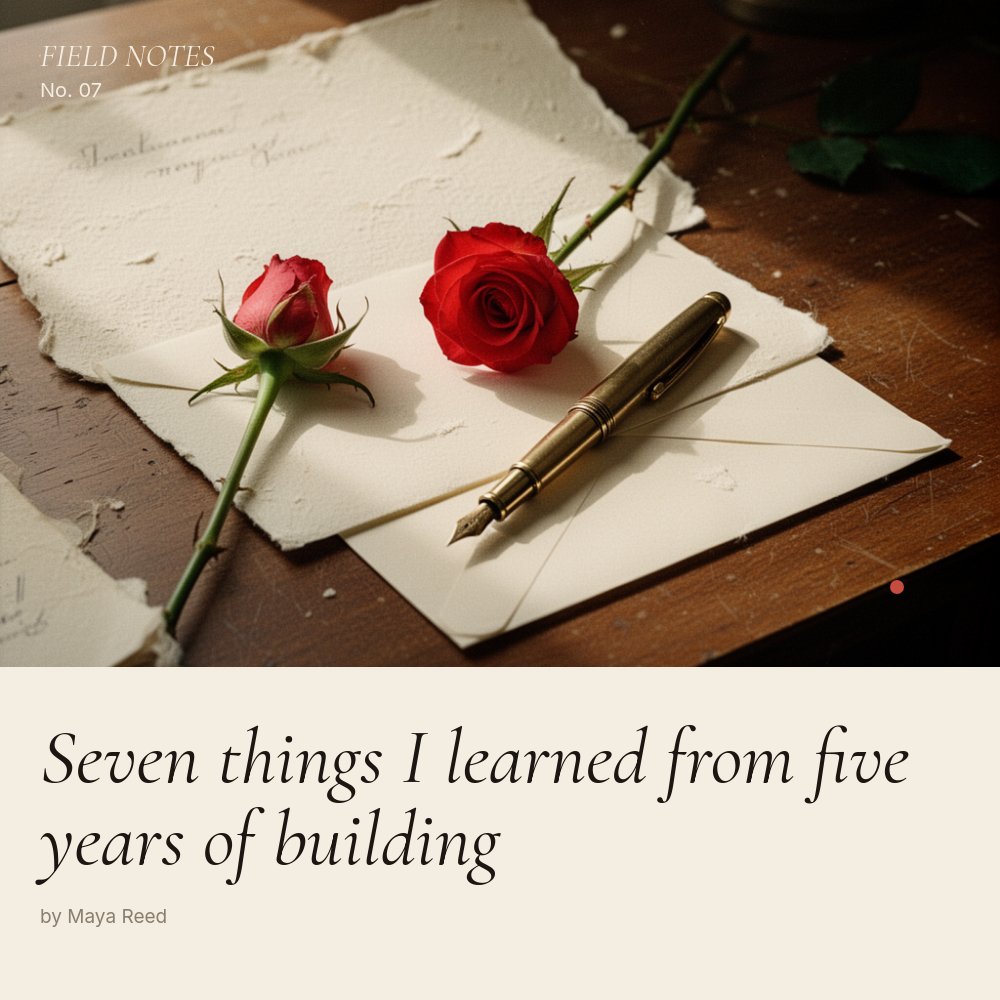
A LinkedIn listicle carousel template with the texture of an editorial print column. Cream paper background, italic Cormorant Garamond lessons, warm red lesson numerals, and a slow drift motion that lets each idea land before the swiper moves on. Built for founders, operators, and content creators sharing reflective lessons on a platform that usually rewards louder formats.
#What Makes This Template Stand Out
Most LinkedIn listicles look the same: a bright background, sans-serif numerals, and a punchy hook designed to interrupt the feed. This template does the opposite. The cream #f4ede1 paper background and italic Cormorant Garamond headings borrow the visual language of small-press magazines and Substack essays, and the result reads as quieter, more considered, and far more memorable in a feed full of stat hooks and gradient backgrounds.
The 10-pane structure is shaped around the actual rhythm of a "lessons learned" post. Pane 1 is a Cormorant italic cover with a rose-and-fountain-pen photograph that sets the editorial tone. Pane 2 lays out the 1-line context - the experience that produced the lessons. Panes 3 through 9 are seven lesson panes, each pairing an italic title on the left with a large red lesson numeral on the right, a small "FIELD NOTES" running header, and a "Lesson 2 / 7" pagination tag. Pane 10 closes with the author and a follow line.
Motion is intentionally slow. Drift-y carries each block in from below, letter-fade renders the italic titles word by word, and succession staggers the body copy so the eye reads top to bottom in sequence. There are no pop entrances, no zoom flourishes, no looping animations. The pacing matches the reflective voice and gives the carousel the feel of pages turning rather than slides flipping.
- 10-pane structure: cover, setup, seven italic lessons, and a follow CTA
- Cream paper palette with warm red accent for lesson numerals and footnotes
- Italic Cormorant Garamond 600 headings paired with Inter body for editorial typography
- Slow drift-y entrances with letter-fade headlines and succession on body copy
- Running "FIELD NOTES" header and "Lesson N / 7" pagination on every lesson pane
- Square 1:1 format sized for LinkedIn document post upload at 1080x1080
#Who Should Use This Template
- Founders writing reflective LinkedIn content about a chapter, a launch, a fundraise, or a wind-down. The template makes vulnerable lessons feel earned rather than performative.
- Operators sharing playbooks from a function they ran for years - growth, sales, hiring, ops - in a tone that signals craft rather than self-promotion.
- Content creators publishing personal essays who want a swipeable companion piece to a long-form newsletter or blog post.
- Coaches and consultants establishing thought leadership through narrative content rather than stat-led posts.
#Best Use Cases
#"N Things I Learned" LinkedIn Document Posts
The post format is one of the most durable shapes on LinkedIn for thoughtful content. Frame the cover as "Seven things I learned from five years of building" or any variation, write seven lessons that each fit two short lines, and the template gives every entry equal weight on its own pane. Export as PDF, upload as a document post, and the cream-and-serif aesthetic stops the scroll for exactly the audience that responds to substance over volume.
#Anniversary, Wind-down, and Chapter-close Reflections
When a founder hits a milestone - a five-year anniversary, the close of a startup chapter, a transition between roles - the listicle format gives the content room to breathe. The slow drift motion and italic typography land the reflection without the post feeling self-congratulatory. The setup pane is built for one line of context, which is usually enough.
#Newsletter and Substack Companion Carousels
Pair the carousel with a newsletter post that tells the full story. The carousel surfaces the seven lessons in their condensed form on LinkedIn, the newsletter expands each one into a paragraph, and the CTA pane links readers back to the full essay. The shared editorial palette across both surfaces makes the cross-platform content feel like a single body of work.
#How to Customize This Template
- Open PaneFlow and select "LinkedIn Carousel - Listicle" from the template gallery
- Edit the cover headline on pane 1 to match your topic ("Seven things I learned from...")
- Replace the cover photograph with your own editorial image or keep the rose photo as-is
- Write the 1-line setup on pane 2 framing the experience the lessons came from
- Update each of the seven lesson panes with your italic title and two-line body
- Swap the cream, red, and ink colors in the project palette if you want a different editorial tone
- Replace the author portrait, name, and handle on the final CTA pane
- Export as PDF for LinkedIn document upload, or publish to a private link for newsletter readers
#Related Templates
- LinkedIn Tutorial Carousel - clean Linear-style how-to companion in the same square format
- LinkedIn Founder Story Carousel - dark editorial narrative variant for first-person stories
- LinkedIn Stat Carousel - brutalist data-led version for stat-first hooks
- LinkedIn Mini Case Study - outcomes-led square carousel for client wins
#Related Resources
- PaneFlow for Content Creators - editorial templates and animated carousels for creator workflows
- PaneFlow for Marketers - animated social, campaign, and content assets for B2B teams
- PaneFlow vs Canva - how PaneFlow's animated carousels compare to Canva for LinkedIn document posts
Start with LinkedIn Carousel - Listicle Lessons
Open this template in PaneFlow, customize it to match your brand, and export as HTML, React, Vue, or video.







