LinkedIn Mini Case Study Carousel Template - Client Outcomes Post
A LinkedIn mini case study carousel template that condenses a long-form customer story into eight square panes a swiper can read in twenty seconds. SaaS-minimal palette, three big result numerals with number-roll motion, and an outcomes-first structure built for B2B agencies, freelancers, and customer marketing teams who need to ship case studies as social content rather than 2,000-word landing pages.
#What Makes This Template Stand Out
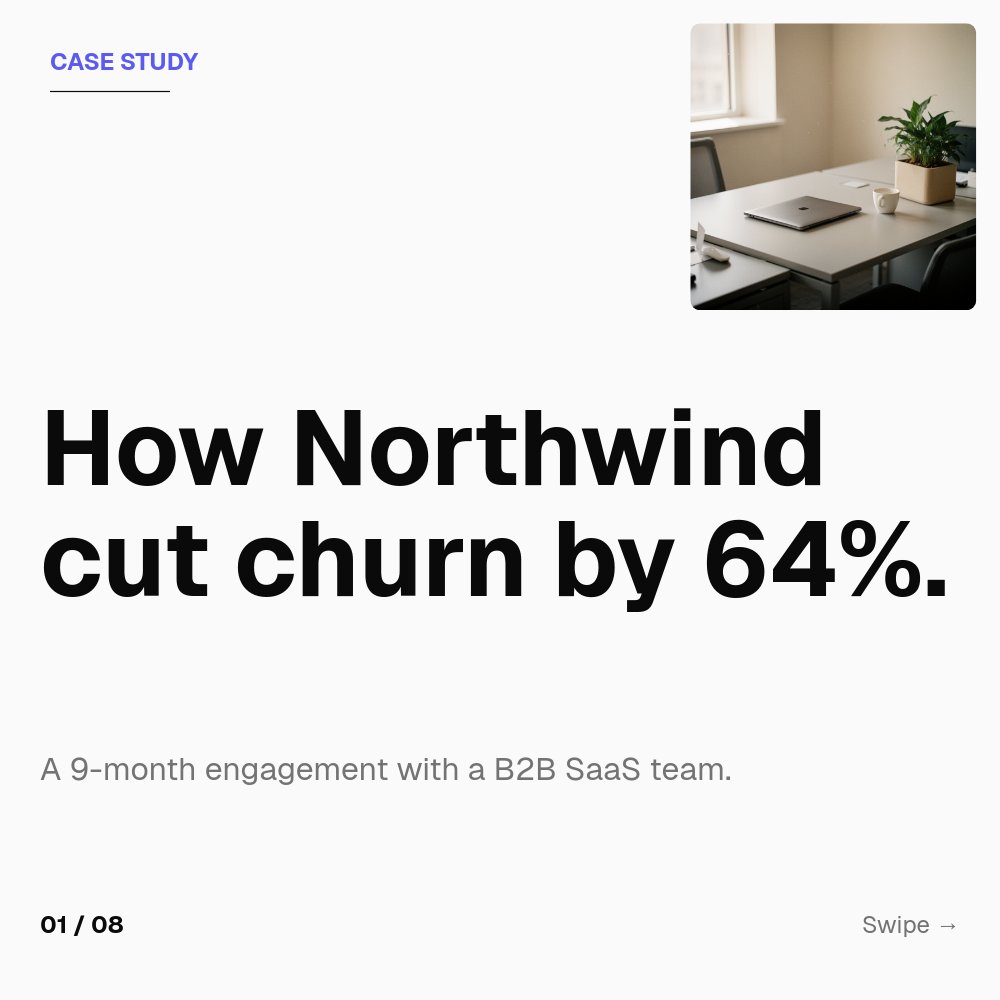
This is the most outcomes-led template in the LinkedIn carousel set. The cover does not bury the result behind a hook - it leads with the headline outcome ("How Northwind cut churn by 64%.") in heavy Geist 600, with a small "CASE STUDY" tag in indigo above and a clean client image floating in the top-right corner. By the time the swiper hits the second pane, they already know what happened. The remaining panes back the claim with context, approach, and three big result numerals.
The 8-pane structure mirrors the actual flow of a B2B case study. Pane 1 is the hook with the headline outcome. Pane 2 introduces the client in one line. Pane 3 frames the problem in two short lines. Pane 4 outlines the approach in three bulleted moves. Panes 5, 6, and 7 are the three result panes - each one a single big numeral with a soft indigo rounded background shape behind it and a one-line label below ("Trial-to-paid conversion", "Demo bookings", "Annual churn"). Pane 8 is the contact CTA.
Motion stays restrained and purposeful. Number-roll animates each of the three result figures up to their final value as the pane comes into view, which is the most convincing way to show change in a static format. Letter-fade renders the headlines word by word, and succession staggers the approach bullets so they land in sequence. The palette stays neutral - off-white background, near-black ink, muted gray for context, single indigo accent - so the numbers carry the visual weight.
- 8-pane outcomes-first structure: hook, client, problem, approach, three results, CTA
- Three big result numerals with number-roll animation and soft indigo background shapes
- SaaS-minimal palette with off-white background and single indigo accent
- Geist 600 typography paired with itself in lighter weights for clean hierarchy
- Letter-fade headlines and succession on approach bullets for readable swipe pacing
- Square 1:1 format sized for LinkedIn document post upload at 1080x1080
#Who Should Use This Template
- B2B agencies and consultancies publishing client wins as LinkedIn social proof. The outcomes-first format does the convincing in two panes; the rest closes.
- Freelancers and independents building a portfolio of case studies that double as both lead-gen content and a credibility archive.
- Customer marketing teams at SaaS companies producing short-form case studies for sales enablement, social, and ABM campaigns.
- Founders and operators sharing internal wins - revenue lift, churn reduction, activation gains - in a format polished enough to feel like an external case study.
#Best Use Cases
#LinkedIn Document Post Case Studies
A traditional case study on a marketing site might run 1,500 words and convert at one or two percent. A LinkedIn carousel built from the same story can reach ten times the audience and convert dwell time into a follow or a DM. This template is sized for that swap. Export the project as a PDF, upload as a document post, and the same content that took an hour to read on the site is now an eight-pane swipeable that closes in twenty seconds.
#Sales Enablement One-Pagers
Sales teams need short-form case studies they can drop into a Slack DM or attach to a cold email. Export the project as a PDF for direct send, or as a single tall image for a Slack-friendly preview. The three result numerals carry the proof; the approach pane gives the AE talking points; the CTA pane points back to the full version on the marketing site.
#Anonymous and Confidential Customer Stories
Some of the strongest case studies are ones the customer cannot name publicly. The template is built for this case - the client image slot uses a clean office or product shot rather than a logo, the client pane describes the company by industry and size rather than by name ("A B2B SaaS team"), and the rest of the carousel works fine without a single named brand. Anonymized case studies still carry weight when the numbers and the approach are specific.
#How to Customize This Template
- Open PaneFlow and select "LinkedIn Carousel - Mini Case Study" from the template gallery
- Edit the cover hook on pane 1 with your client and headline outcome ("How [Client] [outcome]")
- Update the one-line client description on pane 2 with the company type, size, or category
- Rewrite the two-line problem on pane 3 and the three approach bullets on pane 4
- Replace each of the three result numerals on panes 5, 6, and 7 with your figures and labels
- Swap the client image in the top-right of the cover with a logo, product shot, or scene photo
- Update the contact CTA on pane 8 with your email, calendar link, or DM handle
- Export as PDF for LinkedIn document upload, or publish to a private link for sales enablement
#Related Templates
- Case Study - Long-form Customer Story - the long-form 16:9 customer story this carousel condenses
- LinkedIn Stat Carousel - brutalist single-stat companion for data-led posts
- LinkedIn Founder Story Carousel - dark editorial narrative variant for first-person stories
- LinkedIn Listicle Carousel - editorial cream and serif "lessons learned" companion
#Related Resources
- PaneFlow for Agencies - case studies, proposals, and client-facing decks for services teams
- PaneFlow for Marketers - animated social, campaign, and content assets for B2B teams
- PaneFlow vs Canva - how PaneFlow's animated carousels compare to Canva for LinkedIn document posts
Start with LinkedIn Carousel - Mini Case Study
Open this template in PaneFlow, customize it to match your brand, and export as HTML, React, Vue, or video.







