Lesson Deck - Chapter Nav Template
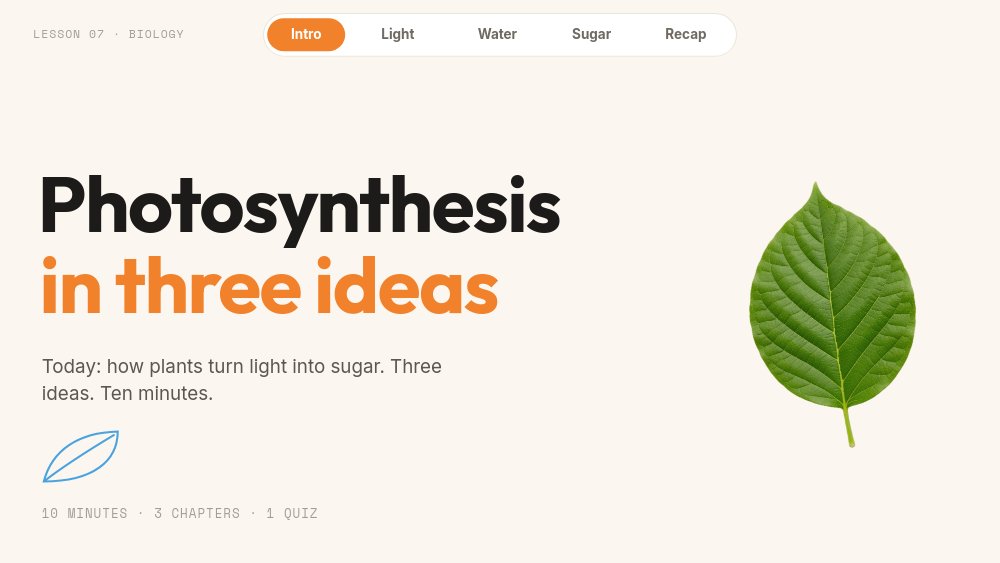
A lesson deck template for teachers who project in class and share the same slides with students afterward. The sample lesson is "Photosynthesis in three ideas", a secondary-school biology unit that opens with "Photosynthesis" in bold Outfit, "in three ideas" in warm orange beneath, and a promise the class can hold you to: "Today: how plants turn light into sugar. Three ideas. Ten minutes." Across the top of every pane sits a chapter bar - Intro, Light, Water, Sugar, Recap - that works like a table of contents you can click. These are lesson plan slides that stay navigable whether you are at the front of the room or a student is revising at home.
#What Makes This Template Stand Out
The chapter bar is the lesson's spine. It never moves, the active chapter lights up in orange, and every item jumps straight to its chapter with a click. That solves the most common classroom slide problem - "can you go back to the bit about water?" - without scrubbing through a dozen slides. It also turns the deck into a self-paced module: a student opening the hosted link can skip to Sugar, reread the key term, and jump to the Recap.
Every chapter follows a pattern students learn quickly. A "CHAPTER 1" mono label, a large heading, two short paragraphs set large enough to read from the back row, and a key-term card with an orange outline: "Chlorophyll - the pigment that catches light.", "Xylem - the pipes that carry water up the plant.", "Stomata - the tiny doors that let gases in and out." Next to the text, diagrams are drawn from sky-blue strokes: rays reaching from a circular sun photo to a leaf outline, roots spreading below a soil line with "WATER UP" arrows climbing the stem. Continuation panes break the rhythm on purpose - a giant orange "1%" "of sunlight reaching a leaf becomes sugar." beside a backlit leaf, or an "Ask the room: what happens at night?" prompt for discussion.
The motion is paced for teaching. Diagram lines draw themselves as you arrive, so you can narrate them as they appear. On the Sugar pane, the whole equation assembles as chips - "6 CO2", "6 H2O", an orange "light", a drawn arrow, a black "C6H12O6", and "6 O2" - popping in one after another, with "WHAT GOES IN" and "WHAT COMES OUT" labels beneath. Key-term cards slide in from the right, and the title letters blur into focus on the first pane. Nothing loops, and autoplay is off, so the lesson moves only when you do.
- Persistent chapter bar with five click-to-jump items and an orange active state on every pane
- Three chapter panes with a key-term card each, plus continuation panes for stats and discussion prompts
- Diagrams built from editable shapes that draw themselves live as the pane enters
- Equation pane built from chips that pop in sequence, adaptable to any formula or process
- Recap pane with three summary cards and a "Next: quiz" pill you can link to a quiz
- 8-pane 16:9 interactive deck in Outfit, Inter, and Space Mono with projector-friendly body text
#Who Should Use This Template
- Secondary and high school teachers who project lessons and want students to revisit the same slides at home without a separate handout.
- University tutors and teaching assistants building short concept lessons for seminars or flipped classrooms.
- Online course creators who need a self-paced module with real navigation, not a video students cannot skim.
- Corporate trainers and L&D teams teaching a three-part concept - a process, a policy, a product - to new hires.
#Best Use Cases
#Classroom Projector Lessons
Publish the lesson and open the hosted link on the classroom computer. Step through with arrow keys or a clicker, let diagrams draw as you explain them, and use the chapter bar when a question sends you back. The hook pane - "What does a plant eat?" with soil, light, and air chips and "Hint: it is not the one you would guess first." - gets the class guessing before you teach.
#Lesson Plan Slides in Your LMS
Export to HTML or share the hosted link inside Google Classroom, Canvas, Moodle, or any platform that accepts embeds or links. Students get the same lesson you taught, with the chapter bar doubling as a study guide. Because PaneFlow keeps click actions in the export, every chapter jump works inside the embed.
#Printable Revision Notes
Export to PDF for students who revise on paper or need an accessible offline copy. Each chapter, key-term card, and the recap - "Three ideas, one leaf." - lands on its own page, which makes a tidy one-lesson revision pack.
#How to Customize This Template
- Open PaneFlow and select "Lesson Deck - Chapter Nav" from the template gallery
- Change the "LESSON 07 · BIOLOGY" chip and the title pane - "Photosynthesis", "in three ideas", and the "Today: ..." line
- Rename the chapter bar items (Light, Water, Sugar) to your three ideas, checking both the active and inactive label of each
- Rewrite the hook question "What does a plant eat?", its three answer chips, and the hint line
- On each chapter pane, replace the heading, the two paragraphs, and the key-term card
- Rework or replace the diagrams - the sky-blue lines are editable shapes, and the circle photos swap like any image
- Update the equation chips on the Sugar pane or turn them into your own sequence, then edit the "1%" stat and the discussion prompt
- Rewrite the three recap cards, link "Next: quiz" to your quiz, then publish as a hosted link or export to HTML for your LMS
#Related Templates
- Classroom Quiz - Answer Reveal - the quiz to link from the "Next: quiz" pill
- Course Intro - promote the full course the lesson belongs to
- Onboarding Walkthrough - Steps - a step-by-step guided format for training
- Choose-Your-Path Quiz - another click-wired interactive for learners
#Related Resources
- PaneFlow for Educators - interactive lessons, quizzes, and course material
- PaneFlow for Content Creators - course modules and teaching content that travel
- PaneFlow for Startups - reuse the lesson structure for internal training and onboarding
Start with Lesson Deck - Chapter Nav
Open this template in PaneFlow, customize it to match your brand, and export as HTML, React, Vue, or video.







