Course Intro Template - Curriculum and Module Walkthrough
If you teach a cohort course, your curriculum page is the highest-leverage piece of marketing you have. This Course Intro template gives you a 10-pane animated walkthrough built for outcome-led course creators - a clean SaaS aesthetic with personality, oversized module numerals, and the kind of editorial hero pane that signals quality before a single word gets read.
#What Makes This Template Stand Out
The defining structural choice is the module numeral system. Each of the five module panes pairs an oversized indigo numeral, set in Inter Tight 700, with a tight three-line description on the right. The visual rhythm makes a long curriculum feel scannable: the viewer registers "01, 02, 03, 04, 05" as they swipe, and the giant numerals act as bookmarks they can return to. It is the same pattern you see in well-designed course sales pages on the modern web, transposed into an animated slideshow.
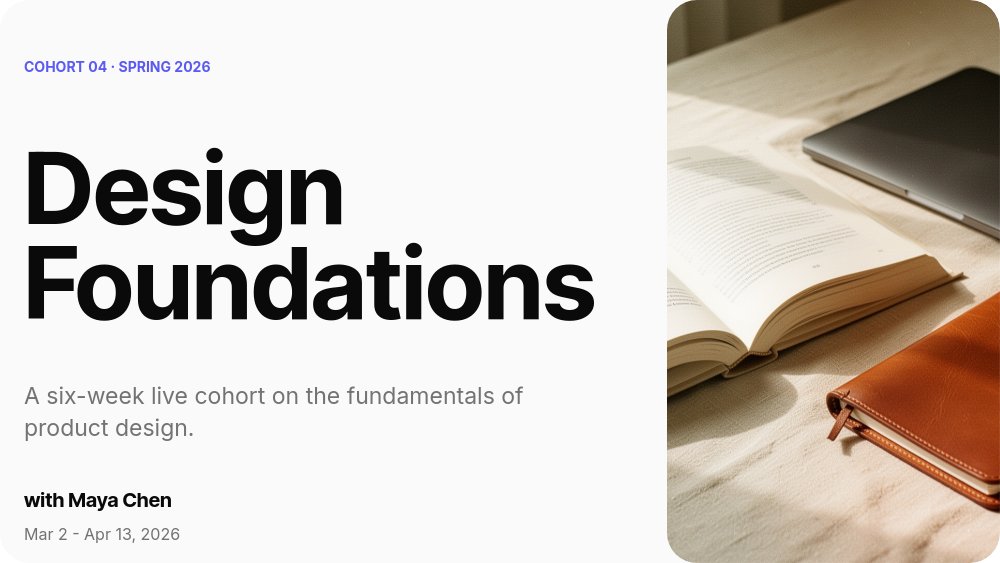
The cover pane sets the tone with a split layout - oversized course title on the left, an editorial photo of a desk with a book, laptop, and notebook on the right. The small indigo "COHORT 04 · SPRING 2026" eyebrow signals that this is a structured program, not a static download. The closing CTA pane mirrors the same hierarchy with a single big line ("See you in the studio.") above cohort dates and tuition, then an indigo apply-now banner that reads as a button.
- 16:9 landscape format with 10 panes covering cover, audience, outcomes, five modules, instructor bio, and enroll CTA
- Oversized indigo module numerals in Inter Tight 700 for a scannable curriculum walkthrough
- SaaS-minimal palette of off-white background, near-black ink, and a single indigo accent
- Fade transitions with succession animation on the outcome list and drift on module pages
- Editorial cover photo pairing for a magazine-quality hero
- Apply-now CTA banner with cohort dates and tuition built into the final pane
The motion stays restrained. Fade is the default block transition, with succession animation on the "What you will learn" list so each numbered outcome lands one after the next, and gentle drift on the module pages so the giant numerals settle into place rather than snapping. There are no looping or attention-pulling animations, which keeps the focus on the content and lets you present this in a Zoom or live class without distracting your audience.
#Who Should Use This Template
- Cohort course creators running structured 4-8 week programs. The 5-module structure is the industry standard for cohort-based courses, and the giant numerals make the progression feel deliberate.
- Online educators launching their first paid course. The instructor bio pane and apply-now CTA give you a clean credibility narrative without needing a separate sales page.
- Bootcamp and accelerator programs publishing their syllabus. The clean editorial aesthetic communicates "professional program" rather than "info product".
- Workshop facilitators and corporate trainers pitching curriculum to clients. Replace the cohort apply CTA with a "book a session" link and the template doubles as a workshop overview deck.
#Best Use Cases
#Cohort Course Sales Pages
Embed the slideshow on the curriculum section of your course landing page. The 10-pane structure walks visitors through who the course is for, what they will learn, the five module breakdown, the instructor, and how to apply - which is roughly the conversion sequence a high-intent visitor needs to make a purchase decision. The animated module reveals keep them scrolling rather than bouncing.
#Cohort Launch Promotion on Social
Export the slideshow as video for LinkedIn, Twitter, and Instagram launch posts. A 10-pane video at 3 seconds per pane runs about 30 seconds, which is well within the attention budget for course launch content. Founders and operators who teach courses can use this as their primary launch creative each time a new cohort opens.
#Application Review Materials for Selective Cohorts
For invite-only or application-based cohorts, share the slideshow as a private link with shortlisted applicants before the live info session. The structured walkthrough answers the questions applicants typically have - what level is this for, what will I learn, who is teaching, what are the dates - which lets your live info session focus on Q&A rather than re-presenting the basics.
#How to Customize This Template
- Open PaneFlow and select "Course Intro / Curriculum" from the template gallery
- Update the cover pane with your course title, instructor name, and cohort dates
- Replace the editorial cover photo with your own brand or course imagery
- Edit the three audience archetypes on the "Who this is for" pane to match your ideal student
- Rewrite the five learning outcomes to be specific and verifiable - the template uses verbs like "spot", "translate", "defend", "run", "write" which work better than abstract benefits
- Update each module title, eyebrow, and description, keeping the descriptions to 3 lines so the layout stays balanced
- Swap the indigo accent color for your brand color by editing the numeral text fills
- Update the enroll CTA pane with your tuition, date range, and apply URL
- Export as HTML, video, or PDF, or publish to CDN for embedding on your course page
#Related Templates
- LinkedIn Carousel Tutorial / How-to - square carousel for teaching individual concepts on social
- Fitness Program Energy - structured program template with weekly module breakdowns
- Webinar Event Promo - event registration template for one-off live sessions
- Digital Storyteller - editorial personal-brand template that pairs well with an instructor bio pane
#Related Resources
- PaneFlow for Educators - animated curriculum, syllabus, and lesson templates
- PaneFlow for Content Creators - course launch, recap, and audience-building decks
- PaneFlow vs Gamma - how PaneFlow compares for course and education slideshows
Start with Course Intro / Curriculum
Open this template in PaneFlow, customize it to match your brand, and export as HTML, React, Vue, or video.







