Classroom Quiz - Answer Reveal Template
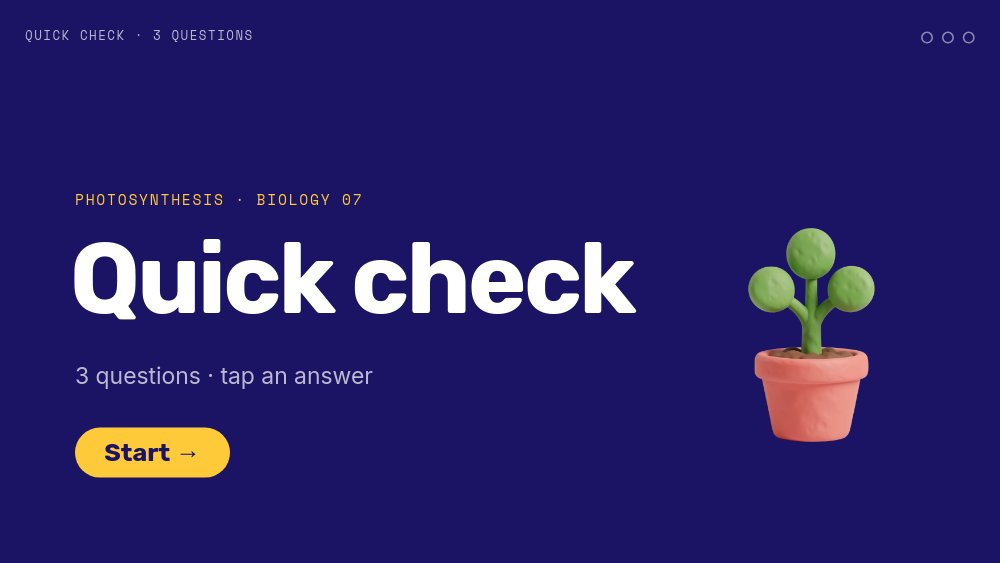
A classroom quiz template with game-show energy and zero setup. "Quick check" opens in huge white Rubik type on a deep indigo field, with "3 questions · tap an answer", a yellow "Start" pill, and a clay-style seedling in a pink pot. The sample quiz is a three-question photosynthesis check that pairs with our lesson deck, and it works the way a projector quiz should: the class shouts an answer, you tap the tile, and the whole screen flips green or red.
#What Makes This Template Stand Out
It is a real branching quiz, built from click actions. Every question pane shows four big answer tiles in candy colors - red A, yellow B, green C, blue D - each with a letter chip and a short answer like "Soil and heat" or "Light, water, CO2". Tap the right tile and you land on a green card with a stomping "Correct!", a one-sentence explanation, a score pill, and "Next question". Tap any of the other three and you get a red "Not quite." card with a hint - "Think about what leaves take in from the air, and what roots pull up from the ground." - plus "Try again" and "Skip" chips. Ten panes, every one reachable, none of them a dead end.
The design is bright without being childish. Deep indigo holds everything together, the four tile colors stay consistent across questions so students learn the layout after the first one, and each question gets a 3D clay-render illustration: a sun, water drop, and leaf for question one, a leaf with floating spheres for question two, a leaf under a magnifying glass for question three. On the reveal panes the illustration sits inside a white circle so green never lands on green, and a perfect run ends on a golden trophy with a leaf emblem.
Motion is quick and punchy. Questions blur in fast, tiles pop in one after another with the letter chip and text arriving together, "Correct!" and "Not quite." stomp onto the screen, and the score pill number-rolls to "1 / 3", "2 / 3", or "3 / 3". A header strip stays fixed on every pane with "QUICK CHECK · Q1 OF 3" and three progress dots that fill yellow as the class advances.
- Four whole-tile click targets per question, wired to a correct or wrong reveal pane
- Green "Correct!" and red "Not quite." reveal cards with explanations, hints, try again, and skip
- Score pill that number-rolls on every correct reveal, plus header progress dots
- Clay-style illustrations for each question and a trophy for a perfect score
- No dead ends: every reveal has a forward path and the last question loops back to the start
- 10-pane 16:9 interactive format in Rubik, Inter Tight, Inter, and Space Mono that survives HTML and code export
#Who Should Use This Template
- Teachers checking understanding at the end of a lesson. Three questions on a projector take five minutes and show you exactly which idea did not land.
- Tutors and homeschool parents who want a friendly self-check a student can click through alone.
- Online course creators adding a quick knowledge check after each module without paying for a quiz tool.
- Trainers and onboarding leads turning compliance or product training into a short, game-like recap.
#Best Use Cases
#End-of-Lesson Check on the Projector
Open the hosted link on the classroom screen after teaching. Read the question, let the room vote, and tap the tile they choose. A wrong answer is not a failure moment - the red card gives a hint and a "Try again" chip, so the class gets a second shot before you explain it. Pair it with the Lesson Deck - Chapter Nav template and link its "Next: quiz" pill straight here.
#Self-Check Quizzes in Your LMS
Export the classroom quiz template to HTML and embed it on a course page, or share the hosted link in Google Classroom, Canvas, or Moodle. Students take it on their own devices at their own pace, and every branch works in the embed because click actions come along with the export.
#Warm-Up Rounds and Review Games
Use it as a starter quiz at the beginning of class to recall last week's material, or build a longer review game by duplicating question panes before a test. The fixed tile colors and quick reveals keep the pace brisk across ten or twenty questions.
#How to Customize This Template
- Open PaneFlow and select "Classroom Quiz - Answer Reveal" from the template gallery
- On the start pane, change "Quick check", "PHOTOSYNTHESIS · BIOLOGY 07", and "3 questions · tap an answer"
- Rewrite the first question "What does a plant need to make sugar?" and the four tile answers
- Check the click actions: the correct tile should point to the green reveal pane, the other three to the red one
- Edit the green reveal explanation ("Light, water and carbon dioxide...") and the red reveal hint for that question
- Repeat for questions two and three - "Which gas do plants release?" and "Where does photosynthesis happen?"
- Update the "QUICK CHECK · Q1 OF 3" header labels and the "1 / 3", "2 / 3", "3 / 3" score pills if you change the question count, and swap the illustrations
- Test every path in preview, then publish as a hosted link or export to HTML for your class site or LMS
#Related Templates
- Lesson Deck - Chapter Nav - the photosynthesis lesson this quiz checks
- Choose-Your-Path Quiz - a personality quiz with branching result panes
- Course Intro - introduce the course the quiz belongs to
- Hotspot Product Tour - another click-to-explore interactive format
#Related Resources
- PaneFlow for Educators - interactive quizzes, lessons, and course content
- PaneFlow for Content Creators - engaging interactive embeds for courses and communities
Start with Classroom Quiz - Answer Reveal
Open this template in PaneFlow, customize it to match your brand, and export as HTML, React, Vue, or video.







