Travel Hero - Destination Slides Template
A homepage hero for travel agencies, tour operators, and boutique hotel groups that treats destinations the way an airline wishes it could. Five panes at 2:1: Patagonia, Kyoto, and Amalfi rotate full-bleed under giant Bebas Neue names, a deep-navy interlude slices the word HORIZON with a real ocean horizon, and a starry desert camp asks "WHERE NEXT?" before the loop answers itself. One amber accent carries the CTA and the temperature chips; the imagery carries everything else.
#What Makes This Template Stand Out
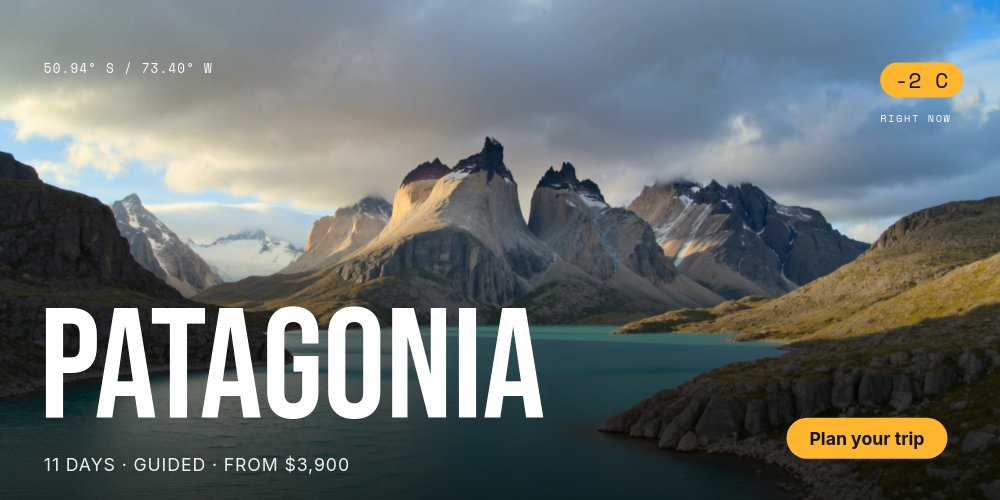
This is the classic destination slider executed with full conviction. Slides enter from the right and exit left in hard horizontal cuts - the swipe-native move - while each destination name lands letter by letter in Bebas Neue at up to 300px over a bottom scrim. The type rides higher parallax than the photo, so PATAGONIA, KYOTO, and AMALFI float over their landscapes instead of sitting on them, and the "Plan your trip" pill holds an identical position on every pane so the conversion point never has to be found twice.
The micro-data system makes invented destinations feel booked. Space Mono coordinates sit top-left of every slide (50.94 S / 73.40 W for Patagonia), an amber chip top-right rolls the live temperature into place (-2 C, 18 C, 24 C) above a mono "RIGHT NOW" label, and the meta row under each name rolls its price numerals: "11 DAYS · GUIDED · FROM $3,900", "6 DAYS · SOLO-FRIENDLY · FROM $2,400", "8 DAYS · SLOW COAST · FROM $3,100". Weather-chip detail is what separates a travel brand from a stock-photo slideshow.
The HORIZON interlude is the pane people remember. The slider cuts to solid deep navy, "HORIZON" sets in giant Bebas centered, and a thin panoramic strip of real ocean horizon slices the word mid-height - the image is the horizon through the letters. One line below reads "Twelve places. One year. Zero regrets." Then the closer lands a starry desert camp under "WHERE NEXT?", the question the cut back to Patagonia immediately answers.
- Full-bleed Patagonia, Kyoto, and Amalfi slides with slow cinematic drift
- Bebas Neue destination names up to 300px entering letter by letter over bottom scrims
- Amber temperature chips with number-roll and Space Mono coordinates on every slide
- Meta rows with rolling price numerals: 11 DAYS · GUIDED · FROM $3,900
- HORIZON split-word interlude where a thin ocean strip slices the headline mid-height
- Persistent "Plan your trip" CTA pill across a 5-pane 2:1 loop sized for hero bands
#Who Should Use This Template
- Travel agencies and tour operators whose homepage has to sell three very different trips in the first ten seconds. The destination-per-pane structure maps directly to a featured-itineraries lineup, price included.
- Boutique hotel groups and destination brands with properties in multiple places. Each pane becomes a property: photo, name, rate, and the live-temperature chip that makes the page feel staffed.
- Travel creators and trip planners selling group trips or guided experiences. The laconic meta voice - days, style, price - does the pitch without a paragraph of itinerary copy.
- Marketing teams at booking products who need a campaign hero that rotates seasonal destinations without rebuilding the page each quarter. Swapping a pane is a photo and five text edits.
#Best Use Cases
#Travel Site Hero Sections
The native habitat. Export to HTML, React, Vue, or Svelte and mount it as the hero band of your booking or agency site - the 2:1 format is cut for that slot. Destinations rotate on a 5-second autoplay, visitors swipe between them like a native gallery, and the amber CTA pill never moves. The hard horizontal transitions make this the most swipe-friendly hero in the catalog.
#Seasonal Campaign Rotations
When the summer lineup changes, the hero should not require a designer. Each destination pane is the same five-slot skeleton, so refreshing the rotation is three photo swaps and a copy pass on names, day counts, temperatures, and prices. The HORIZON interlude and the "WHERE NEXT?" closer stay as the campaign's fixed grammar while the destinations cycle through.
#Social and Ad Video Cuts
Export the whole loop to video for a destination-marketing ad, or render single panes as stills for feed placements. The letter-scale name entrances and rolling temperature chips give paid creative the motion hook static travel ads lack, and because all three destination panes share one composition, a three-variant ad test comes out of a single file.
#How to Customize This Template
- Open PaneFlow and select "Travel Hero - Destination Slides" from the template gallery
- Replace the Patagonia background with your first destination photo and rewrite the giant name, coordinates, and bottom meta row
- Update the amber temperature chip value and keep the number-roll animation so it counts into place
- Repeat for the Kyoto and Amalfi panes: swap photos, names, day counts, prices, and temperatures
- On the HORIZON interlude, swap the panoramic ocean strip if you want a different horizon and rewrite the "Twelve places. One year. Zero regrets." tagline
- Replace the starry desert photo on the closing pane and adjust the "WHERE NEXT?" question to your brand voice
- Edit the "Plan your trip" pill text and recolor the amber accent if your brand needs a different warm tone
- Export to HTML, React, Vue, or Svelte and mount it as your site's hero section
#Related Templates
- Travel Destination - Cinematic - the single-destination deep dive in the same full-bleed register
- Travel Packages - Midnight Editorial - the 8-pane package catalog for after the hero hooks them
- Event Hero - Countdown - the same persistent-CTA hero logic pointed at an event date
- Fashion Hero - Editorial Lookbook - full-bleed imagery with editorial type for a different vertical
#Related Resources
- PaneFlow for Marketers - campaign heroes and seasonal rotations without design bottlenecks
- PaneFlow for Landing Pages - animated sections that export straight into your page code
- PaneFlow vs Canva - how PaneFlow goes beyond Canva for animated, code-exportable heroes
Start with Travel Hero - Destination Slides
Open this template in PaneFlow, customize it to match your brand, and export as HTML, React, Vue, or video.







