Fashion Hero - Editorial Lookbook Template
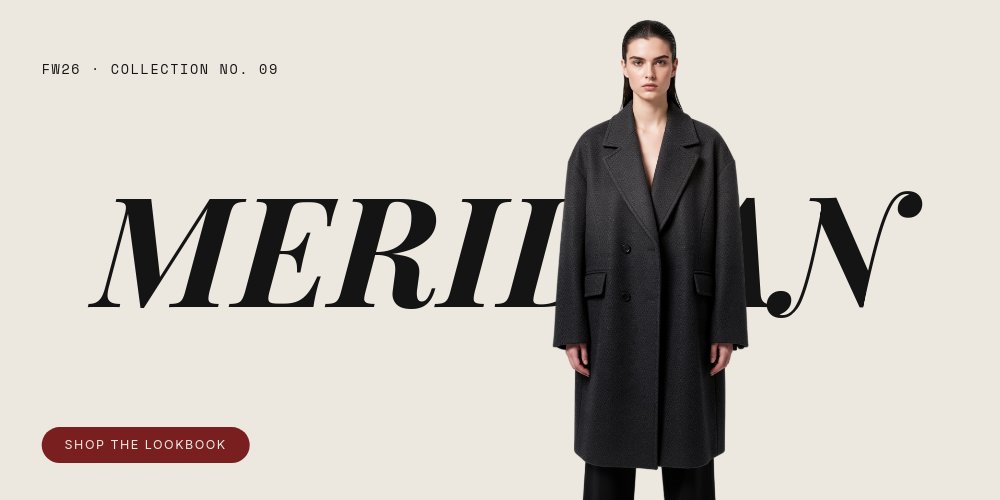
A homepage hero for fashion and apparel brands that treats the top of the site like the opening spread of a lookbook. Four wide panes of bone background, near-black Playfair Display italic, and one oxblood accent reserved for the CTA pill and the drop date. The fictional MERIDIAN collection carries the layout: a model in an oversized charcoal coat pierces the giant wordmark, two editorial looks flank a rolling numeral, and a fabric macro fills the brand name letter by letter. Export it as clean HTML, React, Vue, or Svelte code and it drops into an existing site as the hero section.
#What Makes This Template Stand Out
The cover fuses model and wordmark into one composition. "MERIDIAN" runs the full width in Playfair Display italic, and a full-body cutout of the model stands center-right so the letters read behind her shoulders and coat. The micro-meta "FW26 · COLLECTION NO. 09" sits quietly top-left in mono, and the oxblood "Shop the lookbook" pill anchors bottom-left. It is the cutout-pierces-type move from magazine covers, rebuilt as a website hero.
Pane 2 turns the lookbook into a horizontal triptych. Two full-color editorial photographs - the model against raw concrete, standing on the left, seated on a plinth on the right - flank a center bone column where giant numerals stack "01" over an oxblood rule over "02", with "THE LOOKS · FW26" beneath. The numerals roll with PaneFlow's number-roll animation mid-pane, so the column reads as the lookbook paging itself.
The fabric knockout is the pane people remember. The whole canvas inverts to near-black and the MERIDIAN wordmark renders as a window onto a macro merino-twill weave, dark wool shot through with oxblood thread. One line below in plain Inter - "Cut for movement. Sewn to last." - does the product talking. The closing pane then snaps back to bone with "SS DROPS" in black and "03.15" in oxblood flanking a second cutout of the same model mid-stride, so the loop back to the cover reads as a beat rather than a rewind.
- Bone background with near-black Playfair Display italic and one oxblood accent
- Cover pane with a full-body model cutout piercing the giant collection wordmark
- Lookbook triptych: two editorial photos flanking numerals that roll 01 to 02
- Inverted knockout pane filling the wordmark with a macro fabric weave
- Closing drop-date pane - SS DROPS 03.15 - mirroring the cover for a clean loop
- 4-pane 2:1 hero that exports to HTML, React, Vue, or Svelte and drops into any site
#Who Should Use This Template
- DTC fashion and apparel brands that need the homepage to announce a collection the way a printed lookbook would. The cover, looks, fabric, and drop-date sequence is the standard collection story, already staged.
- Fashion ecommerce teams replacing a static hero banner with something that holds attention. The autoplaying four-pane loop gives the top of the store four selling moments instead of one.
- Designers and agencies building sites for fashion clients who want editorial typography without hand-coding the animations. The exported component slots into Webflow embeds, Next.js apps, or plain HTML alike.
- Emerging labels announcing a seasonal drop with one model, a handful of photos, and a date. The template is engineered to make exactly that much material feel like a campaign.
#Best Use Cases
#Fashion Brand Homepage Hero
This is the template's native habitat. Export to HTML, React, Vue, or Svelte and mount it as the full-width band at the top of the homepage. The cover sets the collection, the triptych previews the looks, the knockout sells the material, and the close lands the drop date - all before the visitor scrolls. The "Shop the lookbook" pill persists across panes, so the path to the collection page is always one click away.
#Seasonal Collection Launch
When a new season drops, the four panes update in minutes: new collection name on two panes, new cutouts, two new look photos, a new fabric macro, and the new date. The structure stays, so every season gets the same editorial treatment without redesigning the hero. Publish the PaneFlow link as a teaser while the full collection page is still in production.
#Lookbook Teaser for Social and Email
The same project exports to video or an image sequence, which turns the homepage hero into the campaign's social cut. The cutout-pierces-type cover works as a feed-stopping opener, and the rolling 01/02 numerals give the mid-section motion that static lookbook PDFs never have. One source file feeds the site, the announcement email header, and the Instagram teaser.
#How to Customize This Template
- Open PaneFlow and select "Fashion Hero - Editorial Lookbook" from the template gallery
- Replace "MERIDIAN" on the cover with your collection or brand name, and update the "FW26 · COLLECTION NO. 09" micro-meta
- Swap the cover cutout with a background-removed photo of your own model so the wordmark reads behind the figure
- Replace the two triptych look photos on pane 2 and edit "THE LOOKS · FW26" to your season label
- Update the knockout pane: rename the wordmark to match the cover, swap the fabric macro, and rewrite "Cut for movement. Sewn to last." and the "FABRIC NO. 7 · MERINO TWILL" kicker
- Edit the closing pane's "SS DROPS" and oxblood "03.15" to your drop line and date, and swap the second model cutout
- Point the "Shop the lookbook" pill at your collection URL
- Export to HTML, React, Vue, or Svelte and drop the hero into your site, or export to video for the social teaser
#Related Templates
- Fashion Week Showcase - runway-scale presentation energy for the same audience
- Apparel Collection - a deeper multi-look catalog to sit behind this hero
- Beauty Drop - Luxe - launch-drop pacing for beauty and cosmetics lines
- Luxury Product Hero - Dark Spotlight - the dark single-product counterpart to this light editorial hero
#Related Resources
- PaneFlow for Ecommerce - product galleries, lookbooks, and store-front heroes
- PaneFlow for Landing Pages - animated hero sections that export as clean code
- PaneFlow vs Canva - how PaneFlow goes beyond Canva for animated, code-exportable brand pages
Start with Fashion Hero - Editorial Lookbook
Open this template in PaneFlow, customize it to match your brand, and export as HTML, React, Vue, or video.







