Marquee + Anchor - Ticker Behind Template
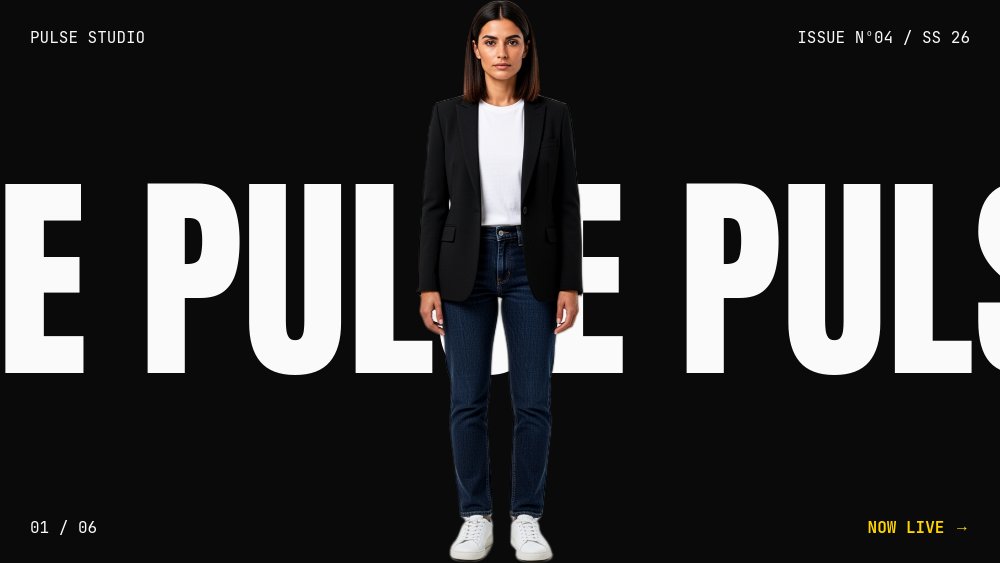
A 6-pane brutalist event teaser built on a single visual tension - a stock-ticker marquee drifts continuously behind a cutout figure that never moves. Solid black canvas, Anton 900 marquee text that reads as a Times Square LED, electric yellow accent for the drop announce, signal red reserved for the LIVE beats only, and a same-subject cutout anchored dead center on every pane. The whole template feels like a scoreboard, a sports broadcast lower-third, and a streetwear drop teaser at once.
#What Makes This Template Stand Out
The defining choice is depth tension. PaneFlow's parallax system lets the marquee text sit at parallax depth 6 (further back, drifts faster relative to the viewport) and the cutout sit at parallax depth 0 (foreground rock, completely still). The marquee phrase repeats 4-5 times inside a single Anton text child and runs an infinite drift-x animation, so the loop never seams. The cutout enters with a fade only - never bounce, never drop, never any other animation - because the whole composition lives or dies on the figure feeling immovable while the world drifts behind it.
The color discipline is signal-led. The bg is #0a0a0a near-black, the marquee is usually #fafafa near-white, but pane 2 swaps the marquee to #ffd400 electric yellow for the drop announce ("DROP 04 INCOMING DROP 04 INCOMING"), and pane 3 swaps it to #ef4444 red with a faster drift for the LIVE moment ("LIVE LIVE LIVE LIVE"). The accent color tells you the energy of the beat before you read the words. The corner meta in JetBrains Mono ("REC 19:42:08", "BROOKLYN - NY", "ISSUE No 04 / SS 26") keeps the scoreboard aesthetic anchored.
Pane 4 breaks the formula deliberately. Instead of one marquee row plus one anchor, it stacks three rows - "THE" / image-strip / "SHOW" - where the middle row is a horizontal strip of the subject mid-stride, drifting like a film loop across the pane. The compositional shift sells the back half of the deck. Pane 5 runs a stats marquee with the cutout standing in front of pulled stat numbers. Pane 6 closes with a CTA marquee and the cutout pointing toward the URL.
- Solid #0a0a0a black canvas with Anton 900 marquee type, #fafafa default, #ffd400 yellow drop, #ef4444 red LIVE
- Single infinite drift-x animation per pane at speed-scale 0.5 with phrase repeated 4-5 times inside one text child
- Anchor cutout at parallax depth 0 with fade-only entrance, marquee at parallax depth 6 drifting behind
- Same-subject cutout across all 6 panes - relaxed center, product-hold, mid-speech, mid-stride strip, arms-folded, pointing
- JetBrains Mono corner meta on every pane - brand mark, issue number, page indicator, status line
- 6-pane teaser arc - cover, drop announce, LIVE moment, THE/strip/SHOW stacked, stats marquee, CTA
#Who Should Use This Template
- Event organizers and conference producers building hype for an upcoming show, festival, or summit. The LIVE pane and the drop-announce pane both land "happening RIGHT NOW" energy that static posters cannot.
- Streetwear, sneaker, and DTC drop brands teasing the next release. The "DROP 04 INCOMING" structure is native to drop culture and the cutout-with-product on pane 2 is the screenshot that ships to Instagram.
- Podcast networks, live shows, and broadcasters announcing season premieres or one-off live episodes. The REC timestamp meta and the BROOKLYN-NY location line read as broadcast-grade.
- Studios and agencies announcing campaign launches that need a high-energy teaser before the campaign goes live. The marquee + anchor pattern works for any "we're alive, this is happening" moment.
#Best Use Cases
#Event and Conference Hype Loops
Use the template as the holding screen on the venue's big LED before doors open, or as the homepage hero on the event site in the week leading up. The infinite drift-x marquee loops without ever needing user interaction, so it works as a screensaver-style animation on lobby displays. Export as MP4 for social pre-show promo and as live HTML for the event site.
#Streetwear and Sneaker Drop Teasers
When a drop is incoming, the announce window between teaser and release is everything. This template gives you a 6-pane sequence - cover with brand marquee, drop-04 announce with product cutout, LIVE moment with countdown, strip pane with the model mid-stride, stats marquee with hype numbers, and a CTA pointing to the drop link. Post the MP4 to Instagram and Twitter, embed the HTML on the product page.
#Podcast Season Premieres and Live-Show Promos
For broadcast-style content, the LIVE pane with the red marquee and the REC timestamp reads as native to the format. The location-time block ("BROOKLYN - NY - 7:42 PM EST") signals real-event energy. Run the deck as the in-feed promo three days before the live show, then strip the marquee from pane 6 and replace with the watch-now URL when the show goes live.
#How to Customize This Template
- Open PaneFlow and select "Marquee + Anchor - Ticker Behind" from the template gallery
- Update the brand mark in the top-left corner of every pane ("PULSE STUDIO") with your brand name
- Edit each marquee text child - keep the phrase short and repeat it 4-5 times inside the single child so the loop fills pane width
- Swap the six anchor cutout PNGs with your background-removed subject in the matching gestures (center, product, speaking, stride, folded, pointing)
- Change the drop-announce date on pane 2 and the location-time on pane 3 to your event details
- Adjust the accent colors if your brand uses different signal hues - one token per beat (yellow for announce, red for LIVE)
- Update the THE / SHOW stacked rows on pane 4 with your show name or campaign title
- Set the CTA URL on pane 6, then export to MP4 for social or publish as a live HTML loop for the venue display
#Related Templates
- Triptych Film Cut - Three Words - sister brutalist black-canvas template with cut rhythm instead of drift
- Keynote Speaker - Cinematic Bold - speaker-intro template with similar Anton-heavy type discipline
- Product Drop - Cutout Hero - drop-teaser template focused on product hero shots
- Punk Zine - Anti-Design Chaos - anti-design alternative for chaotic event energy
#Related Resources
- PaneFlow for Marketers - campaign teasers, event promos, and hype-loop templates
- PaneFlow for Product Launches - drop teasers and announcement sequences
- PaneFlow vs Gamma - why PaneFlow supports infinite drift animations Gamma cannot
Start with Marquee + Anchor - Ticker Behind
Open this template in PaneFlow, customize it to match your brand, and export as HTML, React, Vue, or video.







