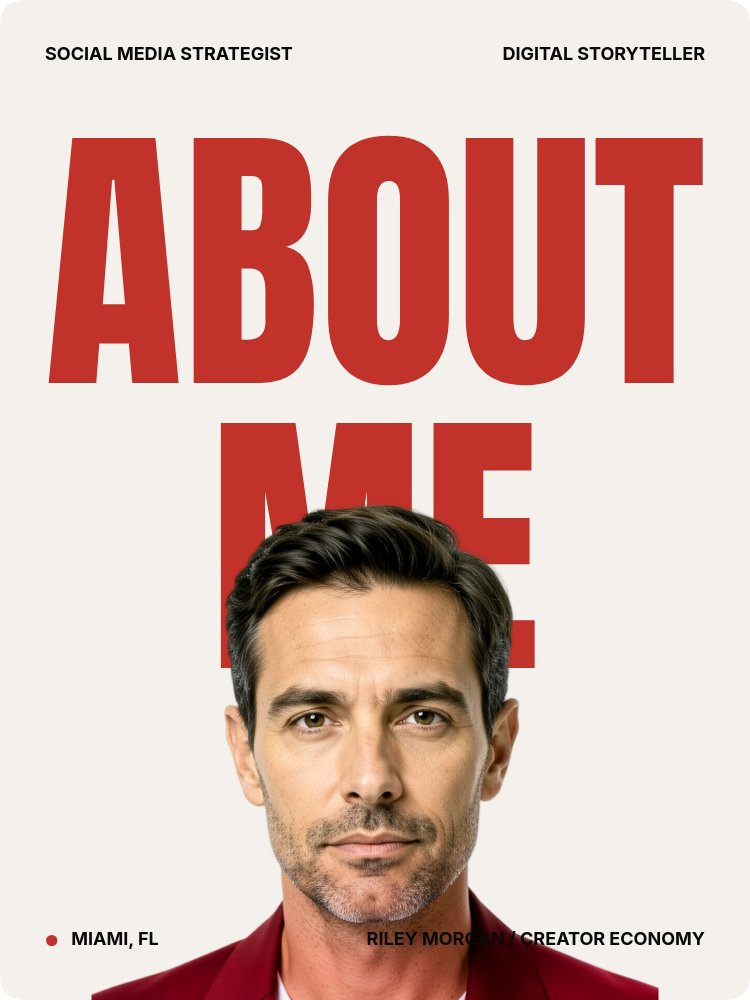
About Me - Cutout Portrait Template
A 3:4 about-me carousel for creators, freelancers, and personal-brand operators who need the introduction to do work before anyone decides to scroll. Six panes of warm off-white background, deep red Anton condensed headlines, and a portrait cutout that pierces the giant type on the cover. Built to live on Instagram, LinkedIn, or link-in-bio without losing any of the magazine-grade typography that makes it worth sharing.
#What Makes This Template Stand Out
The defining move is the cutout-pierces-type cover. "ABOUT" and "ME" stack centered in deep red Anton at 38% pane height, and a transparent-background portrait of the subject lands in front so the letters read behind the head and shoulders. Most about-me slides separate the photo from the type. This one fuses them into one composition - the kind of cover that gets screenshotted and saved before the rest of the carousel even loads.
The micro-meta system carries the magazine feel through every pane. Four corner labels on the cover (top-left role, top-right secondary role, bottom-left address with a red pin shape, bottom-right name and industry) set up a typographic frame that pane 2 inherits as numbered role cards and pane 3 inherits as a rotated "STORY" kicker running up the left margin. Nothing is decorative; everything is positioned with intent.
Animation is composed, not chaotic. The cover headline lands with letter-scale (each letter punching out individually), the cutout drops in after the type sets so the layering reads correctly, and the corner labels fade in with succession from the corners inward. Subsequent panes use letter-blur on the giant words and quiet fade entrances on body copy. The closing "LET'S TALK" sign-off pane uses the image-replaces-letter move - the cutout portrait sits where a letter should be, closing the loop with the same visual logic that opened it.
- Warm off-white background with deep red Anton condensed headlines and Inter micro-meta
- Cutout-pierces-type cover with portrait layered in front of giant ABOUT ME wordmark
- Four-corner micro-meta system: role, secondary role, address with pin shape, name and industry
- Image-between-text sandwich pane reading "I MAKE / [cutout] / THINGS HAPPEN" as one phrase
- Letter-scale, letter-blur, pop, and drop animations staged so type sets before the cutout lands
- 6-pane 3:4 carousel sized for Instagram, LinkedIn documents, and link-in-bio embeds
#Who Should Use This Template
- Social media strategists and content creators who need a personal-brand introduction that out-designs the LinkedIn About section and the Instagram bio. The micro-meta role labels and the three numbered offers map directly to how a creator describes themselves to a new audience.
- Freelance consultants and fractional operators posting an introduction carousel to land inbound work. The "WHAT I DO" pane has three role descriptors built in (content systems, ideas to stories, grow audience) that adapt cleanly to strategy, design, or operations practices.
- Coaches, course creators, and personal-brand founders building a top-of-funnel asset that explains who they are without a single talking-head video. The bio pane gives you 60 to 80 words of editorial column space without the page feeling text-heavy.
- Career switchers and portfolio-light professionals who need an introduction that reads as composed rather than improvised. The typography does the credibility work that a years-of-experience list usually has to do.
#Best Use Cases
#Instagram and LinkedIn Introduction Carousels
Drop this in as the welcome carousel on a personal-brand account. The 3:4 format displays full-height in the Instagram feed and at full size in LinkedIn document posts, so neither platform crops the cover. The letter-scale entrance on the cover headline turns the first pane into a hook that stops the scroll, and the six-pane length is long enough to introduce the work without losing the reader before the sign-off. Export to PDF for LinkedIn or to image sequence for Instagram.
#Link-in-Bio Personal Site
Publish the carousel as a hosted PaneFlow link and use it as the entire link-in-bio destination, or embed it on the homepage of a personal site. The cover pane sets the brand, the three role cards explain the offers, the bio pane gives the long version, and the "LET'S TALK" sign-off lands an email and a handle. The whole thing loads as a single animated experience instead of a wall of static text.
#Speaker, Coach, or Consultant One-Sheet
When an event organizer or potential client asks for an introduction, the static one-sheet PDF usually under-delivers. Export this template to PDF for the leave-behind and link to the animated version for anyone who wants the full read. The editorial tone reads as taste-led rather than self-promotional, which is the bar most repeat-business referrals are pattern-matching against.
#How to Customize This Template
- Open PaneFlow and select "About Me - Cutout Portrait" from the template gallery
- Replace the four cover-pane portrait images with your own background-removed cutout (head and shoulders, full body, mid-stride, and sign-off head shot)
- Edit the four corner micro-meta labels on the cover - role, secondary role, city, and name with industry
- Update the three numbered role cards on pane 2 with your own offers and one-line descriptions
- Rewrite the bio paragraph on pane 3 (target around 60 to 80 words) and update the rotated "STORY" kicker if you want a different section name
- Swap the middle-row cutout on the "I MAKE / THINGS HAPPEN" sandwich pane and rewrite the framing phrase if your practice is different
- Replace the featured-in logos and trusted-by brand names on pane 5 with your own press and client list
- Update the sign-off email and handle on the final pane, then export to PDF for LinkedIn or to image sequence for Instagram
#Related Templates
- Keynote Speaker - Cinematic Bold - same cutout-pierces-type move on a black 16:9 cinematic stage
- Quote Portrait - Pulled Word - 1:1 portrait carousel that pulls one word out of a quote
- Manifesto Declaration - Gesturing Cutout - vertical declaration carousel with the same cutout vocabulary
- Digital Storyteller - editorial personal-brand slideshow with Anton headings and a different rhythm
#Related Resources
- PaneFlow for Content Creators - personal-brand carousels, media kits, and intro decks
- PaneFlow for Marketers - campaign-grade typography for social and pitch use
- PaneFlow vs Canva - how PaneFlow goes beyond Canva for animated, layered personal-brand carousels
Start with About Me - Cutout Portrait
Open this template in PaneFlow, customize it to match your brand, and export as HTML, React, Vue, or video.







