Travel Itinerary Template - Day-by-Day Cards
A travel itinerary should read like a guidebook chapter, not a Google Doc. This template gives every day of a trip its own editorial card - one hero photograph of the destination, a short Cormorant headline, and three timeslot blocks for morning, afternoon, and evening. It is the format a travel writer would actually use, translated into a slideshow that travel agents, planners, and individual travelers can publish in minutes.
#What Makes This Template Stand Out
The day-card structure is the whole template, and it is designed for one specific reading job: helping a traveler glance at a single screen and instantly understand what is happening on Day 3 between 2pm and 6pm. Each day pane uses the same anatomy - destination name top-left, "DAY 03" indicator top-right in terracotta, a hero photograph that fills the upper half of the pane, an italic Cormorant Garamond headline summarizing the day in three or four words ("Tiles, Tram, Custard"), a small neighborhood label, and three timeslots beneath. That repetition across 5 day panes is what makes the itinerary actually usable - you train your reader once, and every subsequent day uses the same map.
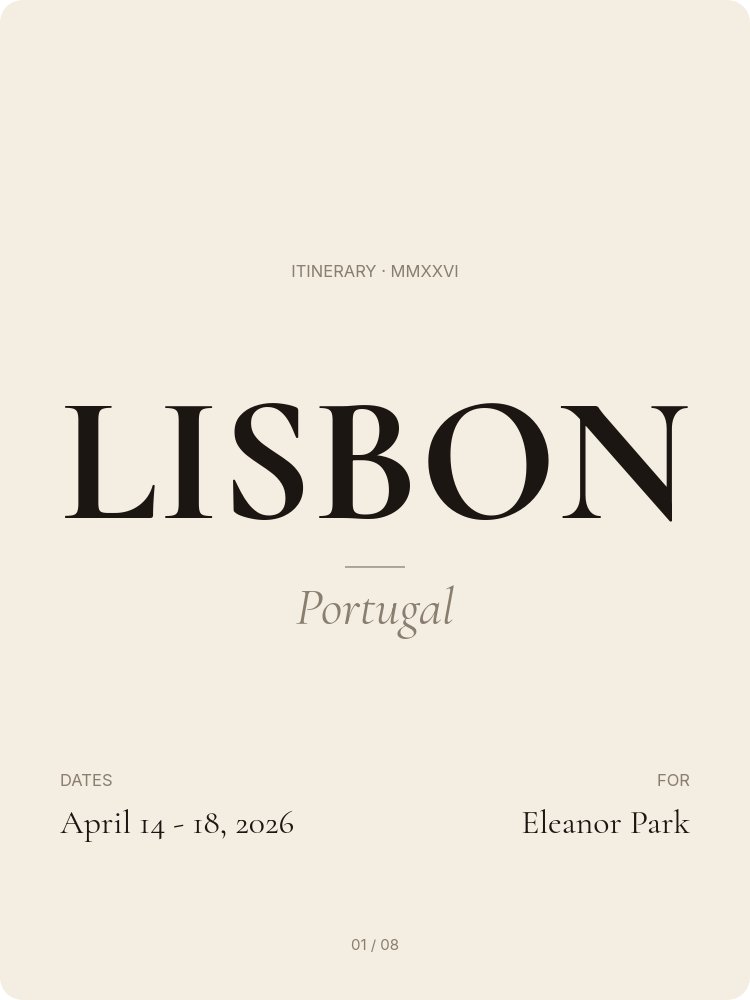
The cover pane uses a different structure on purpose. Massive uppercase Cormorant for the destination ("LISBON"), italic country subtitle, dates, and traveler name. It reads as the title page of a hand-bound trip plan rather than a generic cover. The cream and ink palette plus a single terracotta accent (#c44d3f) used only for the day numbers and roman numerals keeps the entire 8-pane sequence cohesive.
The closing two panes solve the practical reality of trip planning - tips and essentials (visa, currency, power, language) on pane 7, and booking confirmations plus emergency contact on pane 8. Most itinerary templates ignore these in favor of looking pretty. This template includes them because real trips need them, and because keeping them inside the same slideshow means the traveler has one URL to bookmark instead of five.
- 3:4 portrait format that reads cleanly on phone screens during travel
- 8 panes: cover, 5 day cards, tips and essentials, booking confirmations
- Editorial cream and terracotta palette with italic Cormorant Garamond headlines
- Three-timeslot anatomy on every day card: morning, afternoon, evening
- Repeating day-card structure makes 5-day trips instantly scannable
- Drift, fade, and succession animations with subtle parallax on day photographs
#Who Should Use This Template
- Travel agents and trip planners delivering itineraries to clients. The branded slideshow is more professional than a PDF and keeps editable, so last-minute changes to bookings update without re-sending anything.
- Bespoke tour operators and concierge services producing client-ready trip plans. The editorial typography signals the price point of a premium service.
- Individual travelers documenting and sharing trip plans with travel partners or family. Beats group chats and shared docs because the format is genuinely fun to look at.
- Wedding planners and event coordinators producing destination weekend itineraries for guests at weddings, retreats, or off-sites. The 5-day structure handles a Thursday-to-Sunday wedding weekend cleanly.
#Best Use Cases
#Travel Agent Client Itineraries
Travel agents producing custom itineraries can replace the generic Google Doc with this template as the standard deliverable. Each client gets their own URL, editable in PaneFlow, sharable with the rest of their party. The hero photograph per day plus the timeslot structure mirrors the way premium travel publications like Conde Nast Traveler structure their city guides, which sets the right expectation for the price of a planned trip.
#Family or Group Trip Sharing
For a family or group of friends planning a 5-day trip together, this template replaces three group chats and a shared spreadsheet. One person owns the PaneFlow file, edits as bookings get confirmed, and shares the live URL. Everyone sees the same plan without having to refresh anything. The closing booking confirmation pane keeps confirmation numbers, addresses, and emergency contacts in the same place.
#Destination Wedding Weekend Itineraries
Wedding planners can use this template for the welcome packet that goes out before a destination wedding. The day cards handle the Thursday welcome dinner, the Friday rehearsal, the Saturday wedding day, and the Sunday brunch, while the tips pane handles airport transfers, dress codes, and currency. Guests bookmark the URL and reference it through the weekend without needing a printed program.
#How to Customize This Template
- Open PaneFlow and select "Travel Itinerary - Day-by-day Cards" from the template gallery
- Update the cover with your destination, country, dates, and traveler name
- Replace each day's hero photograph with shots that match the planned activities
- Edit the day headline in italic Cormorant - aim for three or four sensory words that summarize the day
- Update the morning, afternoon, and evening timeslots with venue names and short descriptions
- Customize the tips pane with destination-specific visa, currency, power, and language information
- Add booking confirmation references and emergency contacts to the closing pane
- Duplicate day panes if your trip is longer than 5 days, or remove panes for shorter trips
- Publish to a private link or export as PDF for offline access during the trip
#Related Templates
- Travel Destination Cinematic - cinematic 16:9 destination reel that pairs naturally with this itinerary template
- Outdoor Adventure - nature and landscape photography template for adventure trips
- Course Intro Curriculum - structured day-by-day template adapted for educational content
- Fitness Program Energy - day-by-day program template with similar repeating-card structure
#Related Resources
- PaneFlow for Content Creators - building polished travel and lifestyle content
- PaneFlow for Marketers - producing travel campaign and itinerary content
- PaneFlow vs Canva - how PaneFlow's editorial typography and live editing go beyond static design tools
Start with Travel Itinerary - Day-by-day Cards
Open this template in PaneFlow, customize it to match your brand, and export as HTML, React, Vue, or video.







