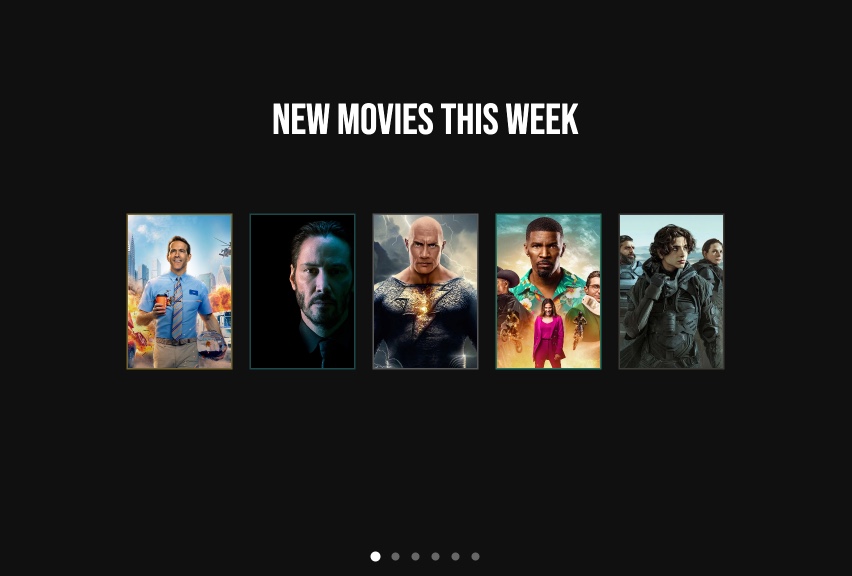
Movie Posters - A Cinematic Showcase for Visual Media
Give your content the blockbuster treatment. This template presents visual media in poster-card layouts against a pitch-black background, with Bebas Neue display type for titles and bullet pagination for browsing. The 16:10 cinema-like aspect ratio and right-to-left transitions create an experience that feels like browsing a premium streaming platform.
#What Makes This Template Stand Out
This template borrows its visual language directly from cinema. The pure black background with subtle dark gray borders frames each poster the way a theater lobby displays its coming attractions. The Bebas Neue font - the same condensed display typeface used across actual movie marketing - sells the cinematic authenticity from the first frame.
The 16:10 aspect ratio is a deliberate choice that sits between standard widescreen (16:9) and traditional film formats. It gives poster cards slightly more vertical breathing room than a standard presentation, which matters when you are displaying portrait-oriented artwork alongside titles and metadata. The compact grid layout with 2-3 columns per pane keeps multiple posters visible simultaneously, mimicking the "New This Week" sections of streaming platforms.
What elevates this beyond a static gallery is the interactive navigation layer. Bullet pagination dots at the bottom provide a visual map of the 6 panes, with the active bullet in bright white and inactive ones at 36% opacity. Viewers can click any pagination bullet to jump directly to a specific pane. Right-to-left transitions with 1000ms duration give each pane change a theatrical curtain-pull feel.
- 16:10 cinema-like aspect ratio optimized for poster card and visual media display
- Bebas Neue display font for movie titles and headers matching cinema typography
- Pure black background with subtle dark gray borders for theatrical framing
- Bullet pagination with white active and translucent inactive states
- Clickable bullet pagination for direct navigation between panes
- 6 panes with 27 blocks organized in 2-3 column poster grid layouts
#Who Should Use This Template
- Film festivals and screening events building promotional showcases of their lineup that viewers can browse interactively
- Entertainment companies creating "new releases" or "coming soon" displays for websites, lobby screens, or social media
- Video production agencies showcasing their portfolio of projects in a format that matches the entertainment industry aesthetic
- Content curators building themed collections - "best of the year" lists, genre spotlights, or recommendation galleries
#Best Use Cases
#Streaming Platform Content Showcases
Build a "New This Week" or "Featured Collection" display that mimics the browsing experience of major streaming platforms. The poster-card layout, click navigation, and dark theme create immediate familiarity for audiences accustomed to Netflix, Disney+, or Amazon Prime interfaces. Export as HTML and embed it on your website or use it as a standalone promotional page.
#Film Festival Program Guides
Present your festival lineup in a format that does justice to each film's artwork. Each pane can represent a screening block or genre category, with poster cards that viewers can browse via pagination. The Bebas Neue font and black background give the program guide a premium, event-worthy feel that printed programs cannot match.
#Creative Portfolio Showcases
Adapt this template for any visual creative work - book covers designed, album artwork produced, game assets created, or advertising campaigns launched. The poster-card format naturally accommodates portrait-oriented artwork, and the interactive navigation lets prospective clients browse your work the way they would browse titles on a streaming service.
#How to Customize This Template
- Open the template in the PaneFlow editor and review the 6-pane poster gallery structure
- Replace the movie poster background images with your own artwork, cover images, or promotional stills
- Edit the Bebas Neue title text to match your content - movie names, project titles, or collection labels
- Update the metadata text (descriptions, dates, categories) in the smaller text blocks below each poster
- Adjust the pagination style and colors in the slideshow settings to match your aesthetic
- Modify the black background and dark gray border colors if you want a slightly different cinema palette
- Export as HTML for website embedding, as video for social media trailers, or as a framework component for app integration
#Related Templates
- Milestones in Space Exploration - a paginated timeline with Orbitron typography and themed backgrounds
- Photos Grid - a multi-directional photo gallery with overlay text labels
- Testimonials - a dark-themed content showcase with purple accents and staggered animations
- Fashion Week Showcase - a visual media presentation with vibrant accents and background video
#Related Resources
- PaneFlow for Content Creators - building engaging visual showcases for media and entertainment content
- PaneFlow for Portfolios - presenting creative work in formats that match industry standards
- PaneFlow vs. PowerPoint - how PaneFlow's interactive navigation and web-native export compare to static slides
Start with Movie Posters
Open this template in PaneFlow, customize it to match your brand, and export as HTML, React, Vue, or video.







