Colorway Picker - Tono Template
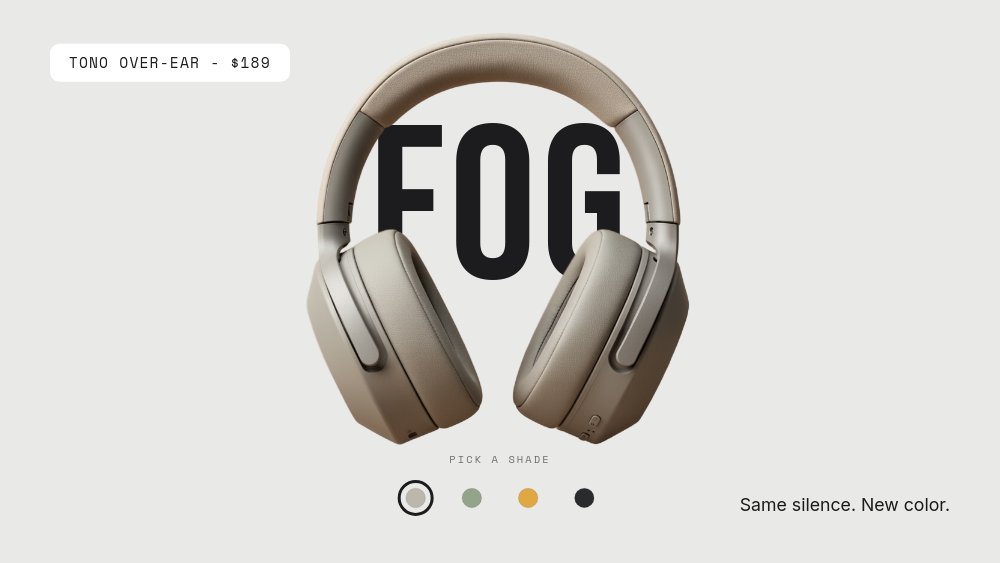
A 16:9 "pick your color" module for product pages, built on one disciplined idea: the layout never changes, only the world does. Tono over-ear headphones float center stage in front of a giant Bebas Neue colorway name - FOG, MOSS, OCHRE, INK - and each pane tints its entire background to match the shade. A white "TONO OVER-EAR - $189" chip holds the upper-left on every pane, a quiet "Same silence. New color." line sits lower-right, and a four-dot swatch row under the product carries the micro-label "PICK A SHADE". Click a dot and the whole stage re-tints around a product that never moves.
#What Makes This Template Stand Out
The swatch row is a working picker. Each dot exists in two states - ringed when active, plain when inactive - and both are wired with real click navigation to their colorway pane. Because PaneFlow exports interactivity along with animation, the picker keeps working after export to HTML, React, Vue, and Svelte, and the four shades play through automatically when exported to video. Clicking the product area advances to the next colorway too, so mouse-wheel browsers can cycle shades without aiming at the dots.
Each colorway is a complete monochrome world, not a product swap on a static background. Fog is warm gray on warm gray, Moss goes sage on sage, Ochre turns the whole frame golden, and Ink drops the stage to near-black and flips the typography to cream. The giant colorway name sits behind the headphones so the product physically overlaps its own label - the composition that makes color pages feel like campaigns rather than dropdowns.
The discipline pays off at the end. Three panes browse; the fourth converts. Ink is staged as the hero colorway, and it is the only pane that adds a CTA - a white "Add to cart - $189" pill in the lower-right - so the loop ends on the strongest-contrast frame with a purchase action. The colorway names land with fast letter-scale, the product pops subtly on arrival, and everything runs at double speed because color shopping is impatient.
- Four-dot swatch row with ringed active states, wired with real click navigation to each colorway pane
- Whole-stage re-tint per shade - Fog, Moss, Ochre, and Ink each own their background, type, and product
- Giant Bebas Neue colorway names layered behind the floating product
- Persistent "TONO OVER-EAR - $189" price chip and "Same silence. New color." tagline on every pane
- Ink hero pane flips type to cream and lands the "Add to cart - $189" CTA pill
- 4-pane 16:9 interactive format with autoplay off - the picker survives HTML, React, Vue, and Svelte export
#Who Should Use This Template
- DTC brands selling one product in multiple colors. This is the colorway section of a product page as a self-contained interactive module - swatches, stage, and CTA in a single embed.
- Ecommerce teams replacing dropdown variant pickers. A select menu tells shoppers a color exists; a full-stage re-tint shows them what owning it feels like. The mechanics survive export, so it slots into an existing PDP.
- Product designers and brand studios presenting a color range to a client. The identical-layout discipline makes the palette itself the presentation - four worlds, one product, zero clutter.
- Drop-based labels building hype pages. Run the picker as a teaser where the product stays constant and the shades rotate, with the hero colorway holding the only buy button.
#Best Use Cases
#The Colorway Section of a Product Page
Export to HTML, React, Vue, or Svelte and embed the module below the buy box or as the full-width color section. Autoplay is off, so the stage holds the landing shade until the shopper clicks a swatch, and each click is a real pane navigation rather than a video scrub. Point the Ink pane's "Add to cart" pill at your cart link, or duplicate the CTA across all four panes wired to per-variant URLs.
#Launch Teasers and Paid Social
Export the same project to video and the colorways play through automatically - four full-stage re-tints in a few seconds, price chip persistent, CTA landing on the final frame. The monochrome worlds are built for thumb-stopping contrast in a feed, and the source project stays identical to the interactive embed, so the ad and the PDP never disagree about what the product looks like.
#Color Range Reveals for Existing Products
When a product you already sell gains new shades, the picker becomes the announcement. Keep the product photography recipe identical across the four gens or shoots so the images read as the same model recolored, set the swatch fills to the real product colors rather than idealized hexes, and the module doubles as the email hero, the landing section, and the social cut for the range launch.
#How to Customize This Template
- Open PaneFlow and select "Colorway Picker - Tono" from the template gallery
- Replace the four headphone images with background-removed PNGs of your product, one per colorway - keep the same camera angle and lighting across all four so they read as one product recolored
- Rename the giant FOG, MOSS, OCHRE, and INK colorway names to your own shade names
- Re-tint each pane background toward its product shade, and update the four swatch dot fills to match the actual product colors
- Edit the "TONO OVER-EAR - $189" price chip and the "Same silence. New color." tagline with your product name, price, and line
- On the Ink pane, point the "Add to cart - $189" CTA pill at your cart or variant URL - duplicate it onto other panes if each colorway sells separately
- Click through all four swatches in preview, confirm the product-area click cycles shades, then export to HTML, React, Vue, or Svelte for the product page - or to video for ads
#Related Templates
- Sneaker Drop - Colorway Rotator - the autoplay sibling of this picker, rotating colorways on its own clock
- Product Page Gallery - E-Commerce - a multi-angle gallery module for the same product page
- Watch PDP - Macro Luxe - single-product staging with macro detail panes instead of color variants
- Choose-Your-Path Quiz - the same one-accent-per-clickable-path logic applied to a branching quiz
#Related Resources
- PaneFlow for Ecommerce - interactive product modules, PDP sections, and variant showcases
- PaneFlow for Product Launches - teasers, reveals, and launch pages from one source project
- PaneFlow vs Canva - why click-wired product pickers need more than a slide tool
Start with Colorway Picker - Tono
Open this template in PaneFlow, customize it to match your brand, and export as HTML, React, Vue, or video.







