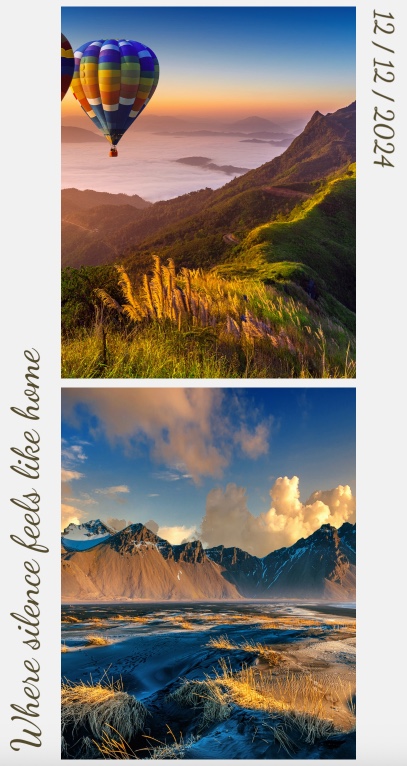
Instagram Story Collage - Magazine-Style Visual Storytelling
Turn a handful of photos into a swipeable, magazine-quality Instagram Story. This template arranges images in an elegant collage grid with smooth directional transitions, giving your content a polished editorial look without any design software.
#What Makes This Template Stand Out
The Instagram Story Collage template takes a fundamentally different approach to social media content. Instead of the typical single-image-per-slide format, it arranges multiple photos into a carefully composed grid that feels like flipping through a lifestyle magazine. Each of the 4 panes presents a fresh collage composition, keeping viewers engaged through the entire story.
What gives this template its editorial quality is the carefully composed grid layout. Images are positioned at different scales and angles within each pane, creating a magazine-spread feel that static grids cannot achieve. Combined with the Dancing Script font for captions and the warm earthy color palette, the result is content that looks handcrafted rather than templated.
The 9:16 vertical format is purpose-built for Instagram Stories, but the aspect ratio translates equally well to TikTok, YouTube Shorts, and any other vertical-first platform. With autoplay set at a comfortable 2-second interval, your story moves at a pace that gives viewers time to absorb each composition.
- 9:16 vertical aspect ratio optimized for Instagram Stories and other vertical social platforms
- Magazine-style collage grid with rotated text blocks and layered image positioning
- Smooth directional transitions between panes for a polished browsing experience
- Dancing Script font adds handwritten elegance to captions and overlay text
- 4-pane structure with 22 blocks for rich visual storytelling
- Autoplay with 2-second intervals for hands-free viewing
#Who Should Use This Template
- Social media managers building story content for lifestyle, travel, or fashion brands that need to stand out in crowded feeds
- Photographers who want to showcase multiple shots from a session in a single cohesive story format
- Content creators looking for an editorial presentation style that elevates everyday content beyond the typical single-image post
- Small business owners creating product showcases or behind-the-scenes stories with a professional, curated aesthetic
#Best Use Cases
#Travel and Destination Stories
Arrange your travel photos into a visual diary that captures the mood of a place. Use the collage grid to combine wide landscape shots with close-up details - a street market texture next to a panoramic sunset, a local dish beside a colorful doorway. The smooth transitions between panes make viewers feel like they are flipping through a travel magazine spread.
#Product Showcase Collections
Present multiple products in a single story without overwhelming viewers. The grid layout naturally organizes items while the rotated text blocks provide space for product names or short descriptions. This works especially well for seasonal collections, new arrivals, or curated gift guides where you want to show variety at a glance.
#Event Highlights and Recaps
Compile the best moments from an event - a wedding, a conference, a brand activation - into a polished recap story. Each pane can represent a different phase of the event, with the collage format letting you include candid shots, detail images, and atmosphere photos together. The Dancing Script captions add a personal, journal-like quality to your annotations.
#How to Customize This Template
- Open the template in the PaneFlow editor and review the 4-pane structure
- Click on each image block to replace the placeholder nature photos with your own images
- Adjust image scale and position within each block to get the crop you want
- Edit the overlay text captions using the text editing panel - change the copy while keeping the Dancing Script font or switch to another typeface
- Modify the warm earthy color palette in the block background settings if you want a different mood
- Adjust the 2-second autoplay interval in the slideshow settings to speed up or slow down transitions
- Export as video for direct Instagram upload, or as HTML for embedding on your website
#Related Templates
- Instagram Story Fashion - a bold fashion-focused vertical story with sale messaging and Bebas Neue typography
- Photos Grid - a landscape-oriented photo grid with overlay text labels and varied compositions
- Outdoor Adventure - nature photography with directional transitions and a light earth-tone theme
- Photographer Minimalist Portfolio - an elegant photography showcase with Bodoni Moda serif headings
#Related Resources
- PaneFlow for Content Creators - how PaneFlow helps creators build engaging visual content
- PaneFlow for Marketers - social media and marketing presentation workflows
- PaneFlow vs. Canva - how PaneFlow's animation capabilities compare to Canva's static design tools
Start with Instagram Story Collage
Open this template in PaneFlow, customize it to match your brand, and export as HTML, React, Vue, or video.







